

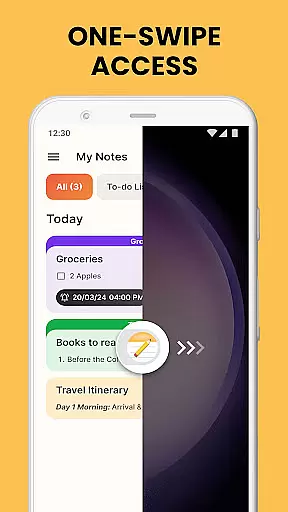
Notes Launcher is a productivity app designed to help users efficiently manage their notes and daily tasks. The app allows you to create quick notes or to-do lists with a simple swipe from the home screen, making note-taking seamless and instant. With features like text formatting tools, color-coding, locking sensitive notes, and categorization, it offers a comprehensive solution for organizing your thoughts and important information.
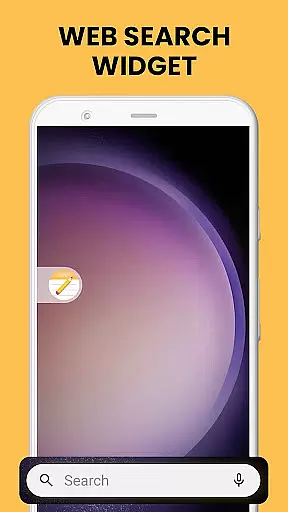
In addition to its core note-taking capabilities, Notes Launcher provides added functionalities such as home screen widgets, personalized wallpapers, and multi-touchpoint search powered by Yahoo. These features enhance user experience by offering quick access to apps, web searches, and customizable layouts. Whether you're managing work tasks or planning personal projects, Notes Launcher ensures that all your essential notes and tools are easily accessible, helping you stay organized and productive every day.
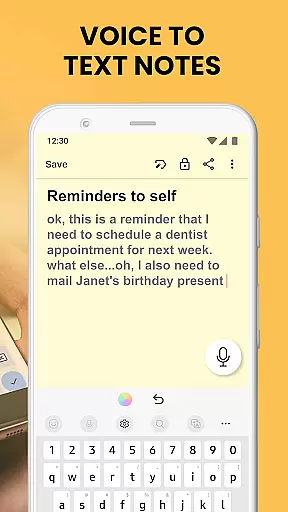
Notes Launcher stands out with its rich set of features tailored to boost productivity. One of its key highlights is the ability to create notes and checklists instantly by swiping right from the home screen. This one-swipe access ensures that jotting down ideas or creating to-do lists is fast and effortless. Additionally, the app includes a rich-text editor that allows users to format their notes with different font sizes, styles like italic and underline, and lists—both bulleted and numbered.
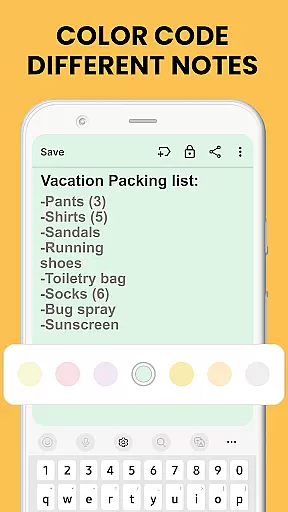
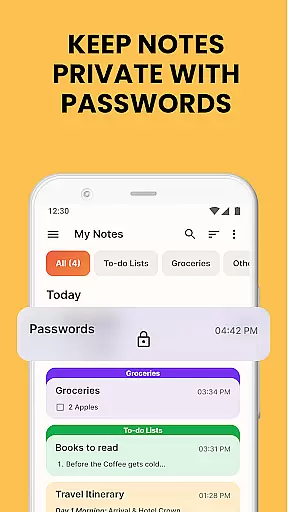
The app also supports color-coding, enabling users to prioritize and categorize their notes visually. For enhanced security, sensitive notes can be locked, ensuring that confidential information remains private. Users can categorize and sort their notes based on modification dates or creation order, making it easy to locate specific notes. Furthermore, the intuitive search feature helps users quickly find notes using keywords or phrases. Sharing options allow collaboration, letting users send notes via email or social media platforms, which is particularly useful for group projects or family planning.
Effective task management is essential for staying organized and productive. Notes Launcher excels in this area by providing users with a comprehensive suite of tools to manage their daily tasks efficiently.
The app allows you to create quick notes or to-do lists with just a swipe from your home screen. This instant access ensures that you can capture important thoughts and tasks the moment they come to mind, without any delay.
With features like categorization, sorting filters, and an intuitive search function, Notes Launcher makes it easy to organize and retrieve your notes. You can sort notes by modification date or creation order, ensuring that your most recent or relevant tasks are always at your fingertips.
Additionally, the ability to share notes via email or social media enhances collaboration, making it simple to work on group projects or plan events with friends and family. These robust task management capabilities ensure that users can stay on top of their responsibilities effortlessly.
In today's interconnected world, reliable cross-device synchronization is crucial for maintaining productivity across multiple platforms. Notes Launcher addresses this need by ensuring that your notes are consistently updated and accessible wherever you go.
While the app itself focuses primarily on local note-taking and organization, its design supports seamless integration with various cloud services. This means that whether you're using your phone, tablet, or computer, your notes will always be up-to-date and available.
Notes Launcher employs advanced syncing technology to minimize latency and maximize data integrity. This ensures that changes made on one device are quickly reflected on all others, providing a smooth and reliable user experience.
By prioritizing synchronization reliability, Notes Launcher empowers users to transition between devices without missing a beat, enhancing both personal and professional productivity.
User-friendly interface
Quick note creation
Secure note locking
Customizable categories
Intuitive search feature
Home screen layout changes
Limited design flexibility
No cloud sync option
Ads in free version
Occasional bugs

QuickBooks Workforce lets teams view pay info and track time in one place.
 4.70
4.70
Ads Free App! Editor, Hide File, Copy, Move, Delete and Rename.. all facility av
1.70
All in one sketching tool. Technical and General drawing. Online Maps support.
3.70
Direct Chat without saving contacts & Dual WA Account on Single Device
4.70
aCalendar+ makes your day, week and month
4.70
CalenGoo is a very flexible and feature-rich calendar app
4.40
App Lock with fingerprint, password: Lock apps & hide photos with lock screens
4.60
Simple and reliable communication between inmates, friends and family
3.20
Quickly and easily keep track of your work shifts
4.70
Native client for Forgejo and Gitea
5.00
Use powerful, industry-leading AI tools to generate visual charts from any data
4.80
All document reader, all in one file viewer read PDF, DOCX, XLS, PPT, TXT files.
4.60
Tally and goal counter for Wear OS & mobile
4.50
A lightweight JSON & XML files creator, editor and viewer (Premium Version)
4.40
When you Focus, so will your Bean in this cozy focus timer
4.30
Device's storage information in a simple and clear graphical form (infographics)
4.10
A Revolutionary All-in-One Artificial Intelligence Tools
3.80
Smart PDF reader & editor to view, organize and manage PDF documents easily.
3.70
Make your handwriting beautiful, even more than pen on paper.
3.60


User Reviews