
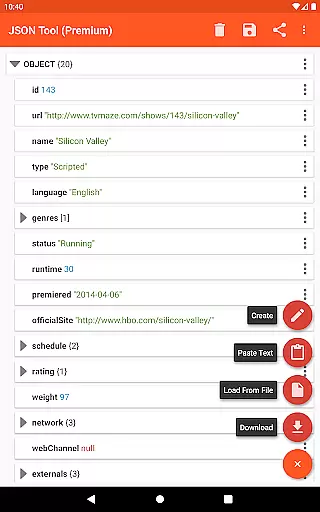
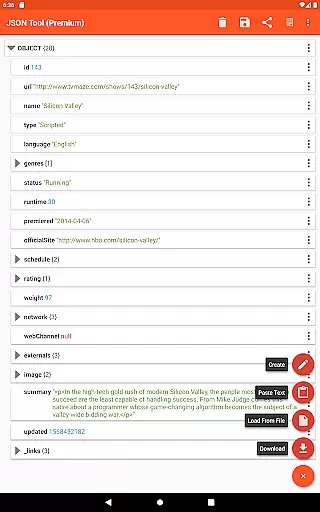
JSON & XML Tool Premium is a powerful productivity app designed for effortless creation, viewing, and editing of JSON and XML files. The app's standout feature is its simple hierarchical view that makes file navigation intuitive and efficient. Whether you're working on game addons or handling data conversion tasks, this tool provides the flexibility to load, edit, and save files in both JSON and XML formats. Its seamless integration with the Storage Access Framework (SAF) ensures secure file management without unnecessary storage permissions.
Beyond basic file handling, the app supports advanced functionalities like JMESPath query language for element extraction and transformation. With additional features such as dark theme support, PDF export, and formatted text output, it caters to both casual users and professionals who require precision and versatility in their workflow. This makes JSON & XML Tool Premium an essential utility for developers, data analysts, and anyone dealing with structured data formats.
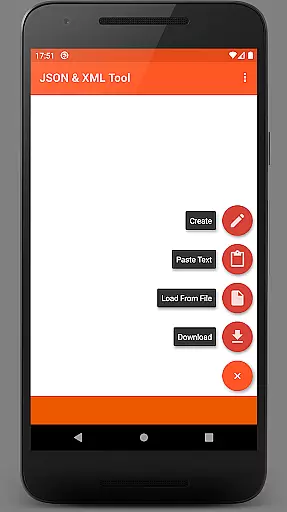
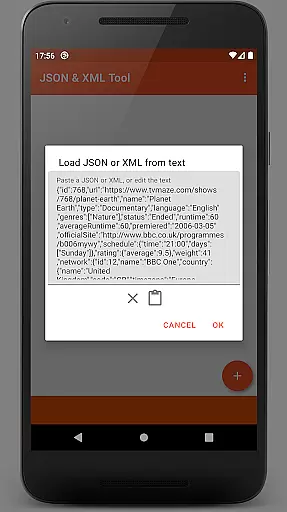
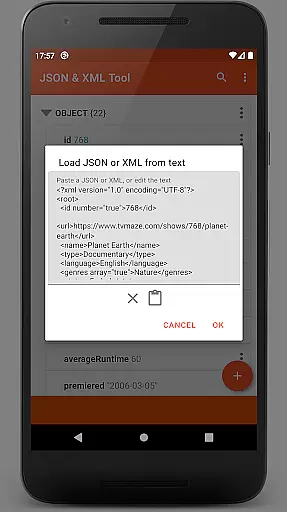
One of the core strengths of JSON & XML Tool Premium lies in its comprehensive file handling capabilities. Users can load files via the internal SAF-based file picker, download from URLs, paste text directly, or receive content from other apps using ACTION_SEND. Editing is equally robust, allowing users to rename nodes, modify values, switch between Boolean, Number, and String types, and manage arrays by adding, duplicating, or reordering elements.
The app also excels in usability with its modern design elements. It offers a sleek dark theme, preview functionality, and options to format outputs for better readability. Advanced users will appreciate the ability to extract data using JMESPath queries and export files as PDFs. By registering itself as a JSON/XML handler upon installation, the app ensures quick access whenever these file types are encountered, streamlining workflows across different platforms.
At the heart of the JSON & XML Tool Premium app lies its robust core task management system, designed to streamline the handling of JSON and XML files. This productivity tool offers a comprehensive suite of features that cater to various user needs, from loading and editing files to converting between different data formats.
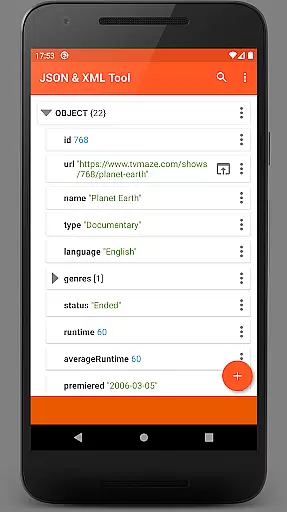
The app's interface presents a simple hierarchical view, making it easy for users to navigate through complex data structures. Whether you're editing game addons or performing data conversion tasks, the app provides intuitive controls for renaming node elements, modifying values, and switching between value types with ease.
Users benefit from the app's ability to handle files through multiple methods including internal SAF-based file picker, external file pickers, web downloads, and even text sharing from other apps. This versatility ensures that regardless of the source or format of your JSON/XML data, the app can efficiently manage and manipulate it.
The true value of this functionality is evident in its practical applications. The app enables users to create new files from scratch, duplicate existing nodes, move elements within arrays, and save their work in various formats. These capabilities make it an indispensable tool for developers, data analysts, and anyone working with structured data files.
While the JSON & XML Tool Premium app doesn't explicitly market itself as a cross-device synchronization solution, it incorporates several features that contribute to reliable data access and management across different devices. The app's implementation of the Storage Access Framework (SAF) ensures that users can access their files consistently, regardless of the device they're using.
The app's intelligent permission handling system demonstrates its commitment to reliable data management. By primarily utilizing SAF and requesting storage permissions only when necessary, it maintains a balance between security and functionality. This approach ensures that users can seamlessly work with their files across multiple devices without encountering permission-related obstacles.
For users who frequently switch between devices, the app offers multiple file access methods that enhance synchronization reliability. Whether downloading files from the web, receiving them via text sharing, or using different file pickers, these features create a flexible ecosystem for managing JSON and XML files across various platforms.
The app's registration as a JSON/XML file handler upon installation further strengthens its cross-device capabilities. Combined with additional features like dark theme support, text preview, formatted output options, and PDF export functionality, the app creates a consistent and reliable user experience across different devices and use cases.
User-friendly interface
Advanced editing tools
Supports multiple file operations
Dark theme available
No unnecessary permissions
Premium version only
Steep learning curve
Limited free alternatives
Occasional permission prompts
Not ideal for beginners

Fill, sign & send docs, forms, agreements & contracts via electronic signature.
 4.50
4.50
Cloud storage, automatic phone backup, and more.
4.10
Functional QR scanner and barcode reader that requires little storage space.
4.60
ID.me Authenticator is a simple and free Two Factor Authentication solution
3.50
Translate text/voice/photos in 150+ languages. Offline & fast translator app.
4.50
Create and edit presentations with Google Slides, part of Google Workspace.
4.00
A beautiful digital clock with autostart and many other functions
4.70
Scientific calculator for Android - looks and operates like the real thing!
4.90
Intelligent AI Assistant
4.10
8 custom complications. Custom Time Fonts. Beautiful color schemes. A++ Design.
5.00
Direct Chat without saving contacts & Dual WA Account on Single Device
4.70
The AI assistant that thinks with you - write, code, and solve complex tasks
4.60
Docker, Kubernetes management over Portainer Mobile
4.40
When you Focus, so will your Bean in this cozy focus timer
4.30
Code on-the-go with VScode for Android. Edit,debug and collaborate from mobile!!
3.10
Experience and share your SolidWorks designs on your Android® phone and tablet.
2.50
Ads Free App! Editor, Hide File, Copy, Move, Delete and Rename.. all facility av
1.70
AI Video AI Image Private LLM AI Browser Llama Gemma Ollama Connect LLM Studio
4.3
Create study competitions, track your hours, and stay consistent with friends
4.0


User Reviews