
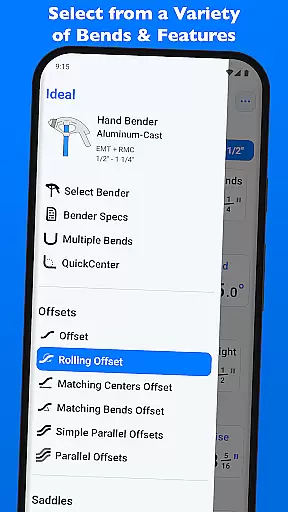
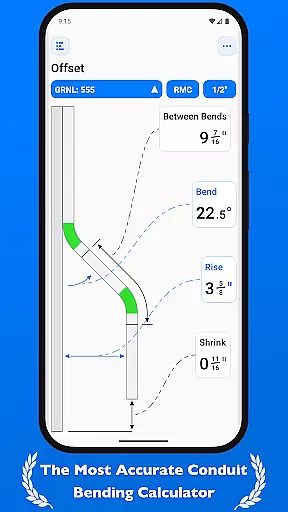
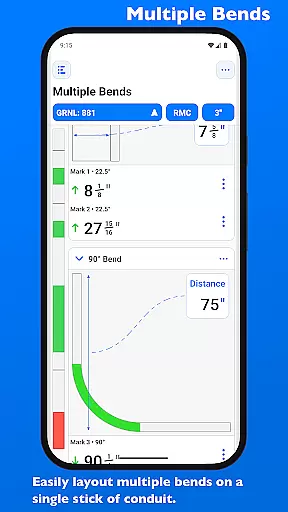
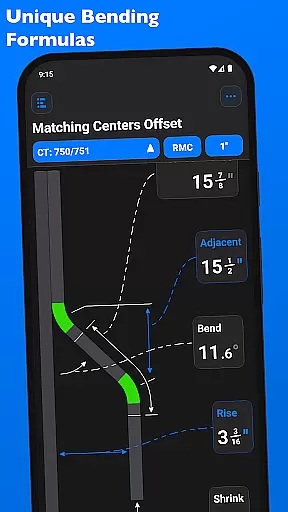
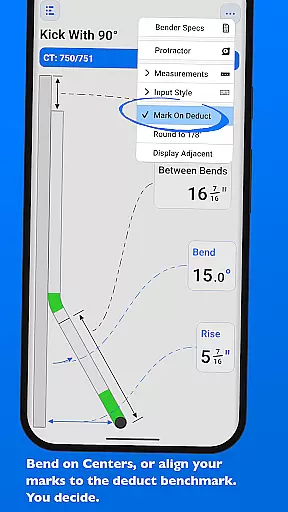
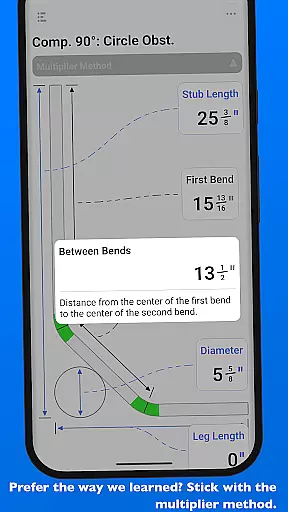
QuickBend is a cutting-edge conduit bending calculator app designed for precision and ease of use. It stands out by offering the most accurate measurements, accounting for shoe and bender radius, conduit type, and size diameter. The app employs a centerline radius algorithm to ensure rigorous and field-tested calculations, making it an indispensable tool for electricians and DIY enthusiasts alike.
Beyond its core functionality, QuickBend provides comprehensive information and documentation for individual bends. Its intuitive interface allows users to toggle between inches and centimeters, switch input styles, and preview bend feasibility through color-coded feedback. With support for various bends and the ability to layout multiple marks on a single conduit, this app streamlines workflows and enhances productivity.
Whether you're a seasoned professional or a novice, QuickBend's innovative features save time and reduce errors. The app consolidates all essential tools on one screen, including detailed bender specifications and customizable options for marking and flipping conduit bends. This cohesive design ensures that users can work efficiently without navigating complex menus.
QuickBend distinguishes itself with several advanced features tailored to improve accuracy and efficiency. One standout feature is its integration of the centerline radius algorithm, which generates precise bend measurements while considering variables like shoe radius and conduit diameter. This meticulous approach guarantees reliable results, whether you're performing simple offsets or complex compound bends.
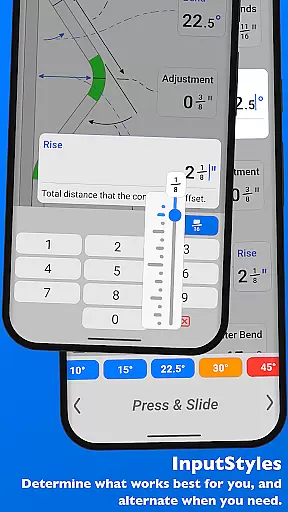
The app also offers versatile input methods, such as a number pad and slider bar (Press & Slide), catering to different user preferences. Its built-in QuickCheck functionality provides real-time feedback by changing text colors to indicate impossible or unlikely bends. Additionally, QuickBend supports a wide range of bend types, from basic 90° bends to intricate segmented configurations, empowering users to tackle diverse projects with confidence.
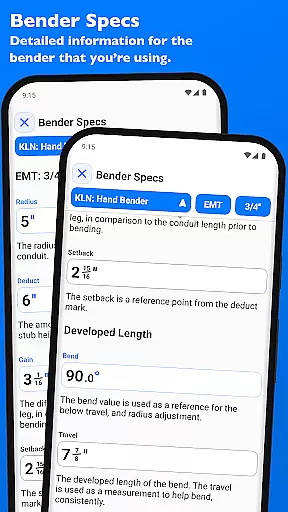
Another key feature is the ability to customize and save frequently used bender settings. Users can pin their preferred benders for quick access and edit detailed specifications like deduct, gain, and setback values. These capabilities, combined with visual aids for travel and radius adjustments, make QuickBend an invaluable asset for optimizing workflow and achieving consistent, high-quality results.
QuickBend revolutionizes the way electricians and conduit workers manage their bending tasks through its advanced calculation engine. The app's core task management system is designed to handle a wide variety of bends, from simple offsets to complex compound 90u00b0 bends around obstructions. Each task is processed using the centerline radius algorithm, ensuring precision and reliability in every calculation.
The application supports seamless switching between different measurement systems, allowing users to toggle between inches and centimeters effortlessly. This flexibility ensures that all professionals, regardless of their preferred measurement system, can utilize QuickBend effectively. The intuitive input methods, including number pad and slider bar options, cater to both quick inputs and detailed adjustments, enhancing productivity on the job site.
With features like QuickCheck integrated into the workflow, users receive immediate visual feedback on the feasibility of a bend through color-coded text alerts. Red indicates impossible bends, while orange suggests potentially problematic ones. This preemptive guidance saves time and materials by preventing errors before they occur, making task management not only efficient but also cost-effective.
While QuickBend focuses primarily on individual device performance, its robust design ensures reliable operation across various Android devices. The app maintains consistent performance whether you're using a smartphone or tablet, providing stable and accurate calculations regardless of the device's specifications. This consistency guarantees that users can rely on QuickBend's measurements without worrying about device-specific discrepancies.
Although direct cross-device synchronization isn't explicitly mentioned, QuickBend offers features that enhance workflow continuity. Users can pin frequently used benders for quick access, maintaining a personalized workspace that remains consistent across different work sessions. The ability to edit and view detailed bender specifications ensures that crucial information is always available, regardless of which device you're using.
The comprehensive 'Bender Specs' section provides detailed information on centerline radius, deduct, gain, and setback values. These specifications are visualized and editable within the app, creating a reliable reference point for all your bending tasks. While not traditional cloud synchronization, this feature set creates a consistent experience across devices, ensuring that your most important data is always at your fingertips when working with QuickBend.
User-friendly interface
Accurate bend calculations
Versatile input methods
Real-time feasibility checks
Customizable bender settings
Premium version required
Steep learning curve
Limited free features
No offline mode
Occasional bugs

Experience Reading - Night Mode for Documents
 4.40
4.40
All in one sketching tool. Technical and General drawing. Online Maps support.
3.70
Customizable calendar widget for seamless event sync, planning & scheduling.
4.00
aCalendar+ makes your day, week and month
4.70
Functional QR scanner and barcode reader that requires little storage space.
4.60
Docker, Kubernetes management over Portainer Mobile
4.40
The ultimate file manager for rooted devices. The original and still the best.
4.00
Ultimate Virtual AI Character for immersive Roleplay Chat. Perfect Companion
3.90
Okta MFA
4.70
Direct Chat without saving contacts & Dual WA Account on Single Device
4.70
The Pro Version of Android's tiniest Notepad app. Just 0.3MB but feature-packed!
4.60
App Lock with fingerprint, password: Lock apps & hide photos with lock screens
4.60
PDF scanner & converter for files, photos, lottery, QR codes. One swipe away!
4.50
Automates browsing any website and notifies you of important changes or events
4.30
Access, manage and transfer files on Android, PC, Mac, NAS and cloud storages.
4.30
Easily read and manage all your PDF files
4.10
Take control of your clipboard with Clipper!
3.90
Find and delete junk files & block unwanted notifications & manage files
3.70
AI Video AI Image Private LLM AI Browser Llama Gemma Ollama Connect LLM Studio
4.3


User Reviews