
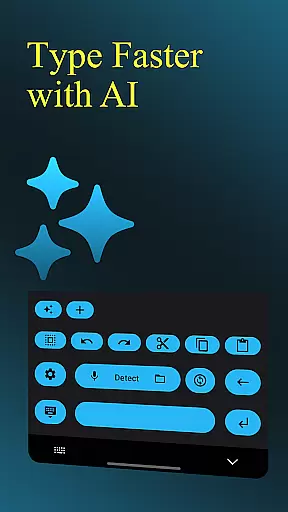
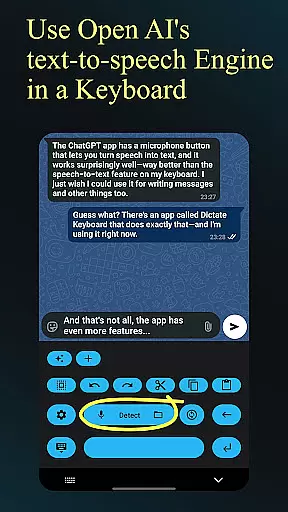
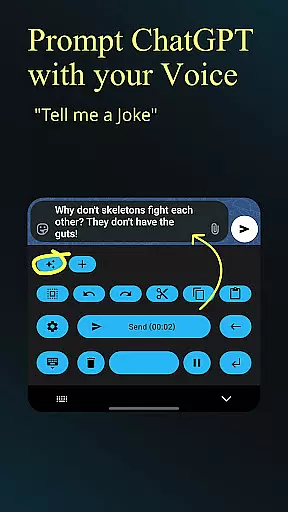
Dictate Keyboard is a cutting-edge productivity tool designed to streamline text input through advanced speech recognition technology. This innovative keyboard app converts spoken words into written text with remarkable accuracy, supporting all major languages. Its AI-driven transcription engine not only recognizes speech but also intelligently adds punctuation and formatting.
The application goes beyond basic dictation by offering features like custom rewording using GPT models, automatic formatting of commands, and seamless integration with various transcription services. Whether you're composing emails, creating documents, or messaging, Dictate Keyboard adapts to your needs while maintaining professional standards in formatting and style.
Designed for both personal and professional use, this keyboard solution proves especially valuable in fast-paced work environments where efficiency is crucial. The app's ability to handle complex transcription tasks while providing customization options makes it an indispensable tool for modern productivity workflows.
Dictate Keyboard distinguishes itself through a comprehensive set of features that enhance the dictation experience. The app supports multiple transcription models including Whisper and GPT-4o-transcribe, allowing users to select their preferred recognition engine. Its sophisticated AI can process various input methods such as live voice, audio files, and even video transcriptions.
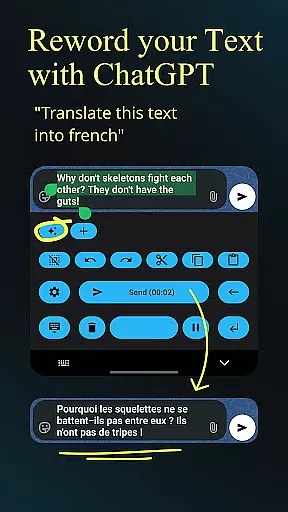
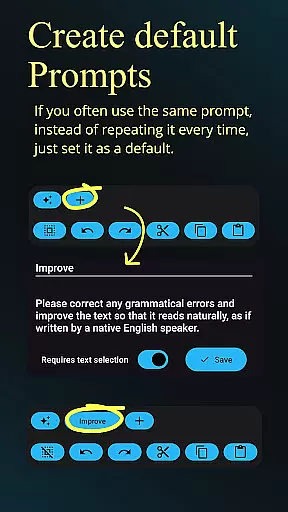
Advanced functionality includes customizable system prompts that guide the transcription style, automatic formatting of spoken commands, and seamless switching between different recognition models. Users can create custom rewording instructions for translation or style modification using powerful language models like GPT-5.
The keyboard's versatility extends to its support for dark-mode, light-mode, and custom themes, along with practical features like haptic feedback and quick switching to standard keyboards. These capabilities, combined with its open-source nature and API server support, make Dictate Keyboard a highly adaptable productivity solution for diverse user needs.
Dictate Keyboard revolutionizes core task management by integrating advanced speech recognition technology into a user-friendly keyboard interface. This innovative approach allows users to convert spoken language into text with remarkable accuracy, supporting all common national languages.
The app's AI-driven system goes beyond basic transcription by intelligently adding punctuation and formatting commands automatically. Users can create new paragraphs, insert specific phrases, and even dictate complex instructions without manual corrections, making task documentation more efficient.
What sets Dictate apart in task management is its seamless integration with various transcription models and providers. Users can switch between different AI models like Whisper or GPT-4o-transcribe, ensuring the best possible accuracy for their specific needs while maintaining complete control over their preferred transcription service.
Cross-device synchronization is where Dictate Keyboard truly shines, offering unparalleled reliability through its flexible architecture. The application supports multiple API servers and custom proxy configurations, enabling smooth data exchange across different devices.
Users can maintain consistent productivity levels regardless of their current device thanks to the app's support for both OpenAI and Groq API keys. This dual-provider support ensures that transcriptions and custom prompts remain synchronized across platforms without compromising performance.
The synchronization extends to advanced features such as custom rewording instructions, system prompts, and theme settings. Whether switching from mobile to desktop or vice versa, users can expect their personalized configurations and saved data to be perfectly aligned across all their devices.
Accurate transcription
Multilingual support
Customizable settings
Open-source platform
User-friendly interface
Requires API setup
Incurs usage fees
Complex configuration
Limited offline functions
Dependent on third-party services

A Revolutionary All-in-One Artificial Intelligence Tools
 3.80
3.80
Experience Reading - Night Mode for Documents
4.40
When you Focus, so will your Bean in this cozy focus timer
4.30
Ads Free App! Editor, Hide File, Copy, Move, Delete and Rename.. all facility av
1.70
Total remote control for your Android device, PC and cloud services (IFTTT)!
4.20
A lightweight JSON & XML files creator, editor and viewer (Premium Version)
4.40
Pwnagotchi companion app
4.20
Fill, sign & send docs, forms, agreements & contracts via electronic signature.
4.50
Code on-the-go with VScode for Android. Edit,debug and collaborate from mobile!!
3.10
Seamlessly integrate data and reports to build your presentation to impress
4.80
Android Wallet Password Manager
4.80
Mind Map and brainstorm, note taking and idea collection
4.80
Direct Chat without saving contacts & Dual WA Account on Single Device
4.70
CalenGoo is a very flexible and feature-rich calendar app
4.40
This small app MUST BE INSTALLED after purchase, else license won't work
4.40
⏰ Finally a timer app which can run multiple timers simultaneously on your watch
3.90
Make your handwriting beautiful, even more than pen on paper.
3.60
Experience and share your SolidWorks designs on your Android® phone and tablet.
2.50
A comprehensive suite of tools designed specifically for Lactation Consultants
4.2


User Reviews