
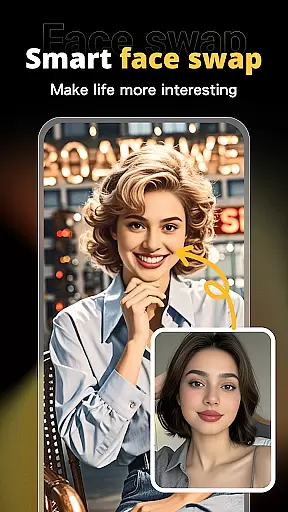
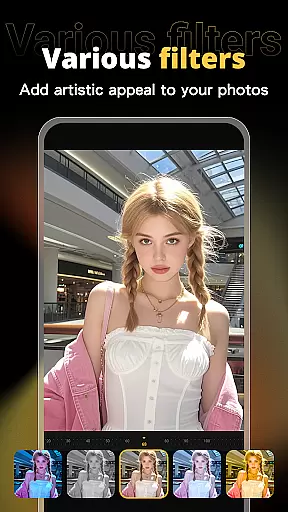
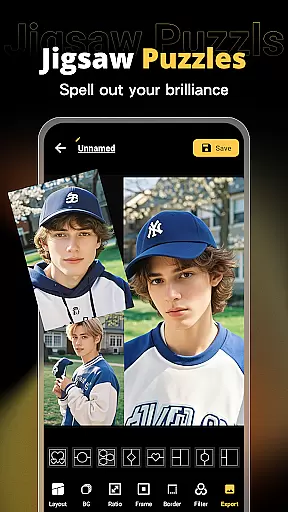
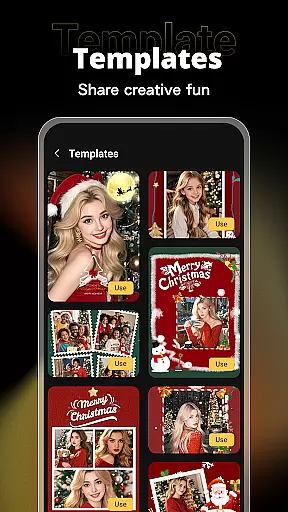

X PhotoKit is a versatile photo editing application that brings professional-level tools to your fingertips. The app features AI-powered face swapping, comprehensive photo editing options, creative collage creation, and ready-to-use templates. Whether you're looking to enhance your personal photos or create marketing materials, X PhotoKit provides the necessary tools to produce stunning visuals with ease.
The app's standout feature is its intelligent AI face swap technology, which allows users to seamlessly replace faces in photos while maintaining a natural look. Additionally, its robust editing suite offers filters, effects, and adjustment tools for quick enhancements. With built-in templates for various occasions and an easy-to-use interface, X PhotoKit caters to both casual users and professionals seeking efficient design solutions.
Perfect for social sharing, travel memories, holiday greetings, and even commercial design projects, X PhotoKit empowers users to unleash their creativity anytime, anywhere. Its intuitive design ensures that anyone can achieve professional-quality results without needing advanced technical skills.
X PhotoKit stands out with its diverse range of powerful features tailored for creative photo editing. One of its core functionalities is the AI face swap tool, which uses advanced algorithms to ensure realistic and seamless face replacements. This feature is ideal for creating fun, engaging content for social media or experimenting with new creative ideas.
In addition to AI capabilities, the app offers a complete photo editing suite. Users can apply various filters, effects, and precise adjustment tools to enhance their images' visual impact. For those who enjoy crafting collages, X PhotoKit provides multiple layout options and customizable templates, enabling effortless combination of photos into cohesive designs.
Another notable feature is the image stitching tool, which allows users to merge multiple photos into panoramic or tall images. Combined with professionally designed templates for posters, covers, and cards, this makes X PhotoKit suitable for both personal and commercial projects. Its user-friendly interface ensures accessibility for all skill levels while delivering high-quality results.
Real-time capture and preview functionality is essential for ensuring that users can see the results of their photo edits instantly. This feature allows users to visualize changes as they apply filters, effects, and adjustments, providing immediate feedback on their creative decisions.
X PhotoKit offers a seamless real-time editing experience through its advanced processing capabilities. The app ensures that even complex edits like AI face swapping and image stitching are previewed without delay, maintaining a smooth workflow for users.
The benefit of real-time capture and preview in X PhotoKit is significant. Users can experiment with different styles and settings confidently, knowing that they can see the outcome instantly. This not only enhances the overall user experience but also encourages more experimentation and creativity within the app.
AI beauty and enhancement features focus on improving the visual quality of photos while maintaining a natural look. This balance between enhancement and authenticity is crucial for creating images that are both aesthetically pleasing and true to life.
In X PhotoKit, the AI algorithms are designed to intelligently enhance facial features, skin tones, and other elements without over-processing. The app's intelligent AI face swap and beautification tools ensure that edits look realistic, preserving the original character and charm of the subject.
Users of X PhotoKit will appreciate how the app's enhancements elevate their photos without making them appear artificial. Whether it's for personal portraits or professional designs, this feature supports a wide range of use cases, ensuring that every edited photo retains its natural beauty and appeal.
AI-powered face swap
Versatile editing tools
Easy-to-use interface
Built-in templates
Creative collage options
Limited free features
Subscription required
Ads in free version
Occasional bugs
Learning curve

Search, tag and rate your way to an organized image gallery
 4.40
4.40
Add Watermark - Sign your pictures with a text or logo. Effective, quick, easy!
4.50
[3DSteroid Pro] is a stereoscopic application for Android.
4.30
How old age camera Gender Swap App Face Shape Hairstyle App Hair Styler App fun!
4.00
Over 800 film simulation recipes for Fujifilm. Black Friday Offer!
4.1
Movie camera, supports pro recording settings for filming. Try it and be amazed!
4.50
AI Photo Editor with 100+ Filters, Effects! Remove BG, Retouch & Photo Enhancer.
4.80
Snap photos remotely using your Garmin watch as the camera trigger
4.4
Try an anime version, cartoon yourself, and generate AI hug or aging videos!
3.70
Android Native system HD camera app. Never been so simple and faster.
4.70
Amazing Photo Effects - The most fun you can have with your photos!
4.70
Automatically backup your photos and videos to computer, NAS and Cloud services
4.60
AI-powered video creator by MiniMax - Where ideas meet cinema
4.20
What celebrity do you look like? Celebs will find your celebrity match!
4.10
Turn photos into cartoons & avatars! - Photo Editor, Cartoon Face!
3.90
Astrophotography with your smartphone, photo live stacking and much more!
3.90
Perfect photos with body shaping, BG changer and object remover.
3.70
Be your best in every shot! Fix, edit and retouch your face in selfies & photos.
3.70
Add a dreamy vibe to your selfies and videos with soft style filters
4.4


User Reviews