
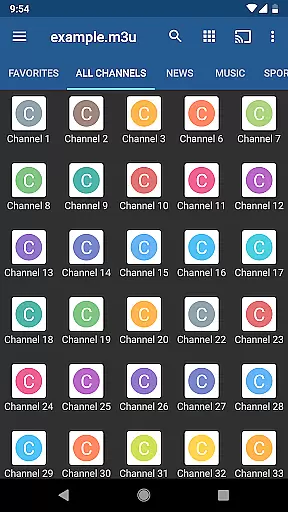
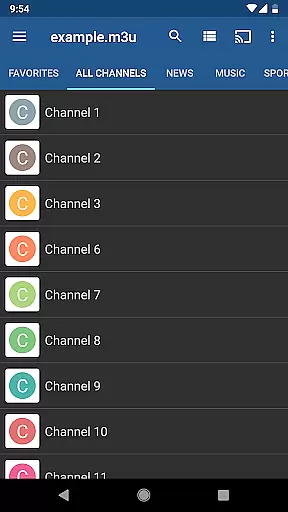
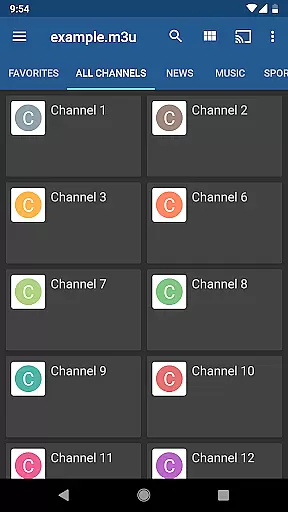
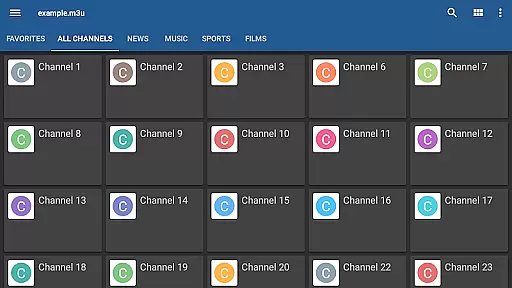
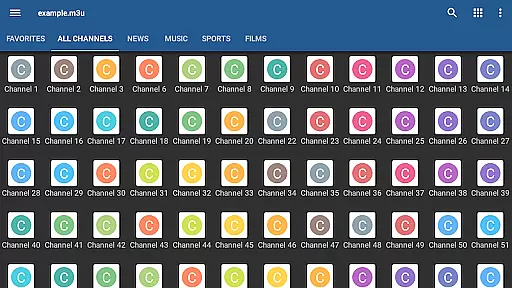
IPTV Pro is the premium version of IPTV app, offering an ad-free experience with advanced features for seamless TV streaming. It supports M3U and XSPF playlists, multicast streams via UDP proxy, EPG in XMLTV and JTV formats, and multiple viewing options like grid, list, or tile views.
Designed for users seeking uninterrupted entertainment, this app allows auto-play of the last channel and extended playlist history. With both internal and external video player support, it ensures compatibility across devices. Parental controls add a layer of security, making it suitable for family use.
While IPTV Pro does not include built-in channels, it excels as a powerful tool for those with their own playlists. The app is ideal for streaming from internet service providers or web sources, providing a customizable and user-driven TV experience.
IPTV Pro stands out with its comprehensive feature set tailored for avid TV streamers. One notable feature is the auto-play option for the last viewed channel, ensuring a consistent viewing experience. Additionally, the app supports multicast streams using a UDP proxy, which is particularly useful in LAN environments.
The app provides multiple viewing formats including grid, list, and tile views, catering to user preferences. EPG support in XMLTV and JTV formats enhances usability by offering detailed program guides. With parental controls and dual video player support, IPTV Pro delivers both flexibility and security.
Although it requires users to supply their own channel playlists, the app's ability to integrate with various sources makes it versatile. For optimal multicast streaming, installing a UDP proxy on your network is recommended, ensuring smooth and reliable performance.
Video format compatibility is a crucial feature for any video player application like IPTV Pro. This ensures that users can enjoy content from a wide range of sources without worrying about format support.
IPTV Pro excels in this area by supporting popular playlist formats such as M3U and XSPF. These formats are widely used for internet-based TV streaming services, making the app versatile for various user needs.
The application also provides options for both internal and external video players. This flexibility allows users to choose their preferred playback method while maintaining consistent performance across different devices.
By offering comprehensive format support, IPTV Pro enables seamless viewing experiences regardless of the source or type of video content, giving users peace of mind when accessing their personal media libraries.
While IPTV Pro focuses primarily on video playback rather than editing, it incorporates several advanced features that enhance the overall viewing experience through intelligent design choices.
The application includes an Electronic Program Guide (EPG) that supports XMLTV and JTV formats. This smart feature helps users organize and plan their viewing schedule by providing accurate program information.
Parental control functionality demonstrates another form of intelligent content management. This feature allows administrators to restrict access to inappropriate content, creating a safer viewing environment for families.
Although not traditional AI-powered editing, these smart features contribute to a more organized and controlled media consumption experience, setting IPTV Pro apart from basic video player applications.
Ad-free experience
Auto-play last channel
Multiple viewing formats
Parental control included
EPG support in multiple formats
No built-in channels
Requires technical setup
UDP proxy may be needed
Paid version only
Limited to user-provided content

Auto video maker with music & exclusive filters. Video editing made simple.
 4.50
4.50
Watch a large amount of high-definition short drama content
4.60
Play ALL formats in 4K & HD. Video downloader, MP3 player, Chromecast & more.
4.80
VLC Remote lets you control your VLC Media Player on Mac, PC or Linux.
4.60
1)AirPlay/DLNA Mirroring/Streaming, up to 4 connections; 2)Samba/NAS/DMS Player.
4.00
Pro video editor app for Instagram, edit video with song, AI, effect & slowmo.
4.80
GENRAL PRO - General Pro is the best video player that fully supports all formats.
4.70
Play and download HD videos from all sources — fast, simple, and all-in-one.
4.3
AI Video Editor with Music, Filter, Slideshow, Effect, Merge & Trim Video.
4.80
A Quick and Pro Video Editor
4.70
Cast to Chromecast, Xbox, Fire Stick, Roku, DLNA, Smart TV & No Feature Limited!
4.50
HD video maker with no watermark, no ads & vlog maker with music, PIP, text
4.50
KMPlayer Plus (Divx Codec) officially support Divx codec.
4.30
Powerful Video Editor & Photo Editing App —— Quick Edits & Stunning Effects!
4.30
Video player with 4K & 1080P support, popup play, background play and subtitle.
4.20
Explore the largest library of free GIFs, Stickers & Memes - or create your own!
3.90
Save photos and videos from social apps in one tap.
3.60
AirMirror is Receiver for Screen Mirroring and Casting from Apple Devices.
3.60
Stream high quality video from your camera over NDI protocol
4.4


User Reviews