
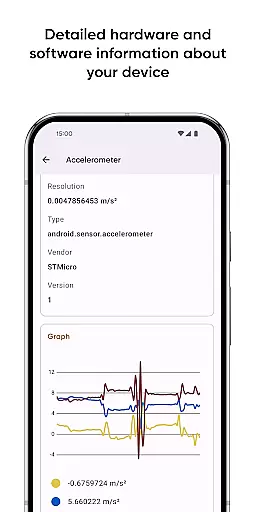
Castro Premium is a comprehensive device monitoring tool that provides real-time performance tracking and detailed system information. The app offers an extensive collection of data points, including processor statistics, battery monitoring, memory usage, network data consumption, and sensor readings.
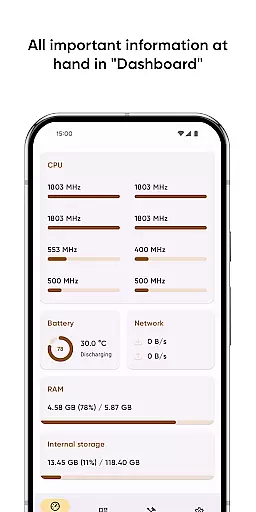
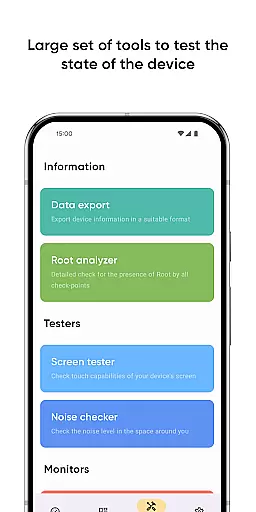
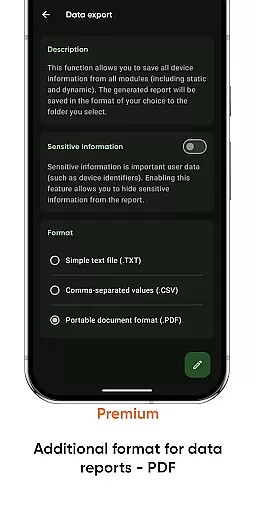
For users seeking quick insights, the Dashboard feature presents key metrics such as CPU usage, battery status, network activity, and memory load in an easily digestible format. Advanced users can delve deeper into specific areas of interest through specialized tools like Data Export, Screen Tester, and Noise Checker.
This application is particularly valuable for tech enthusiasts and professionals who need to monitor device health and optimize performance. With its premium features, Castro offers enhanced customization options, making it a versatile tool for both casual users and power users alike.
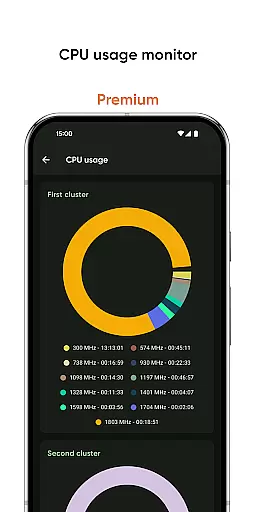
Castro Premium stands out with its rich feature set designed for comprehensive device analysis. The app provides detailed processor statistics for both CPU and GPU, allowing users to monitor performance metrics and identify potential bottlenecks in real-time.
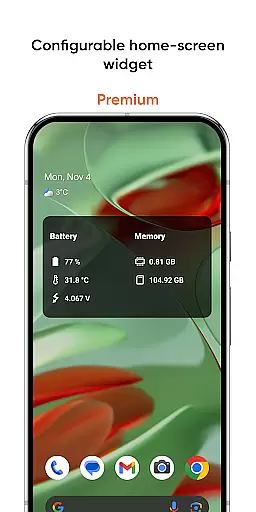
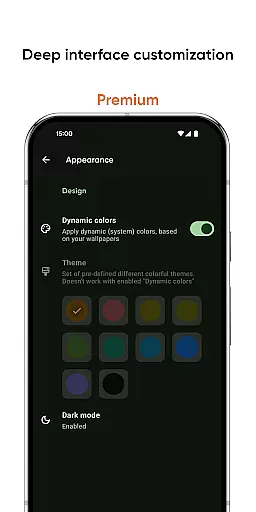
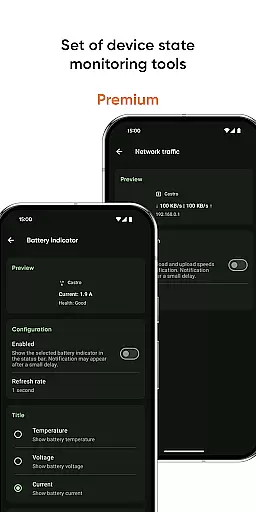
Beyond basic monitoring, Castro includes advanced tools such as battery property tracking, network traffic speed monitoring, and configurable home-screen widgets. These widgets display crucial information including battery status, memory usage, and connection speed. The premium version enhances these capabilities with deep interface customization options, PDF export functionality, and specialized monitoring tools.
The application's strength lies in its ability to cater to both casual users through its intuitive Dashboard and power users through its advanced monitoring features. This dual approach ensures that all users can effectively track and optimize their device's performance according to their specific needs.
Castro Premium stands out in the Tools category by offering highly accurate and effective core functionalities that cater to users who need detailed insights into their device's performance. The app provides comprehensive statistics on processor usage, including both CPU and GPU metrics, which are crucial for understanding how your device handles different tasks.
Beyond processor statistics, Castro offers real-time monitoring of battery consumption, memory usage, and network data flow. This allows users to pinpoint exactly which applications or processes are consuming the most resources, enabling them to optimize their device's performance effectively. Such precise monitoring tools ensure that users can maintain optimal device health.
The value derived from these features is significant; users gain the ability to troubleshoot performance issues, manage resource allocation efficiently, and ultimately extend the lifespan of their devices through informed decision-making. This level of detail and accuracy in presenting data empowers users with actionable insights.
In addition to its powerful monitoring capabilities, Castro Premium excels in providing an interface that is both simple and intuitive. The Dashboard feature consolidates all critical information such as CPU usage, battery status, network activity, and memory load into a single, easy-to-navigate screen. This design choice ensures that even users with limited technical knowledge can understand their device's status at a glance.
Further enhancing its user-friendly approach, Castro includes specialized tools like the Screen Tester and Noise Checker, which are straightforward to use yet provide valuable information about your deviceu2019s display condition and ambient noise levels respectively. These practical tools demonstrate the app's commitment to accessibility without compromising on functionality.
For those seeking deeper customization, the Premium version unlocks extensive interface personalization options. Users can modify themes and colors, ensuring that the app not only performs well but also aligns with personal preferences. This blend of simplicity and customization underlines Castro's dedication to delivering an intuitive user experience.
Comprehensive monitoring
Real-time data tracking
Customizable interface
Advanced widget options
Premium customization
Complex for beginners
High resource usage
Premium features costly
Occasional inaccuracies
Limited free features

Easily install aab(Android App Bundle) files on your Android device with our app
 4.80
4.80
Use your phone as a webcam on your computer over WiFi or USB.
4.40
Canon PRINT is a companion app for your Canon printer.
4.60
ADB support Android 4.X-Android 13(Support wireless pair mode).No root required!
4.70
Detect hidden spy camera with advanced scanning {{ Premium version }}
4.00
Screen Mirroring for Roku Sticks, Roku TCL TV and Roku Hisense TV
4.50
Create your own custom widget with endless possibilities
3.90
Clean up your phone, find files, play media, and share files offline
4.50
The ideal app to be the digital eye of your family
3.40
Support Fossify apps with a warm thank you!
5.00
Navigate with Ease and Style
4.90
Change your GPS location instantly. Simulate routes anywhere in the world.
4.90
Quickly switch to an encrypted DNS server on Android TV
4.50
Button mapper, mouse toggle, sleep timer and a lot of another features
4.50
Effortlessly run ADB commands directly on your device without a PC.
4.20
Screen Mirroring with sound for Samsung TV, LG TV, Sony TV, Smart TV and Browser
4.20
A recovery soft,it features photo recovery, video recovery, file recovery.
3.40
A non-root local ADB shell client. READ BELOW!
3.40
card-reader app
2.20


User Reviews