
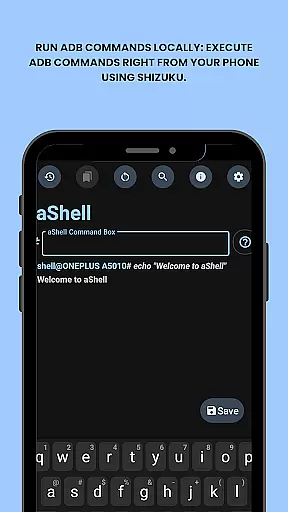
aShell is a specialized Android tool designed for users who require direct ADB command execution on their mobile devices without the need for a PC. This app operates within a Shizuku-supported environment, making it particularly useful for developers and power users who demand full control over their device's system internals.
The application offers a streamlined experience with features like preloaded command examples, live command output, and search functionality within results. Its ability to save outputs to files and support for both dark and light modes enhances its practicality for various use cases. Whether you're debugging applications or managing device settings, aShell provides an efficient solution.
With its open-source nature and comprehensive resources including source code availability, issue tracking, and translation support, aShell represents a valuable tool for those with basic ADB knowledge. The app's bookmarking feature allows quick access to frequently used commands, further optimizing workflow efficiency.
aShell distinguishes itself through its unique set of features tailored for Android power users. The primary advantage is its capability to run ADB commands locally on the device, which eliminates the dependency on external computers for system-level operations.
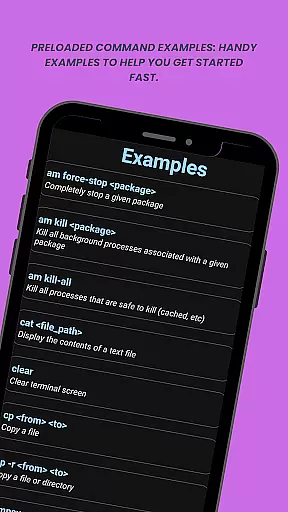
The app comes equipped with practical functionalities such as preloaded command examples that assist users in quickly getting started. It supports continuous commands like logcat or top, providing real-time feedback. Users can also search within the command output, save results to text files, and switch between dark and light modes based on their preferences.
Additional notable features include an issue tracker for reporting bugs, translation support for broader accessibility, and the option to build the app from source code. These aspects make aShell not only a powerful tool but also a customizable and community-driven project suitable for advanced users seeking flexibility and control.
aShell is designed to provide an accurate and effective way for users to execute ADB commands directly on their Android devices. This eliminates the need for a PC, making it highly convenient for developers and power users.
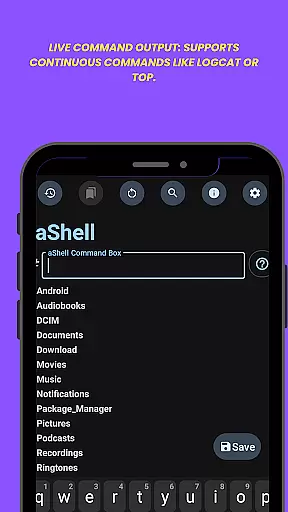
The app leverages the Shizuku environment to ensure that all ADB commands are executed with precision. It supports continuous commands like logcat or top, providing live output that enhances real-time monitoring and debugging capabilities.
With features such as search within output and saving output to a file, aShell ensures that users can efficiently manage and analyze command results. These functionalities significantly boost productivity by streamlining workflows and reducing time spent on routine tasks.
aShell offers a simple and intuitive interface that caters to both beginners and experienced users. Despite its powerful capabilities, the app remains user-friendly, ensuring ease of use without compromising functionality.
The inclusion of preloaded command examples helps new users get started quickly. These examples serve as practical guides, reducing the learning curve associated with ADB/Linux command-line operations.
Additionally, aShell supports dark and light mode themes, adapting seamlessly to the user's system settings. This attention to detail in design enhances user comfort and accessibility, making prolonged usage more pleasant and less straining on the eyes.
User-friendly interface
Live command output
Dark mode support
Open-source project
Active community
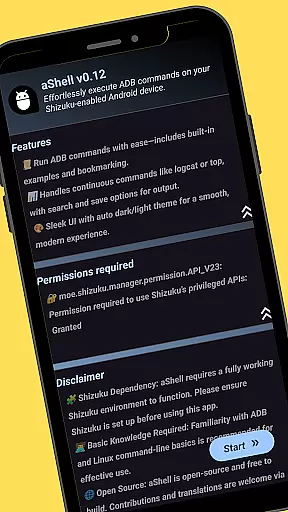
Requires Shizuku
Limited to advanced users
No iOS support
ADB knowledge needed
Paid version only

Easily install aab(Android App Bundle) files on your Android device with our app
 4.80
4.80
A powerful, easy-to-use flight computer on your phone or tablet!
3.80
HD Video player and downloader for all formats, fast & smooth 4K video playback.
4.60
App to pay for FUTO Keyboard
4.60
Forza Tuning Calculator App for Forza Horizon 5, Motorsport and Earlier Titles
4.40
A non-root local ADB shell client. READ BELOW!
3.40
Quickly check the frequency of the Earth
4.30
NFC Tools can read and write NFC tags.
4.70
fast and easy mp3 music downloader
4.80
Powerful collection of electronics tools and reference.A must for any enthusiast
4.90
Excellent scientific calculator with symbolic algebra, integrals, derivatives
4.80
HD Camera captures every special moment.
4.60 4.50
4.50
Universal TV remote control all TVs, Roku, LG, Samsung, Fire, Vizio, Sony, TCL.
4.40
Pro Emulator is an easy to use game console emulator for a range of consoles.
4.40
pdf merge, word to pdf, jpg to pdf, edit pdf, convert to pdf and much more!
4.20
1-Click close all background apps on Android TV
3.90
Create your own live wallpaper or check out thousands already made presets
3.90
Save any video in HD - paste the link, download fast and watch offline.
4.4


User Reviews