
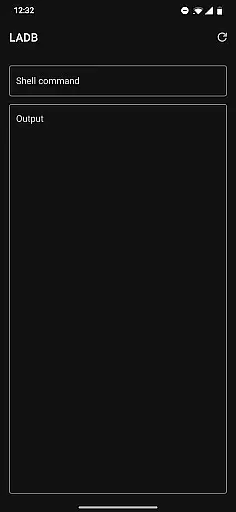
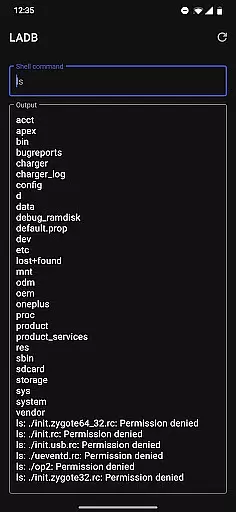
LADB is a powerful Android tool that bundles an ADB server within the app, enabling local device connections without USB. It utilizes Android's Wireless ADB Debugging feature to facilitate communication between the server and client locally.
Setting up LADB requires using split-screen mode or a pop-out window alongside Settings to input the pairing code and port. This ensures continuous connectivity during the initial setup process. While there are some compatibility issues with other apps like Shizuku, LADB remains a reliable choice for developers needing quick access to ADB functionalities.
This tool is ideal for developers who frequently debug Android applications and require a seamless, wireless connection to their devices. By eliminating the need for physical USB connections, LADB streamlines the debugging process, making it more efficient and accessible.
LADB offers several notable features that enhance its functionality. Firstly, it includes an integrated ADB server, which removes the necessity for external ADB installations. This makes the setup process straightforward and less error-prone.
Another key feature is the Assisted Pairing mode, which simplifies the connection process by guiding users through pairing their devices. Although this mode can sometimes be inconsistent with newer Android versions, a manual pairing tutorial is available to ensure a reliable connection every time.
Additionally, LADB provides troubleshooting steps that help resolve common issues, such as clearing app data and rebooting the device. These features collectively make LADB a robust tool for developers seeking efficient and hassle-free ADB access on their Android devices.
LADB u2014 Local ADB Shell is designed to provide an integrated ADB server within the app, enabling users to execute commands on their local Android device without requiring a USB connection. This core functionality is crucial for developers and power users who need to debug or control their devices wirelessly.
The app leverages Android's Wireless ADB Debugging feature, allowing seamless communication between the bundled ADB server and the client device. By pairing through a generated code and port, LADB ensures that users can maintain a stable connection, which is essential for accurate command execution.
For users, this means they can perform a variety of operations such as file management, app debugging, and system modifications directly from their device. The ability to use split-screen mode with settings enhances the setup process, ensuring that the pairing remains active and reliable.
Overall, LADB's commitment to functional precision ensures that users can depend on it for effective device management, making it an indispensable tool for anyone involved in Android development or advanced device handling.
A significant aspect of LADB's design is its focus on providing a straightforward and intuitive user interface. Given the technical nature of ADB operations, having a clear and accessible interface is vital for ensuring that users can efficiently utilize the app's features without unnecessary complexity.
The app simplifies the initial setup by offering a guided process that includes copying pairing codes and ports directly into the interface. This reduces the potential for user error and makes the connection process as smooth as possible, even for those who may not be familiar with ADB.
Moreover, LADB addresses common issues preemptively by including troubleshooting tips within the app. Users can resolve most problems by following simple steps like clearing app data or rebooting, which are clearly outlined to prevent confusion.
By focusing on interface simplicity, LADB ensures that users can concentrate on their tasks without being hindered by a steep learning curve, thus enhancing overall productivity and user satisfaction.
User-friendly interface
Integrated ADB server
Wireless debugging support
Comprehensive troubleshooting guide
Active developer support
Incompatible with Shizuku
Manual pairing required sometimes
Initial setup can be complex
Limited to Android devices
No cloud backups

Change your GPS location instantly. Simulate routes anywhere in the world.
 4.90
4.90
PDF Reader - Document Viewer: Read, Manage & Organize Your Documents
3.10
card-reader app
2.20
An open-source APK explorer for Android!
4.10
An easy-to-use calculator designed to save time calculating and bending conduit
4.30
WiFi Signal Strength Meter help you detect WiFi Signal Strength in real time.
4.80
Connect wirelessly to your computer to watch movies, browse the web, play games
5.00
Screen Mirroring with sound for Samsung TV, LG TV, Sony TV, Smart TV and Browser
4.20
Your personal health butler
3.60
The ultimate tool for network analysis, wifi scanning and problem detection.
4.90
Monitor car performance in real time and troubleshoot malfunctions.
4.80
The Ultimate Flex Drivers Utility App - Convenient Tapping & Block Filters
4.70
Mirror your screen to Fire TV - Super fast and simple
4.40
Just one-tap to easy translate in any language after calls within seconds.
4.20
App that Recover your pictures, videos or files after you delete them.
4.20
VESC Tool can monitor and configure VESC-compatible devices over BLE and Wifi
4.20
Introducing Smart Printer, your ultimate destination for printing solutions!
4.00
Family Locator, Share location, StayConnect with your family in real time
3.90
Clean the junk files on your device
3.40


User Reviews