
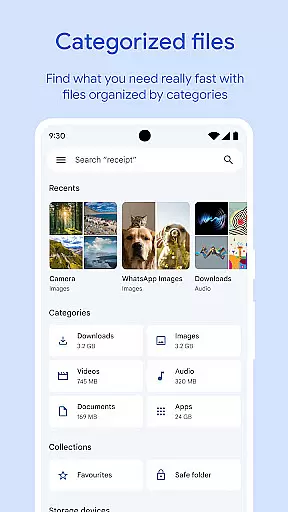
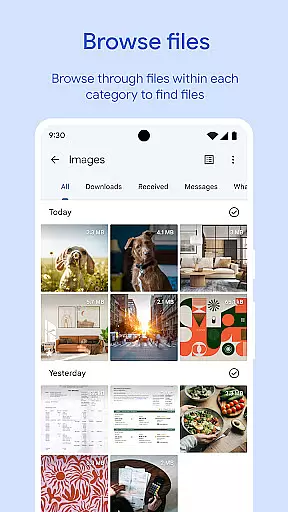
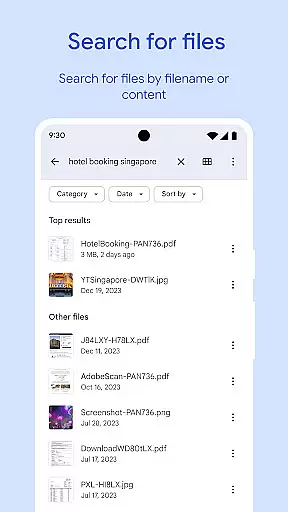
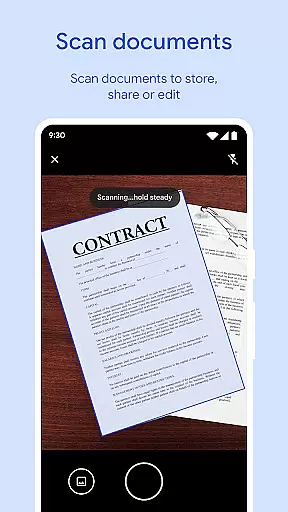
Files by Google is a powerful file management tool designed to help users efficiently organize, secure, and optimize their mobile device storage. The app provides cleaning recommendations to free up space, advanced search features for faster file discovery, and offline file-sharing capabilities through Quick Share. Additionally, it offers cloud backup options and enhanced security measures to protect sensitive files. Whether you're looking to declutter your device or securely share files with others, Files by Google delivers a seamless experience that combines functionality with user-friendly design.
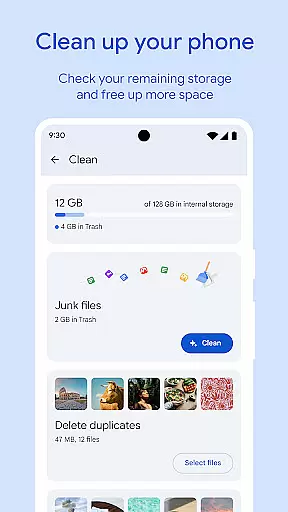
One of the standout features is its ability to analyze storage usage and recommend actions such as removing duplicate files, clearing cached data, and deleting old media. This ensures your device remains optimized without compromising important content. Furthermore, the app supports playback of offline media with customizable controls, making it versatile for both productivity and entertainment purposes.
Files by Google stands out due to its comprehensive suite of tools tailored for efficient file management. Its cleaning recommendations provide detailed insights into storage usage, identifying unnecessary files like duplicates, cached data, and large unused apps. These suggestions empower users to make informed decisions about which files to delete, ensuring maximum free space while preserving essential data.
The app's search functionality allows users to locate specific files quickly, whether they're photos, videos, documents, or GIFs. Sorting options enable further refinement based on file size or type, helping users understand what consumes the most space. Another notable feature is Quick Share, which facilitates fast and secure offline file transfers at speeds up to 480 Mbps. End-to-end encryption ensures privacy during these transfers, adding an extra layer of security.
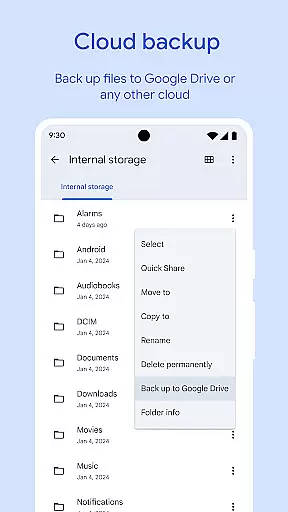
For added convenience, Files by Google includes robust backup solutions, allowing users to store files in Google Drive or other cloud services. It also offers advanced media playback controls and smart recommendations that improve over time, enhancing overall usability. With its lightweight footprint (under 20 MB), the app minimizes its impact on system resources while delivering exceptional performance.
Files by Google delivers exceptional accuracy and effectiveness in its core functions, ensuring users can manage their device storage efficiently. The app provides precise recommendations for freeing up space by identifying old photos, duplicate files, and cache data that are safe to remove.
Its search functionality allows users to quickly locate specific files, such as photos, videos, or documents, with intuitive browsing options. Sorting capabilities enable users to understand which files consume the most space, empowering them to make informed decisions about managing their storage.
The app's offline file-sharing feature, Quick Share, operates at high speeds of up to 480 Mbps, even without an internet connection. This ensures fast and reliable transfers between Android devices and Chromebooks while maintaining privacy through end-to-end encryption.
By using less than 20 MB of device storage and offering smart recommendations that improve over time, Files by Google proves to be both efficient and effective, enhancing the overall user experience without unnecessary resource consumption.
Files by Google excels in providing a simple and intuitive interface that makes file management accessible to users of all technical backgrounds. Its clean design prioritizes ease of use, allowing users to navigate effortlessly through different file categories such as photos, videos, and documents.
The app eliminates clutter by presenting essential features like storage analysis, cleaning recommendations, and file sorting options in a straightforward manner. Users can easily understand how much space is available on their device, SD card, or USB drive, making it simpler to manage files effectively.
Quick Share enhances the user experience further by enabling seamless offline file transfers with just a few taps. The absence of ads and the appu2019s lightweight natureu2014consuming under 20 MB of storageu2014ensure a smooth and distraction-free interaction.
Additionally, advanced playback controls for offline media, including shuffle and speed adjustments, demonstrate the app's commitment to delivering an intuitive and enjoyable experience for managing and consuming digital content.
User-friendly interface
Efficient storage optimization
Secure file sharing
Advanced media controls
Smart recommendations
Limited third-party integrations
No desktop version available
Occasional bugs reported
Requires Google account
Offline mode has limitations

Connect instantly to a fast, encrypted VPN with one tap
 4.60
4.60
Head tracking for PC sim games such as MSFS 2024 or Elite:Dangerous. No headset!
4.50
WiFi Signal Strength Meter help you detect WiFi Signal Strength in real time.
4.80
With videos, electrical calculators, and built-in ebook, Ugly’s has your answer.
4.50
Powerful collection of electronics tools and reference.A must for any enthusiast
4.90
Remote Play with FSR upscaling, low latency & full controller support
4.80
Creation, Learning, Entertainment & More — The All-in-One AI Search Engine
4.70
Protect your device with antivirus, storage cleanup, and system monitoring
4.70
Fast VPN USA for any country. Super secure VPN for calls, streaming, games, TV.
4.40
Change your GPS location instantly. Simulate routes anywhere in the world.
4.90
Navigate with Ease and Style
4.90
Bedrock Together: Join any bedrock server on Xbox/PS
4.80
Learn the vast amount of system information about device and monitor it's state
4.70
Fluid navigation gestures for all of us!
4.30
App that Recover your pictures, videos or files after you delete them.
4.20
An open-source APK explorer for Android!
4.10
Create your own live wallpaper or check out thousands already made presets
3.90
A powerful, easy-to-use flight computer on your phone or tablet!
3.80
Fun lie-detection pranks for friends and parties.
3.80


User Reviews