
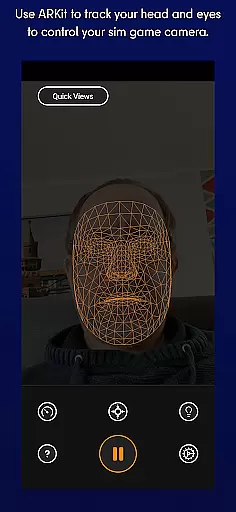
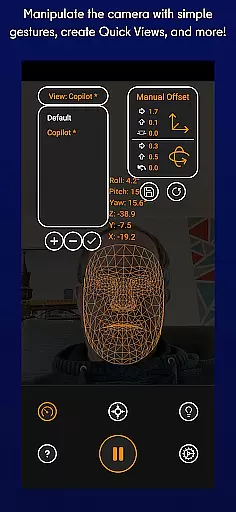
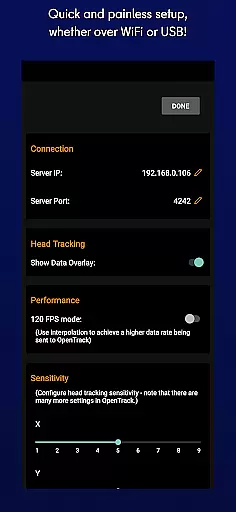
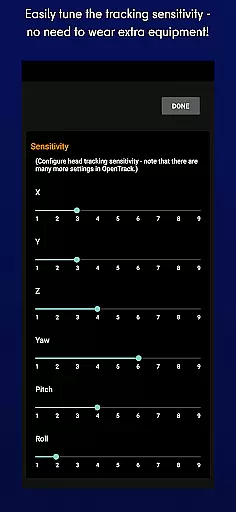
SmoothTrack is an innovative tool that transforms your mobile device into a 3D head tracking controller for sim games. By leveraging the AR capabilities of your device, it allows you to intuitively control your game's camera without any additional equipment. Simply position your device to see your face, and with slight head movements, you can seamlessly adjust your in-game perspective.
The app supports any game compatible with TrackIR, FreeTrack, or similar protocols, making it versatile for flight simulators, space exploration games, and truck simulators. Whether you want to lean forward to inspect your Flight Simulator cockpit or shift your head slightly to view the space station in Elite: Dangerous, SmoothTrack enhances immersion by translating your natural head motions into dynamic in-game camera movements.
Designed for convenience, SmoothTrack includes features like dark mode to preserve battery life and OLED screens, as well as bright mode for gaming in low-light environments. With its intuitive design and compatibility with numerous simulation games, SmoothTrack offers a near-magical experience for gamers seeking enhanced realism and control.
SmoothTrack stands out with its advanced AR-based head tracking technology, which eliminates the need for extra hardware like headsets. The app uses your device's camera to detect facial movements, allowing for precise and responsive in-game camera control. This feature is particularly beneficial for simulation games where spatial awareness is crucial.
One of the key highlights is the exaggerated head movement translation, enabling users to achieve wide-ranging perspectives with minimal physical motion. For instance, leaning slightly to the left lets you peek out of a cockpit window. Additionally, SmoothTrack provides customization options such as dark and bright modes, catering to different gaming environments and preferences.
Compatibility is another major advantage, supporting a wide array of games including Microsoft Flight Simulator, Elite: Dangerous, and Euro Truck Simulator 2. The app also offers reliable customer support through Discord and email, ensuring users can get help or suggest new features. These comprehensive features make SmoothTrack a top choice for enhancing simulation gaming experiences.
SmoothTrack delivers precise 3D head tracking functionality, revolutionizing how users interact with simulation games. The app leverages the AR capabilities of your device to ensure accurate detection of even the slightest head movements.
This level of precision allows gamers to control their in-game camera intuitively. Whether it's leaning forward to inspect a cockpit or tilting your head slightly to view different angles, SmoothTrack translates these motions seamlessly into the virtual environment.
The effectiveness of this tool is evident in its compatibility with a wide range of sim games that support TrackIR. This includes popular titles like Microsoft Flight Simulator and Elite: Dangerous, making it an invaluable asset for simulation enthusiasts.
By magnifying real-world movements, the app enables immersive experiences without the need for additional equipment. Users can enjoy enhanced gameplay while benefiting from the app's responsive tracking system.
SmoothTrack boasts an interface designed for simplicity and ease of use. Upon launching the app, users are greeted with straightforward setup instructions that guide them through positioning their device to capture facial movements effectively.
The intuitive design eliminates the need for complex configurations or extra hardware. Gamers can start using the app immediately by simply ensuring their device's camera has a clear view of their face.
Additional features such as dark mode and bright mode can be toggled effortlessly, catering to different lighting conditions during gameplay sessions. These options not only enhance usability but also help conserve battery life on OLED screens.
With dedicated support available via Discord and email, any queries or feature requests are promptly addressed, reinforcing the user-friendly nature of SmoothTrack's interface.
Intuitive controls
No extra hardware
Wide game support
Battery-saving modes
Responsive tracking
Requires good lighting
Device positioning
Limited to compatible games
Dependent on camera quality
Learning curve

PDF Reader - Document Viewer: Read, Manage & Organize Your Documents
 3.10
3.10
1-Click close all background apps on Android TV
3.90
Enjoy smooth gameplay with Game Booster
4.90
Small and simple app to Verify Root Access and BusyBox Install!
4.70
Create your own live wallpaper or check out thousands already made presets
3.90
Unleash gamepad precision for ultimate mobile gaming dominance.
3.90
Bedrock Together: Join any bedrock server on Xbox/PS
4.80
The Ultimate Bluetooth Keyboard & Mouse. Securely control your PC, Mac, and more
4.50
A clean app.
4.50
Navigate with Ease and Style
4.90
Extremely fast, secure, and protects your privacy
4.80
ADB support Android 4.X-Android 13(Support wireless pair mode).No root required!
4.70
Canon PRINT is a companion app for your Canon printer.
4.60
Planner and Tracker for Stardew Valley
4.60
Quickly check the frequency of the Earth
4.30
A simple app to back up and restore SMS & MMS messages and call logs.
4.10
Introducing Smart Printer, your ultimate destination for printing solutions!
4.00
A powerful, easy-to-use flight computer on your phone or tablet!
3.80
A non-root local ADB shell client. READ BELOW!
3.40


User Reviews