
BedrockTogether (Pro) is an innovative networking tool designed to simplify server connections for Minecraft Bedrock Edition players. This ad-free version allows any Bedrock Edition server to appear as a LAN server on Xbox or PlayStation clients, enabling seamless connections without DNS rerouting. While Realms and Nintendo Switch compatibility aren't supported, the app provides reliable performance for other platforms.
The application's core functionality lies in its ability to facilitate direct server connections through a simple four-step process. Users can input their desired server IP and port, launch the connection through the app, and access the server via the game's Friends tab. The tool automatically handles network configurations, making it particularly useful for gaming groups that frequently play together on local networks.
This tool delivers significant value to Minecraft enthusiasts who want to create more stable and accessible multiplayer environments. By eliminating complex network setups and providing a straightforward interface, BedrockTogether (Pro) enhances the multiplayer experience while maintaining system security and stability.
BedrockTogether (Pro) distinguishes itself through several key features that enhance the Minecraft multiplayer experience. The application's primary capability is its unique server bridging technology, which creates virtual LAN connections between devices on the same network. Unlike traditional methods, this approach doesn't require complicated DNS modifications or port forwarding.
The tool offers practical advantages such as automatic network detection and configuration management. It ensures secure connections by maintaining local network boundaries while allowing authorized devices to communicate effectively. Additionally, the pro version removes advertisements, providing an uninterrupted user experience during server setup and management.
Another notable feature is its comprehensive troubleshooting support system. Through integrated community channels like Discord and Telegram, users can quickly resolve technical issues. The application also includes detailed connection instructions and maintains clear compatibility information, helping users understand its capabilities and limitations across different platforms.
BedrockTogether (Pro) delivers exceptional core functionality by enabling Bedrock Edition servers to appear as LAN servers on Xbox or PlayStation Minecraft clients. This seamless connection eliminates the need for complex DNS rerouting, making server access straightforward and efficient.
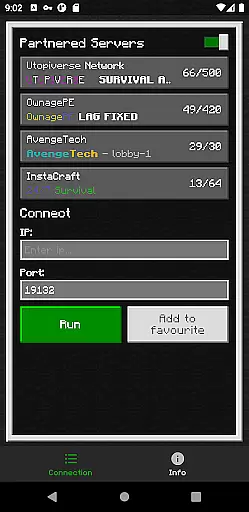
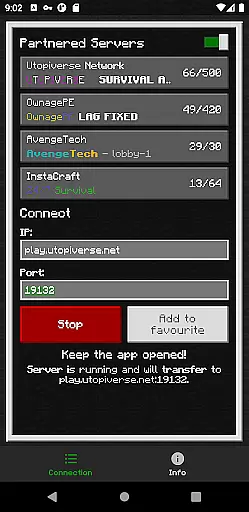
The app's primary feature allows users to input their desired server IP and port, then simply press 'Run' to initiate a connection. By following a few easy steps, players can join servers via the LAN tab in the 'Friends' section of the game. This intuitive process ensures that even those with limited technical expertise can enjoy an effortless connection experience.
For optimal performance, users must ensure their gaming console and mobile device are on the same LAN network. This requirement guarantees maximum accuracy and reliability when establishing server connections, while also maintaining stable communication between devices throughout gameplay sessions.
The effectiveness of BedrockTogether (Pro) is further enhanced by its active community support through Discord and Telegram channels. These platforms provide immediate assistance for troubleshooting and bug reporting, ensuring any potential issues are quickly addressed. The application's commitment to accuracy is also demonstrated through its clear disclaimer regarding third-party status, promoting transparency and user trust.
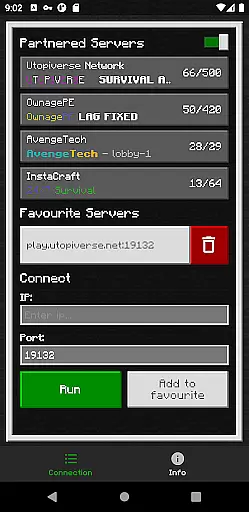
The interface design of BedrockTogether (Pro) prioritizes simplicity and intuitive operation, making it accessible even for novice users. The main screen presents only essential elements - server IP and port fields, alongside a prominent 'Run' button, streamlining the entire connection process.
By eliminating unnecessary features and focusing on core functionality, the application reduces cognitive load and minimizes potential user errors. The straightforward input method requires just two pieces of information before initiating the connection process, significantly lowering the barrier to entry for new users.
Visual clarity is maintained through a clean layout that guides users naturally through the required steps. After launching the app and entering connection details, users can seamlessly transition to their gaming console, where they'll find the server readily available in the 'Friends' tab under the LAN section. This logical flow demonstrates thoughtful consideration of user experience.
Additional helpful information, including troubleshooting tips and community support links, is presented without cluttering the main interface. The app maintains an uncluttered workspace while still providing access to necessary resources, striking an effective balance between minimalism and functionality. This approach ensures users can focus on their primary goal - connecting to their desired server - without distraction.
Seamless LAN integration
User-friendly interface
Ad-free experience
Reliable connection stability
Active community support
No Nintendo Switch support
Limited to local networks
Manual setup required
Third-party application
No official Mojang endorsement

 4.50
4.50
A recovery soft,it features photo recovery, video recovery, file recovery.
3.40
FV File Manager Pro, Fast and powerful file manager for Android
4.60
Safely recover deleted photos, videos, and files with a single easy tap.
3.70
App to pay for FUTO Keyboard
4.60
Best leveling tool for your Android device. Hang paintings like a pro.
4.90
Quickly check the frequency of the Earth
4.30
Mirror your screen to Fire TV - Super fast and simple
4.40
NFC Tools can read and write NFC tags.
4.70
WiFi Signal Strength Meter help you detect WiFi Signal Strength in real time.
4.80
Unit and currency converter with easy and simple UI.
4.80
Remote Play with FSR upscaling, low latency & full controller support
4.80
Fast Video Downloader, Movie Downloader, Torrent Downloader & Adblock Browser
4.70 4.50
4.50
Pro Emulator is an easy to use game console emulator for a range of consoles.
4.40
pdf merge, word to pdf, jpg to pdf, edit pdf, convert to pdf and much more!
4.20
MS-DOS in your pocket. Play old DOS games anywhere you are ;)
4.10
View detailed information about your Nissan Leaf the dealer never shows you.
4.10
Create your own live wallpaper or check out thousands already made presets
3.90


User Reviews