
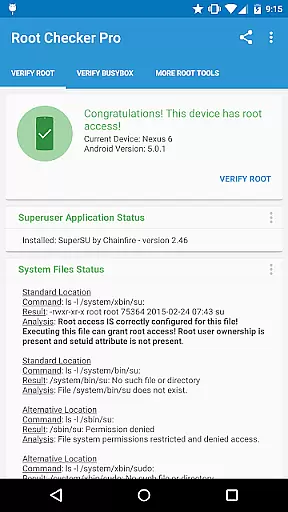
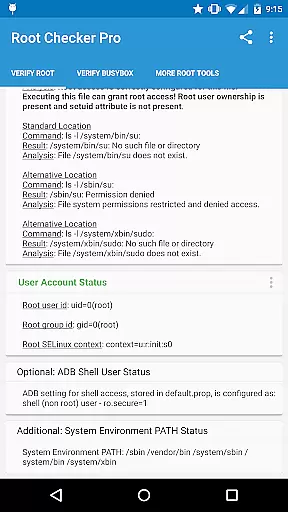
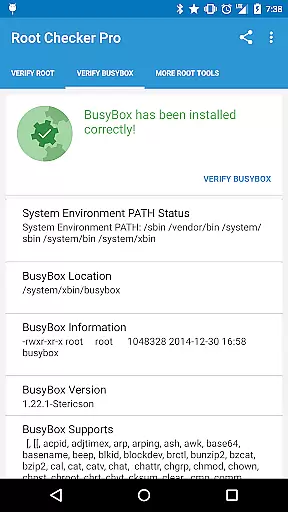
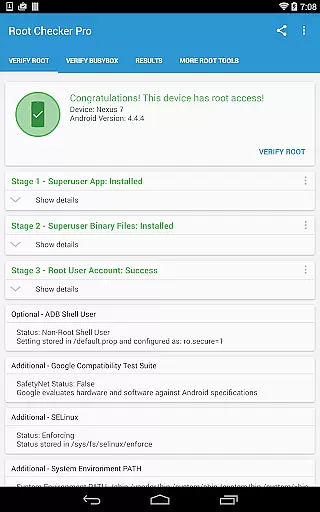
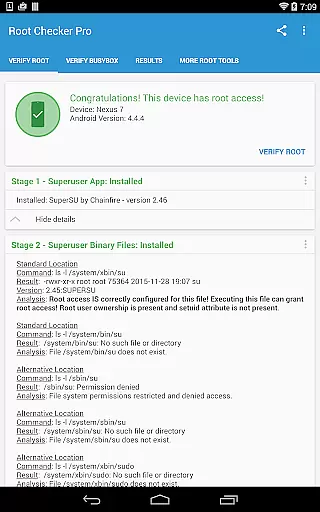
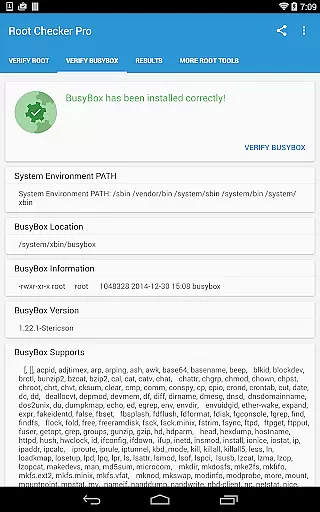
Root Checker Pro is a powerful Android tool designed to verify root access on your device. The app checks for proper root (superuser) permissions and BusyBox installation, providing detailed diagnostic information for troubleshooting. It displays critical data such as su binary locations, file permissions, SELinux status, and Superuser application details.
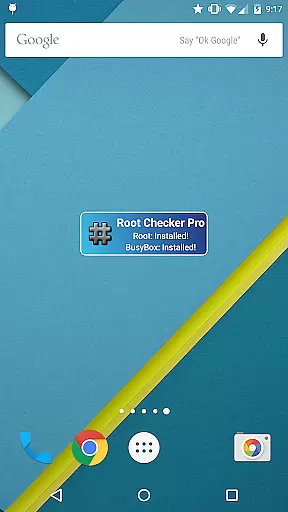
The application caters to both novice and advanced users by presenting essential root information in an easy-to-understand format while also providing technical details for experts. Its intuitive interface allows users to quickly export diagnostic reports via email or social media platforms. The included widget enables continuous monitoring of root and BusyBox status, making it an essential utility for rooted devices.
Root Checker Pro offers comprehensive features for verifying root access and BusyBox installation. The app checks all standard su binary locations, verifies file permissions, and examines SELinux contexts. It detects installed Superuser applications and their versions while also analyzing the default adb shell user mode.
Advanced users will appreciate the detailed technical information provided about their root installation. The app generates complete diagnostic reports that can be easily shared via email or social media for troubleshooting purposes. The companion widget provides real-time monitoring of root and BusyBox status with customizable check intervals, ensuring users stay informed about their device's root condition.
Root Checker Pro delivers exceptional accuracy in verifying root access on Android devices. The application meticulously checks the presence and status of the su binary, which is critical for granting root permissions.
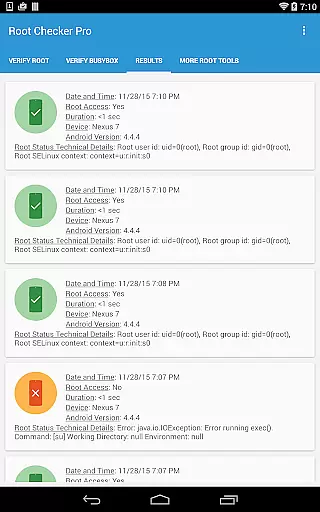
The tool examines standard su binary locations, ensuring that the necessary files are correctly installed with appropriate permissions. This verification process extends to analyzing root uid/gid (user id/group id) and SELinux context results, providing a comprehensive overview of the device's root status.
For users experiencing issues with their root access, the app offers detailed diagnostic information. It presents data on Superuser application installations, versions, and adb shell default user modes, enabling effective troubleshooting.
This level of detail ensures that even the most technically advanced users can rely on Root Checker Pro for precise root access verification. The app's effectiveness lies in its ability to quickly summarize complex system information into an easily understandable format.
Root Checker Pro features an intuitive interface that makes root verification accessible to all users, regardless of technical expertise. The main functionality is presented through a straightforward layout, allowing users to perform root checks with a single tap.
The application's design emphasizes simplicity without compromising on essential features. Key information is clearly displayed, including BusyBox installation status and root access details, making it easy for users to interpret the results.
A convenient widget accompanies the app, offering real-time monitoring of root and BusyBox status. This feature provides at-a-glance information about the device's root condition, updating at user-defined intervals.
The interface also includes simple sharing options, enabling users to export detailed technical information via email or other communication apps. This functionality facilitates collaboration and support when resolving root-related issues, maintaining an optimal balance between advanced features and user-friendly design.
Quick root verification
Detailed diagnostics
Easy report sharing
Comprehensive BusyBox check
Convenient status widget
No rooting capability
Advanced details only
Paid version only
Technical knowledge required
Limited functionality without root

 4.10
4.10
Quickly switch to an encrypted DNS server on Android TV
4.50
A recovery soft,it features photo recovery, video recovery, file recovery.
3.40
Complete kernel toolbox with features to manage and tweak your rooted device
4.30
Unlock your Essential Key. Create custom shortcuts to your favorite apps!
4.0
VESC Tool can monitor and configure VESC-compatible devices over BLE and Wifi
4.20
Detect hidden spy camera with advanced scanning {{ Premium version }}
4.00
Connect wirelessly to your computer to watch movies, browse the web, play games
5.00
Create your own custom widget with endless possibilities
3.90
ADB support Android 4.X-Android 13(Support wireless pair mode).No root required!
4.70
NFC Tools can read and write NFC tags.
4.70
HD Video player and downloader for all formats, fast & smooth 4K video playback.
4.60 4.50
4.50
Mirror your screen to Fire TV - Super fast and simple
4.40
Just one-tap to easy translate in any language after calls within seconds.
4.20
App that Recover your pictures, videos or files after you delete them.
4.20
Quickly & easily calculate the spacing of handrail balusters
4.20
View detailed information about your Nissan Leaf the dealer never shows you.
4.10
Transfer Files, APK from Phone to Watch & Install.
4.1


User Reviews