
The Everything Key is a powerful utility tool designed to unlock the hidden potential of your device's hardware button. With this app, you can remap your phone's special button to perform various actions, significantly boosting your productivity.
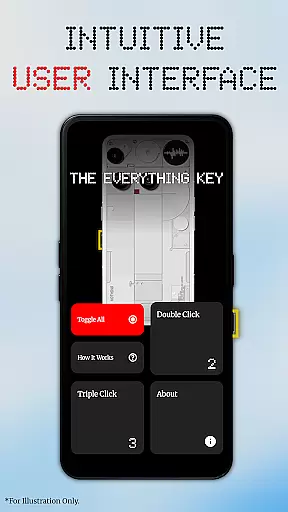
Through an intuitive and minimalist user interface, inspired by the Nothing aesthetic, users can easily assign specific apps to both double-press and triple-press actions. This allows for quick access to frequently used applications such as the camera or messaging apps. The app also offers advanced control features, enabling users to enable, disable, or un-map actions with ease.
This app is perfect for users looking to personalize their device experience without the need for rooting or complex configurations. It works seamlessly with standard Android features, ensuring a smooth and integrated experience.
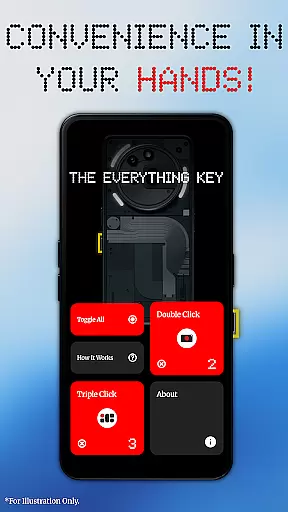
The Everything Key stands out with its powerful remapping capabilities. Users can assign any app to both double-press and triple-press actions, providing unparalleled customization options. The app's intuitive UI ensures that users can easily manage their mappings, with clear indicators showing which apps are active.
Advanced control features allow users to quickly toggle actions on or off, and even un-map apps with a simple tap on the 'X' icon. The 'Toggle All' feature provides the convenience of activating or deactivating all mappings at once, streamlining the user experience.
Privacy and security are top priorities for The Everything Key. Using Android's Accessibility Service, the app detects hardware key presses without accessing any on-screen content, passwords, or personal information. This commitment to privacy ensures that users can trust the app with their device's essential functions.
The Everything Key excels in providing precise and effective core functionality by enabling users to remap their device's hardware button. This app leverages Android's Accessibility Service to accurately detect specific hardware key presses, ensuring that each double or triple press triggers the intended action without fail.
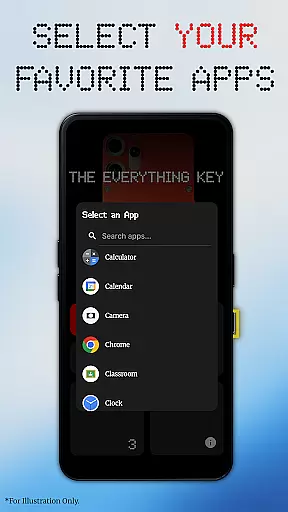
With a focus on speed and personalization, the app allows for both simple and advanced control options. Users can assign favorite apps to specific button actions and easily toggle these mappings on or off through an intuitive interface. The minimalist design not only offers aesthetic appeal but also enhances usability, making it straightforward to manage which apps are linked to the button presses.
This remapping tool stands out due to its no-root requirement, working seamlessly with standard Android features right out of the box. By eliminating complex setup processes such as ADB commands or rooting, The Everything Key ensures that all users can benefit from enhanced productivity without technical barriers.
Simplicity and intuitiveness define The Everything Key's user interface, which is crafted to offer a seamless experience. Inspired by the Nothing aesthetic, this app presents a clean layout where mapped applications are visually represented, allowing users at a glance to see their configurations and whether they're active.
Advanced controls like quick enable/disable for individual app mappings and a 'Toggle All' feature demonstrate how an uncluttered design can still provide powerful functionality. Each element within the UI serves a clear purpose, ensuring that even those unfamiliar with customization tools will find it easy to navigate and modify settings according to personal preferences.
Upon first launch, personalized setup assistance guides users through selecting their device model and color, integrating beautifully into the systemu2019s look while maintaining operational clarity. This attention to detail in both visual presentation and practical operation underscores The Everything Key's commitment to delivering an engaging yet efficient user experience.
Highly customizable
User-friendly interface
No root required
Quick access to favorite apps
Privacy-focused design
Limited to specific devices
Requires accessibility permissions
Not affiliated with device manufacturers
May not support all apps
Device-specific background only

Easily install aab(Android App Bundle) files on your Android device with our app
 4.80
4.80
Quickly switch to an encrypted DNS server on Android TV
4.50
Complete kernel toolbox with features to manage and tweak your rooted device
4.30
Save any video in HD - paste the link, download fast and watch offline.
4.3
Enjoy smooth gameplay with Game Booster
4.90
VESC Tool can monitor and configure VESC-compatible devices over BLE and Wifi
4.20
Clean up large files and similar photos, fast and easy to use
4.40
Mobile Security with Scam Protection | Malware & Virus Cleaner | Safe Browser
4.70
Enhance your Beats
3.70
Best leveling tool for your Android device. Hang paintings like a pro.
4.90
Change your GPS location instantly. Simulate routes anywhere in the world.
4.90
Navigate with Ease and Style
4.90
Canon PRINT is a companion app for your Canon printer.
4.60
Planner and Tracker for Stardew Valley
4.60
Use your phone as a webcam on your computer over WiFi or USB.
4.40
Effortlessly run ADB commands directly on your device without a PC.
4.20
Amateur Radio app for APRS: Track friends, exchange messages, get tactical info.
3.90
A recovery soft,it features photo recovery, video recovery, file recovery.
3.40
PDF Reader - Document Viewer: Read, Manage & Organize Your Documents
3.10


User Reviews