
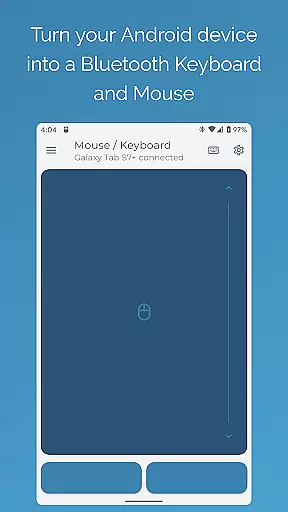
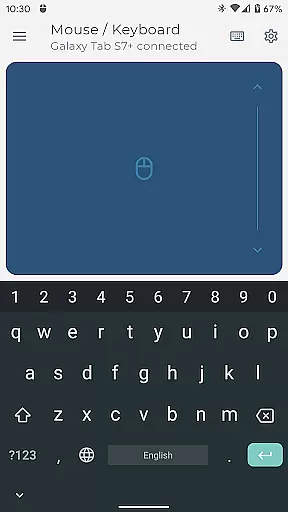

Bluetooth Keyboard & Mouse Pro revolutionizes the way you interact with your devices by turning your Android phone into a versatile remote control tool. This powerful application allows you to seamlessly operate computers, tablets, and media centers without requiring additional server software. With its direct Bluetooth connection, users experience instant response times while maintaining a private and secure environment.
The app offers an extensive toolkit including precision control features like a responsive keyboard, mouse, and multi-touch trackpad. It also provides professional-grade functionalities such as Keep-Alive mode, presenter tools, multimedia controls, and integrated scanning for QR codes and barcodes. These features make it an ideal solution for professionals who need reliable remote access during presentations or extended work sessions.
Whether you're managing a presentation, controlling media playback, or streamlining inventory tasks, Bluetooth Keyboard & Mouse Pro ensures that you stay productive and efficient. Its universal compatibility across Windows, iOS, Android, Chrome OS, and Steam Deck makes it an indispensable tool for anyone looking to elevate their workflow.
Bluetooth Keyboard & Mouse Pro stands out with its comprehensive feature set designed to enhance productivity. The app's Precision Control functionality includes a highly responsive keyboard, mouse, and multi-touch trackpad with intuitive scrolling capabilities. This ensures smooth navigation and accurate input across all connected devices.
For professionals, the app offers advanced tools such as Keep-Alive / Jiggler Mode to prevent computers from sleeping during critical tasks. The Full PC Keyboard layout supports over 100 international languages, allowing users to type efficiently in their preferred language. Additionally, Presenter Mode empowers users to command presentations confidently, navigating slides and controlling pointers with ease.
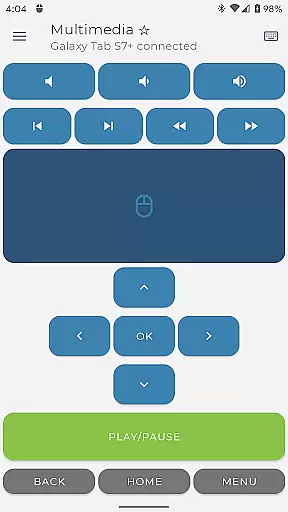
Multimedia Control simplifies managing playback and volume for various media players, while the Integrated Scanner streamlines data entry tasks. Voice & Clipboard Sync features enable quick text input through voice-to-text functionality and easy transfer of copied text between devices. Custom Layouts allow users to create personalized interfaces tailored to specific applications or games, making this app a truly customizable remote control solution.
Bluetooth Keyboard & Mouse Pro delivers exceptional precision and reliability in its core functions, making it a powerful tool for both productivity and entertainment. The app transforms your Android device into a versatile Bluetooth remote control, offering features such as a highly responsive keyboard, mouse, and multi-touch trackpad.
The direct Bluetooth connection ensures instant response without the need for additional server software, maintaining a private and secure link between devices. This seamless integration allows users to control their computers, tablets, or media centers with unparalleled versatility.
With functionalities like Keep-Alive/Jiggler Mode, Full PC Keyboard support, Presenter Mode, and Multimedia Control, the app caters to various professional needs. These features ensure that users can prevent their computers from sleeping, type efficiently, command presentations confidently, and manage media playback effortlessly.
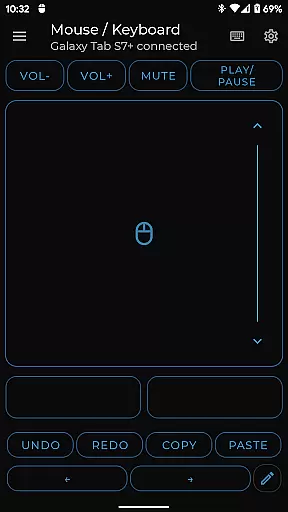
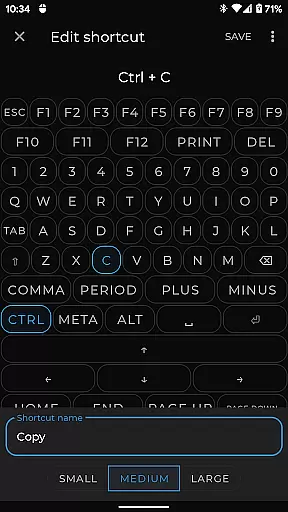
The interface of Bluetooth Keyboard & Mouse Pro is designed to be simple yet intuitive, ensuring users can easily navigate and utilize its comprehensive features without a steep learning curve. The app offers an uncluttered layout where essential tools are readily accessible, enhancing user experience through efficient design.
Users benefit from Precision Control elements including a responsive keyboard, mouse, and multi-touch trackpad with intuitive scrolling capabilities. Such thoughtful design minimizes the time required to learn the application's functionalities while maximizing operational efficiency.
Additional advanced options such as Custom Layouts allow users to tailor the interface according to specific needs, whether for specialized software, applications, or gaming environments. This flexibility ensures that both novice and experienced users find value in using Bluetooth Keyboard & Mouse Pro for their diverse computing tasks.
Instant Bluetooth connection
Extensive feature set
Universal device compatibility
Customizable user interface
Secure serverless operation
Premium features require payment
Complex setup for beginners
Limited free version functionality
Occasional connectivity issues
High system resource usage

Clean the junk files on your device
 3.40
3.40
Family Locator, Share location, StayConnect with your family in real time
3.90
Detect hidden spy camera with advanced scanning {{ Premium version }}
4.00
Monitor car performance in real time and troubleshoot malfunctions.
4.80
Mirror your screen to Chromecast and Android TV - Super fast and simple
4.60
Play your X-Box games remotely in 1080p with any controller and zero latency
4.60
Screen Mirroring with sound for Samsung TV, LG TV, Sony TV, Smart TV and Browser
4.20
Button mapper, mouse toggle, sleep timer and a lot of another features
4.50
fast and easy mp3 music downloader
4.80
Planner and Tracker for Stardew Valley
4.60 4.50
4.50
Just swipe the edge to do something!
4.40
Clean up large files and similar photos, fast and easy to use
4.40
Introducing Smart Printer, your ultimate destination for printing solutions!
4.00
1-Click close all background apps on Android TV
3.90
Safely recover deleted photos, videos, and files with a single easy tap.
3.70
Transfer Files, APK from Phone to Watch & Install.
4.1
Unlock your Essential Key. Create custom shortcuts to your favorite apps!
4.0
Save any video in HD - paste the link, download fast and watch offline.
4.0


User Reviews