
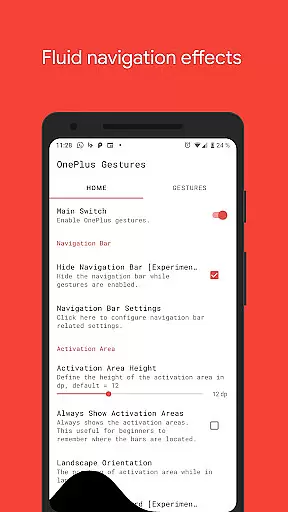
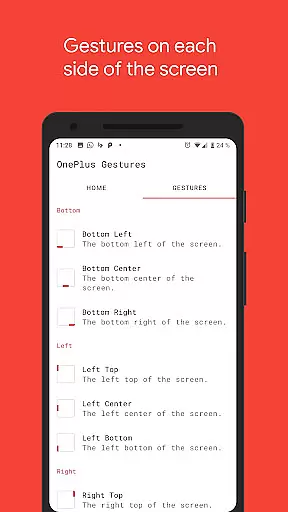
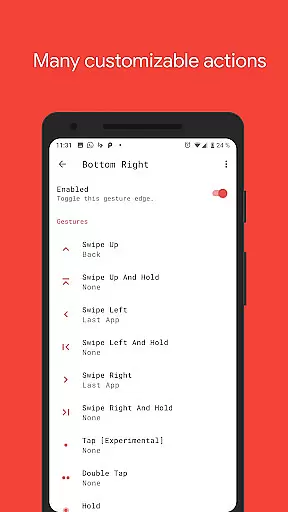
Vivid Navigation Gestures is a powerful tool that revolutionizes the way you interact with your Android device. This app allows users to control their devices through intuitive gestures rather than traditional button presses, offering a more modern and fluid user experience.
With features like beautiful visual effects during gesture execution and multiple gesture triggers across different screen areas, it provides an immersive navigation experience. The app supports various gestures including swipes, holds, taps, and double taps, each customizable to perform specific actions such as launching apps, controlling media, or managing system settings.
Ideal for users seeking enhanced productivity and a futuristic interface, Vivid Navigation Gestures eliminates the need for physical buttons and offers a seamless transition into gesture-based navigation without requiring a new device or Android version upgrade.
Vivid Navigation Gestures stands out with its comprehensive set of features designed to enhance user interaction. The app includes fluid visual effects that accompany each gesture, providing not only functionality but also an aesthetically pleasing experience.
Users can choose from multiple gesture triggers located at different points on the screen - bottom, left, right, and their respective subsections. Each trigger area supports a variety of gestures such as swipe up, swipe left, hold, and double tap, allowing for personalized control over device functions.
The app's capabilities extend to performing essential actions like launching Google Assistant, navigating back, accessing recent apps, toggling settings, and even taking screenshots. By utilizing accessibility services, it programmatically executes these actions without collecting any personal data, ensuring both utility and privacy.
Vivid Navigation Gestures offers a highly accurate and effective gesture-based navigation system that replaces traditional button presses. The app ensures precision in recognizing various gestures, such as swipes and taps, allowing users to seamlessly control their devices.
With multiple gesture triggers available across different screen areas, the app provides an extensive range of control options. This includes edge swipes, holds, and multi-directional gestures, all designed to enhance user interaction without the need for physical buttons.
The effectiveness of Vivid Navigation Gestures is further augmented by its ability to execute a variety of actions, from launching apps to controlling media playback. These features collectively contribute to a more intuitive and fluid user experience.
Users benefit from the app's integration with Android's accessibility services, enabling advanced functionalities like back navigation and quick settings toggles. This ensures that even complex tasks can be performed effortlessly through simple gestures.
The interface of Vivid Navigation Gestures is designed with simplicity and intuitiveness in mind, ensuring that users can easily adapt to gesture-based navigation. By eliminating the need for traditional navigation buttons, the app streamlines the user interface, creating a cleaner and more modern look.
Visual feedback during gesture execution enhances the intuitive nature of the app. Users receive immediate confirmation of their actions through fluid visual effects, making the navigation process both engaging and easy to follow.
Customization options allow users to tailor gesture controls to their preferences, promoting a personalized and user-friendly experience. Whether it's assigning specific actions to certain gestures or adjusting sensitivity, the app caters to individual needs.
Overall, Vivid Navigation Gestures simplifies device interaction while maintaining an intuitive approach, making it accessible for users of all technical backgrounds without compromising on functionality.
Intuitive gesture controls
Beautiful fluid effects
Highly customizable options
Wide range of supported actions
Privacy-focused design
Requires ADB or root access
Complex setup process
Limited to Android devices
Potential learning curve
No iOS compatibility

Just one-tap to easy translate in any language after calls within seconds.
 4.20
4.20
1-Click close all background apps on Android TV
3.90
Save any video in HD - paste the link, download fast and watch offline.
4.5
Quickly & easily calculate the spacing of handrail balusters
4.20
Keep track of your Palia friendships, tasks, and inventory with Palia Notebook
4.60
App to pay for FUTO Keyboard
4.60
Navigate with Ease and Style
4.90
Introducing Smart Printer, your ultimate destination for printing solutions!
4.00
Clean up large files and similar photos, fast and easy to use
4.40
Powerful collection of electronics tools and reference.A must for any enthusiast
4.90
Enjoy smooth gameplay with Game Booster
4.90 4.50
4.50
Quickly switch to an encrypted DNS server on Android TV
4.50
The Ultimate Bluetooth Keyboard & Mouse. Securely control your PC, Mac, and more
4.50
Game Booster, GFX Tool is now compatible with newer game update
4.50
PC precision for mobile gaming: dominate with keyboard and mouse!
4.30
VESC Tool can monitor and configure VESC-compatible devices over BLE and Wifi
4.20
An open-source APK explorer for Android!
4.10
This app unlocks the Pro features of the Central for DayZ app
3.60


User Reviews