



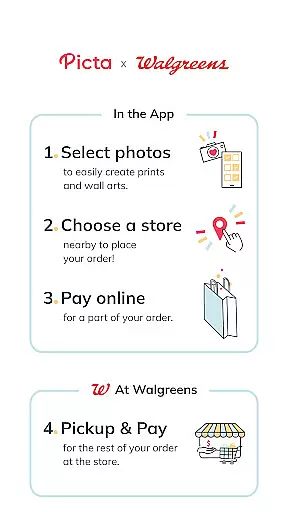
Picta is a photo printing app that allows users to print their mobile photos at Walgreens stores. With this app, you can easily select your photos, choose the print size and quantity, and pick up your prints in just one hour. Picta offers professional-quality photo printing services on Kodak paper in multiple sizes, including 4x6, 5x7, and 8x10 enlargements. You can also create personalized photo gifts such as magnets, posters, canvas, photobooks, greeting cards, and invitations.
One of the key features of Picta is its fast and safe photo transfer capability. The app organizes your mobile photos by date taken, making it easy to find and select the photos you want to print. Picta is available exclusively in the United States and is compatible with Android devices. Whether you want to print individual photos or create a photo collage, Picta provides a convenient and efficient solution for all your photo printing needs.
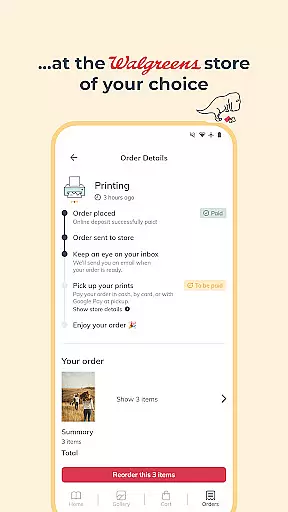
Picta offers a range of features that make photo printing quick and convenient. One notable feature is the ability to crop and zoom each picture easily within the app. This allows you to adjust the composition of your photos before printing, ensuring that you get the desired result. Additionally, Picta provides real-time order status updates, so you can track the progress of your print job and know exactly when it will be ready for pickup.
Another standout feature of Picta is its wide selection of print sizes and formats. Whether you need standard 4x6 prints, larger 8x10 enlargements, or square prints for Instagram photos, Picta has got you covered. The app also offers the option to create custom photo products such as magnets, cards, and photobooks. With Picta, you have the flexibility to choose the perfect format for your photos and unleash your creativity.
Real-time capture and preview functionality is essential for ensuring that users can accurately frame and adjust their photos before printing. The Picta app offers a seamless experience by allowing users to select images directly from their mobile devices, providing an instant preview of how these images will look when printed.
The app's interface enables users to crop and zoom each picture easily within the application, ensuring that every photo meets their exact specifications. This feature is particularly useful when ordering various print sizes, such as 4x6, 5x7, or square formats, as it allows for precise adjustments tailored to different dimensions.
By integrating real-time previews with professional-quality photo printing services, Picta ensures that customers are satisfied with their selections before finalizing their orders. This reduces the likelihood of reprints and enhances overall user satisfaction, making the process of printing photos at Walgreens both efficient and reliable.
AI beauty and enhancement features have become increasingly popular in photography apps, offering users the ability to improve their photos with natural-looking effects. While the primary focus of the Picta app is on photo printing, it incorporates elements of AI enhancement to ensure that printed images maintain a high level of quality and authenticity.
Although not explicitly detailed in the app description, AI enhancements likely play a role in optimizing image clarity and color accuracy during the editing process. Users can expect their mobile photos to be transformed into professional-quality prints, leveraging advanced algorithms to preserve the original essence of each photograph while subtly enhancing its visual appeal.
This blend of AI technology with traditional photo printing services provides a unique advantage, allowing users to turn their great moments and unforgettable memories into fabulous photo prints without compromising on naturalness. By focusing on genuine representation, Picta ensures that every printed photo reflects the true beauty captured in the original shot.
User-friendly interface
Fast and convenient photo printing
Wide selection of print sizes and formats
Real-time order status updates
Ability to create personalized photo gifts
Limited availability outside the United States
Requires access to a Walgreens store for pickup
Some advanced editing features may be lacking
Occasional delays in order processing
Compatibility limited to Android devices

How would you look like with a differently shaped nose, chin or lips?
 3.90
3.90
HD Photo gallery and photo manager to edit, hide private photos, videos & albums
4.4
Pet Camera
3.70
Cartoon and artistic effects for your photos and videos
4.70
Create AI photos & videos with Enhancer; restore, fix, beautify, enhance photos
4.50
Fit multiple photos on one post. Create carousels & scroll layouts for Instagram
4.50
Professional camera app that brings DSLR manual photography controls to Android.
4.20
Remote control the phone camera shutter from your smartwatch and take a picture
1.60
Edit photos with the picture generator: PS2 & AI Clay filters, cartoon effects.
4.50
Perfect body tune & face app - photo retouch, makeup, slim body & beautify face.
4.80
A collection of tools and reference tables for DPs, ACs, DITs and Operators.
4.70
The original Rarevision VHS look seen everywhere!
4.70
Use AI Video Generator to turn your words to ai generated videos.
4.50
Professional photography on your mobile phone
4.20
Luminar: Photo Editor - easy picture editing with AI
4.20
AI-powered video creator by MiniMax - Where ideas meet cinema
4.20
Create & Edit with AI: AI Remove, Enhance, Retouch, Filter
4.10
Be your best in every shot! Fix, edit and retouch your face in selfies & photos.
3.70
Create amazing frames with up to five photos. Rounded corners, effects and more!
3.60


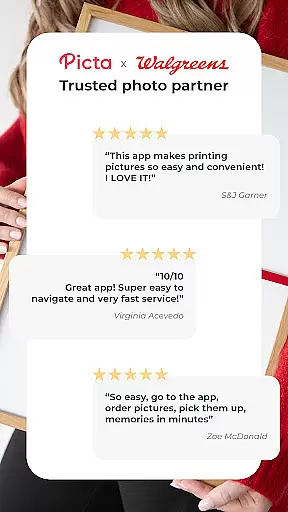
User Reviews