


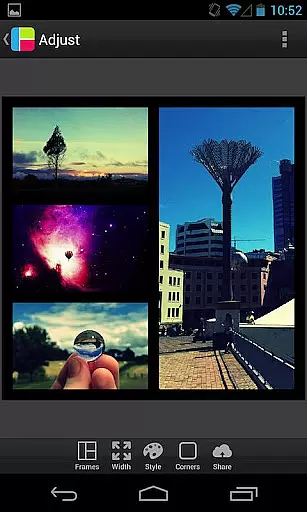
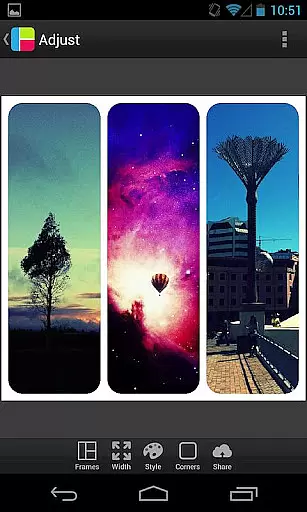

PicFrame is a versatile photography app that allows users to create stunning photo collages by combining multiple images into customizable frames. With 36 adjustable frame layouts, users can include up to five photos in a single frame, offering endless creative possibilities. The app stands out with features like rounded corners, shape customization, and an easy-to-use border color picker, ensuring each collage has a unique touch.
In addition to its core framing capabilities, PicFrame provides advanced editing tools such as brightness, contrast, and saturation adjustments for individual photos. Users can also rotate images, zoom using pinch gestures, and choose from various aspect ratios including square format. Whether you're looking to enhance your social media posts or create personalized gifts, PicFrame delivers both functionality and creativity in one intuitive package.
PicFrame offers an impressive array of features designed to maximize user creativity. One standout feature is the ability to fully customize frames by dragging inner borders, allowing for endless layout possibilities. Users can adjust not only the border width but also apply unique shapes like hearts, circles, and hexagons to their photos, making each collage truly distinctive.
The app includes 52 background patterns and a simple color picker for borders, enabling users to match their designs with any theme or mood. Advanced photo editing tools let you fine-tune each image's brightness, contrast, and saturation while maintaining precise control through rotation and zoom functions. With support for multiple output resolutions and seamless sharing to platforms like Instagram and Facebook, PicFrame ensures your creations look professional and are easily shareable.
PicFrame offers a unique real-time capture and preview feature that allows users to see their photos come together in frames as they are being captured. This immediate visualization helps in making instant adjustments to achieve the desired look.
The app provides multiple output resolutions, giving users the flexibility to choose the best quality for their needs. Whether it's for social media or personal keepsakes, PicFrame ensures that every photo frame is rendered with clarity and precision.
With an intuitive interface, users can pinch to zoom and drag to move photos within their frames. This interactive preview functionality empowers users to create perfectly balanced compositions every time they use PicFrame.
While PicFrame does not focus on AI beauty enhancements, it excels in offering adjustable photo effects that bring a natural enhancement to your images. Users can adjust the brightness, contrast, and saturation of each photo, ensuring that the final frame looks vibrant yet authentic.
The ability to change the shape of your photos to various forms like a circle, heart, or hexagon adds a creative flair to your frames without compromising the natural state of the original photos. These customization options allow for artistic expression while maintaining the integrity of your memories.
In addition, PicFrame provides 52 patterns for the frame backgrounds and an easy border color picker, which contribute to the overall enhancement of the visual appeal without artificial alterations. The result is a beautifully crafted collage that remains true to the essence of the captured moments.
User-friendly interface
Highly customizable frames
Advanced photo editing tools
Variety of background patterns
Easy sharing options
Limited to five photos per frame
No automatic enhancement feature
Some features may feel complex to beginners
Occasional performance lags
Ads can be intrusive

Photo Album Watch Face shows your favorite pictures as a Watchface.
 1.90
1.90
Long exposure camera with computational photography
2.60
Create funny photos and videos with the popular Time Warp Scan filter.
4.90
Photo editor & gallery. Crop pictures & edit photos offline, no wifi!
4.50
Collage your moments in one tap: 1000+ layouts, filters, stickers, and texts.
4.90
Easily view, share, delete photos with Gallery.
4.70
Solocator stamps photos you take with GPS location, Compass Direction, Date/Time
3.80
Discover How to Plan any Sun, Moon and Milky Way Photo You Imagine in Seconds
4.70
Your Family Calendar + Photos. Manage your Skylight Calendar and Skylight Frame.
4.40
Photo prints, cards, & gifts at Walgreens. Easy ordering & fast local pickup !
4.80
Cartoon and artistic effects for your photos and videos
4.70
Add Watermark - Sign your pictures with a text or logo. Effective, quick, easy!
4.50
HD Camera Pro with HD Video shooting, Panorama, Photo editor , Beauty Camera.
4.50
Search, tag and rate your way to an organized image gallery
4.40
Natural Beauty, Selfie Retouch
4.30
Create & Edit with AI: AI Remove, Enhance, Retouch, Filter
4.10
How would you look like with a differently shaped nose, chin or lips?
3.90
Turn photos into cartoons & avatars! - Photo Editor, Cartoon Face!
3.90
Perfect photos with body shaping, BG changer and object remover.
3.70


User Reviews