
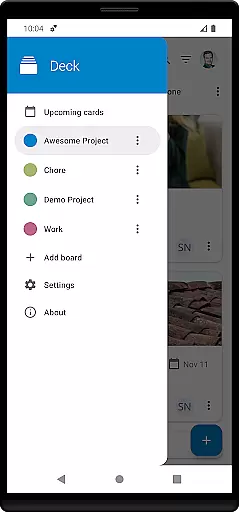
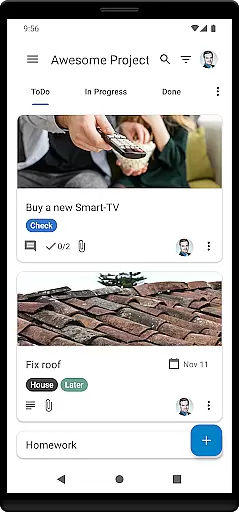
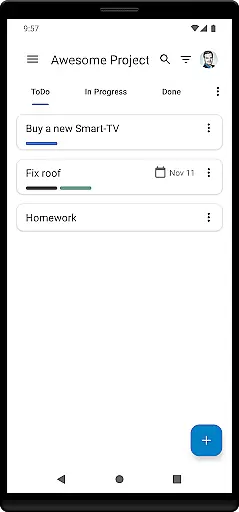
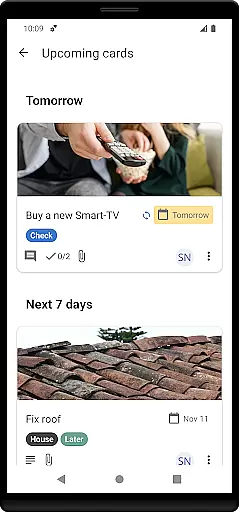
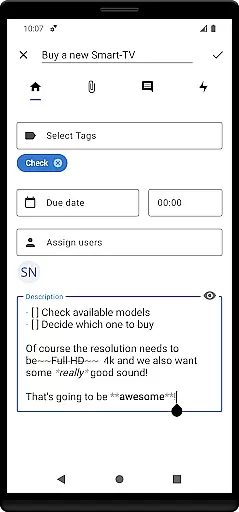
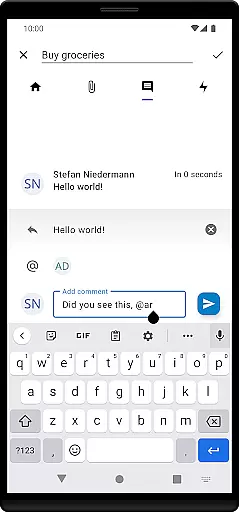
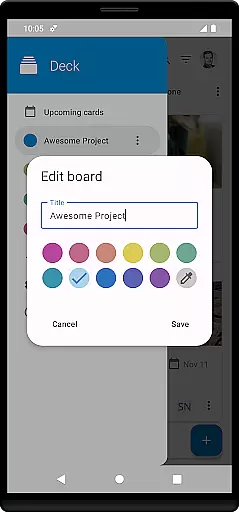

Nextcloud Deck is a productivity-focused application designed to streamline task management and team collaboration. This app allows users to create and organize tasks using cards, lists, and boards, making it an ideal tool for both personal and professional project management.
One of the standout features of Nextcloud Deck is its offline functionality, ensuring that users can manage their tasks even without an internet connection. Additionally, the app supports attachments, activities, and comments, providing a comprehensive platform for team communication and document sharing. The availability of a dark mode and multi-language support further enhances user experience across different preferences and regions.
Whether you're coordinating with a remote team or organizing personal projects, Nextcloud Deck offers a flexible and efficient solution. By integrating seamlessly with the broader Nextcloud ecosystem, it ensures data security and accessibility, empowering users to stay productive wherever they are.
Nextcloud Deck boasts a variety of features tailored to enhance productivity and collaboration. At its core, the app provides robust tools for managing cards, lists, and boards, allowing users to categorize and prioritize tasks effectively. This visual approach to task management helps teams maintain clarity and focus on their objectives.
In addition to task organization, Nextcloud Deck supports advanced functionalities such as tagging, which simplifies task categorization and retrieval. The app also facilitates seamless communication through attachments, real-time activities, and comment threads, ensuring that all team members are kept in the loop. Furthermore, the inclusion of a dark mode not only reduces eye strain but also caters to user interface preferences.
Another significant advantage of Nextcloud Deck is its compatibility with multiple accounts, enabling users to manage various projects or teams from a single interface. Coupled with extensive language translations, this feature underscores the app's commitment to accessibility and user convenience, making it a versatile choice for diverse user bases.
Nextcloud Deck offers a robust solution for managing tasks through its intuitive card, list, and board system. This structure allows users to organize their projects efficiently, ensuring that every task is accounted for and prioritized.
The app supports multiple accounts, enabling users to handle personal and professional responsibilities from a single platform. Its offline functionality ensures that productivity is not hindered by connectivity issues, allowing uninterrupted access to critical information.
With features like tags, attachments, activities, and comments, Deck provides a comprehensive toolkit for task management. These elements facilitate detailed tracking and collaboration, making it easier to monitor progress and maintain clear communication within teams.
Cross-device synchronization is a cornerstone of Nextcloud Deck's productivity enhancement capabilities. By integrating seamlessly with the Nextcloud ecosystem, the app ensures that all your devices reflect the latest updates in real-time.
This synchronization extends to various components such as cards, lists, boards, and even attachments or comments. As a result, users can transition smoothly between their desktop and mobile environments without missing a beat in their workflow.
Moreover, the reliability of this feature is bolstered by the requirement of the Nextcloud Android app, which acts as a bridge to maintain consistency across platforms. This interconnected approach guarantees that every change made is accurately mirrored, providing a dependable experience for users who rely on timely and accurate data access.
User-friendly interface
Offline capabilities
Multi-account support
Comprehensive task management
Secure data integration
Limited standalone functionality
Requires Nextcloud ecosystem
No built-in calendar view
Advanced features need technical know-how
Occasional sync issues reported

Professional calendar app for Google Calendar, MS Outlook & Exchange
 4.20
4.20
Remotely view listen control and record cameras.
3.70
aCalendar+ makes your day, week and month
4.70
ID.me Authenticator is a simple and free Two Factor Authentication solution
3.50
Create and edit presentations with Google Slides, part of Google Workspace.
4.00
Share files & memories safely. Keep your photos and videos secure.
4.40
Ultimate Virtual AI Character for immersive Roleplay Chat. Perfect Companion
3.90
Simple notepad & memo. Take notes, to-do list, shopping list with reminders.
4.80
AT&T Internet customers can use this app to personalize their Wi-Fi network.
4.40
Scan paperwork into PDF/JPG, generate your own e-signature and send fax or email
4.70
Functional QR scanner and barcode reader that requires little storage space.
4.60
Stay on top of your to-dos with Google Tasks, part of Google Workspace.
4.60
All document reader, all in one file viewer read PDF, DOCX, XLS, PPT, TXT files.
4.60
Subscribe to Webcal & .ics calendars and keep them up-to-date!
4.50
A customizable calendar for your Wear OS watch
4.20
Unlock AutoNotification
4.00
Take control of your clipboard with Clipper!
3.90
Smart PDF reader & editor to view, organize and manage PDF documents easily.
3.70
Ads Free App! Editor, Hide File, Copy, Move, Delete and Rename.. all facility av
1.70


User Reviews