

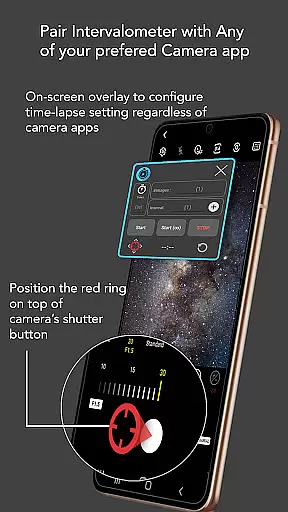
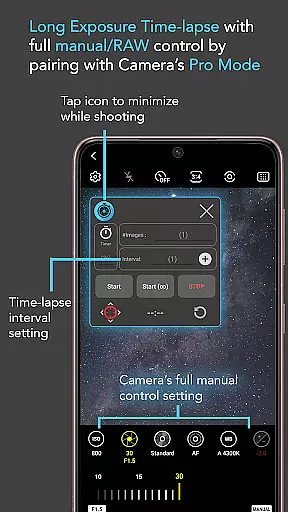
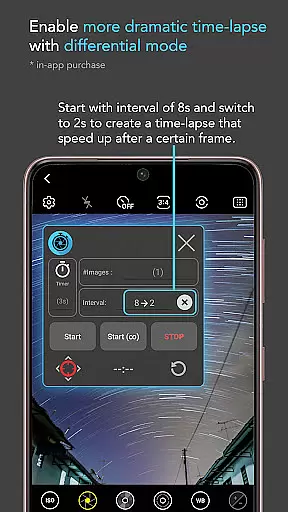
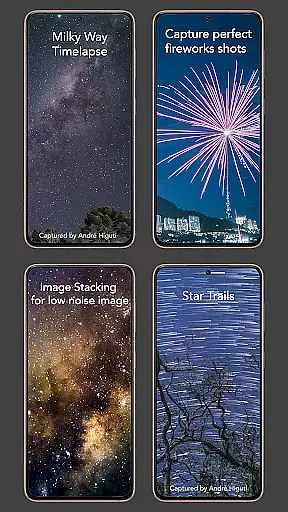
Intervalometer for TimeLapse is a powerful photography tool designed to automate the process of capturing time-lapse sequences. This app allows photographers to configure specific time intervals for triggering the camera shutter, enabling precise control over exposure settings and supporting RAW format capture. Unlike standard time-lapse modes found in most smartphones, Intervalometer works seamlessly with various camera modes including light-painting, HDR, night mode, and more.
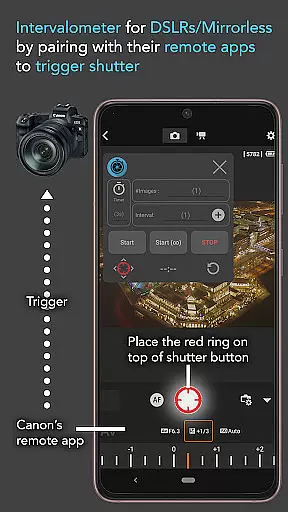
The application's versatility extends beyond smartphone cameras as it can also interface with dedicated camera remote apps from leading brands like Canon, Sony, and Nikon. This makes it an ideal solution for both amateur and professional photographers looking to create stunning low-light time-lapses, star trail sequences, or even holy grail transitions from day to night scenes. Its flexibility in configuring time-lapse parameters provides users with unlimited creative possibilities.
Whether you're capturing ultra-wide angle vistas or experimenting with long exposure effects, Intervalometer ensures consistent and automated image acquisition. Additionally, the app supports advanced techniques such as image stacking and lightning stacking, making it an indispensable tool for achieving professional-grade results through post-processing.
Intervalometer for TimeLapse offers an impressive array of features that cater to both casual and serious photographers. The app provides full control over time-lapse configurations, allowing users to set delay timers, interval times, and the number of shots. This level of customization ensures that each time-lapse sequence can be precisely tailored to the photographer's vision and environmental conditions.
One of the standout features is its compatibility with any camera app, regardless of manufacturer or model. Through the use of AccessibilityService API, the app can automate shutter triggering across different platforms, including Android 7 and above. Users can reconfigure the shutter button position to match their preferred camera interface, ensuring seamless integration with existing workflows.
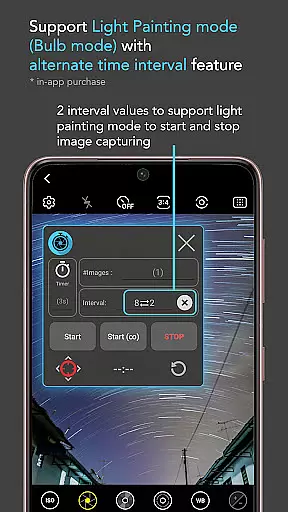
In addition to its core functionality, Intervalometer includes specialized modes such as infinite mode and bulb mode. These features expand creative possibilities by enabling extended exposure times and continuous shooting capabilities. Whether you're capturing star trails, milky way sequences, or complex light painting effects, this app provides the tools necessary to execute your artistic vision with precision and reliability.
Real-time capture and preview functionality is essential for photographers who need precise control over their time-lapse sequences. Intervalometer for TimeLapse offers this by integrating seamlessly with any camera app, allowing users to configure and trigger the shutter at specific intervals.
This app uses AccessibilityService API to automate the photo-taking process without being a camera app itself. It supports various modes including light-painting, HDR, night mode, manual settings, telephoto, or ultra-wide angle shots, providing flexibility in capturing high-quality images.
Users benefit from the ability to set exact parameters such as delay timers, interval times, and the number of shots. This ensures that each frame of the time-lapse sequence is captured exactly when needed, offering unparalleled precision in photography projects.
The app's compatibility with dedicated camera remote apps from brands like Canon, Sony, and Nikon further enhances its utility. By acting as an actual intervalometer for these devices, it allows photographers to execute complex time-lapses such as low light scenes, star trails, and holy grail transitions with ease.
While Intervalometer for TimeLapse does not focus on AI beauty enhancements, it excels in delivering natural and authentic captures through its precise control features. The app automates the triggering of the camera shutter but leaves image processing to other specialized applications.
Photographers can use this tool to create stunning time-lapses that maintain the original quality and authenticity of their subjects. Whether capturing long exposure sequences, milky way shots, or holy grail transitions from day to night, the emphasis remains on genuine representation rather than artificial enhancement.
For those interested in post-processing techniques such as image stacking, star trails, or lightning effects, Intervalometer provides the foundational frames needed for these processes. Its role is crucial in ensuring that each shot is consistent and correctly timed, which is vital for achieving professional results during editing.
By focusing on accurate time-lapse configurations and working harmoniously with different camera modes, Intervalometer ensures that every photograph retains its intended natural beauty without relying on AI-driven alterations.
User-friendly interface
Wide camera compatibility
Precise time-lapse control
Supports advanced techniques
Works with dedicated cameras
Requires careful setup
May need device restart
Limited to photo automation
No built-in editing tools
Depends on other camera apps

What celebrity do you look like? Celebs will find your celebrity match!
 4.10
4.10
All-in-One Editor & AI Photo Enhancer, Collage, Cartoonify, Funny Stickers & BGS
4.10
Natural Beauty, Selfie Retouch
4.30
Photo editor: AI filters, photo enhancer, pic collage maker, AI art generator.
4.80
Automatically backup your photos and videos to computer, NAS and Cloud services
4.60
Photo editor & gallery. Crop pictures & edit photos offline, no wifi!
4.50
Remote control the phone camera shutter from your smartwatch and take a picture
1.60
Discover & download millions of art for The Frame TV or Hisense CanvasTV
4.60
Try an anime version, cartoon yourself, and generate AI hug or aging videos!
3.70
Transform photos into videos! Create realistic or anime-style images easily!
4.50
Professional photography on your mobile phone
4.20
Create & Edit with AI: AI Remove, Enhance, Retouch, Filter
4.10
How would you look like with a differently shaped nose, chin or lips?
3.90
Hair color changer, AI haircut app, fun hair editor and buzz cut filter for all!
3.80
Perfect photos with body shaping, BG changer and object remover.
3.70
Be your best in every shot! Fix, edit and retouch your face in selfies & photos.
3.70
Create amazing frames with up to five photos. Rounded corners, effects and more!
3.60
GCamera allows all GCam features on all phone models! Better photos with GCamera
3.30
Long exposure camera with computational photography
2.60


User Reviews