
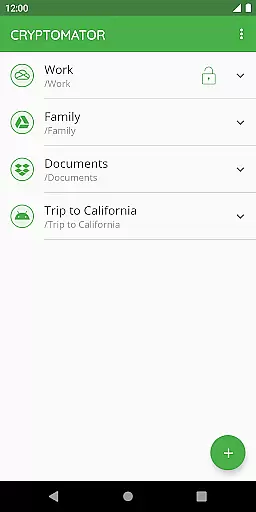
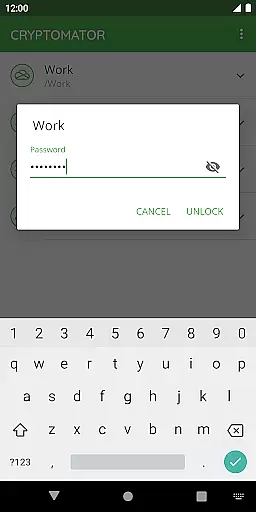
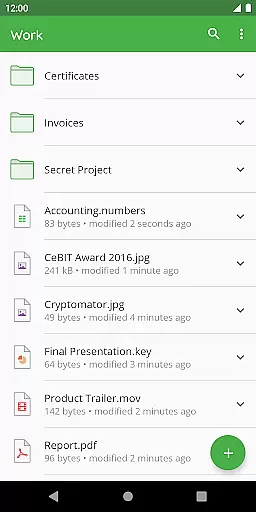
Cryptomator is a user-friendly encryption tool designed to secure your cloud-stored data. This productivity app allows you to create secure vaults, protecting your files with robust AES-256 encryption. Simply set a password and manage your data independently without needing additional accounts or complex configurations.
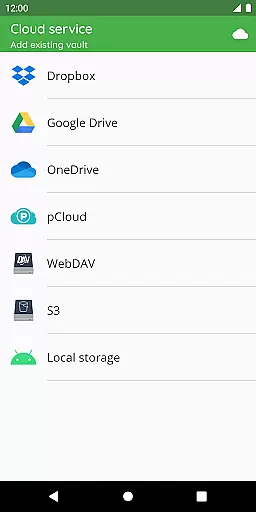
Compatible with major cloud services like Dropbox, Google Drive, and OneDrive, Cryptomator ensures cross-platform accessibility. Whether on mobile or desktop, users can conveniently access their encrypted files. The app also supports Android's local storage, making it versatile for various use cases.
Security is at the core of Cryptomator's design. With features like automatic vault locking and open-source transparency, users maintain full control over their data. Its award-winning technology has earned recognition, including the CeBIT Innovation Award 2016, making it a trusted choice for safeguarding digital privacy.
Cryptomator stands out with its advanced yet accessible security features. The app employs AES-256 encryption for file contents and filenames, ensuring comprehensive protection. Additionally, the use of scrypt enhances resistance against brute-force attacks, securing your vault password effectively.
One of the key highlights is its seamless integration with popular cloud services. Users can encrypt files locally before uploading them to platforms like Dropbox or Google Drive. The app also supports WebDAV-based storage, providing flexibility for different workflows. Furthermore, Cryptomator's open-source nature allows tech-savvy users to verify its cryptographic implementations.
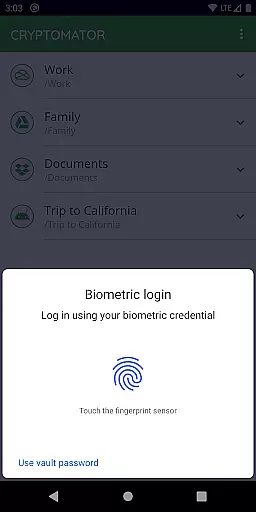
Usability is another strong suit of Cryptomator. Features such as fingerprint unlocking simplify access while maintaining high-security standards. Automatic locking upon minimizing the app adds an extra layer of safety. These thoughtful functionalities make Cryptomator an ideal solution for individuals seeking both security and convenience in managing their digital assets.
In the realm of productivity, managing tasks efficiently is paramount. Cryptomator excels by not just offering a tool for securing your data but also streamlining how you handle information across various platforms. Its seamless integration with cloud services like Dropbox and Google Drive means that task management isn't just about keeping things organizedu2014it's about keeping them accessible and secure wherever you are.
The application simplifies task oversight through its intuitive vault system. By creating a vault and assigning a password, users can compartmentalize different projects or aspects of their digital life. This separation ensures that task management within Cryptomator doesn't interfere with the security of your files, allowing for an organized yet protected environment.
Moreover, Cryptomator enhances productivity by ensuring that all your devices can access these managed tasks without hassle. Whether you're switching from your computer to your mobile device, the transition is smooth, maintaining both the security of your data and the continuity of your workflow. This cross-device functionality underscores Cryptomator's commitment to not only safeguarding your information but also optimizing how you interact with it daily.
Cross-device synchronization is a critical feature for any productivity tool in todayu2019s fast-paced world, and Cryptomator stands out by providing reliable and secure synchronization across all your devices. With compatibility ranging from Androidu2019s local storage to popular cloud services such as OneDrive and WebDAV-based storages, Cryptomator ensures that your files are not only securely encrypted but also consistently available wherever you need them.
This reliability stems from Cryptomator's open-source nature, which allows anyone to inspect the code, ensuring there are no backdoors or vulnerabilities that could compromise your data during synchronization. The use of AES encryption with 256-bit key length guarantees top-notch security, while scrypt enhances brute-force resistance, making sure that your synchronized data remains impervious to unauthorized access.
Furthermore, Cryptomator automatically locks vaults after the app is sent to the background, adding another layer of security during the synchronization process. This feature reassures users that their data stays protected even as it moves between devices. Such meticulous attention to security details makes Cryptomator a trustworthy companion for anyone looking to maintain a seamless and secure workflow across multiple platforms.
Strong AES-256 encryption
Easy-to-use interface
Open-source transparency
Cross-platform support
Automatic vault locking
No built-in cloud sync
Limited free features
Fingerprint setup complexity
Requires manual updates
Premium pricing model

A customizable calendar for your Wear OS watch
 4.20
4.20
Native client for Forgejo and Gitea
5.00
Total remote control for your Android device, PC and cloud services (IFTTT)!
4.20
Planet Free VPN - The best Fast Unlimited and Secure VPN Without Logs
4.50
Smart PDF reader & editor to view, organize and manage PDF documents easily.
3.70
Cloud storage, automatic phone backup, and more.
4.10
To do list widget with a notebook organizer, checklist, simple shopping list
4.60
Secure your apps with lock screens, use custom themes and different features.
4.40
Lightweight PDF, Word, Excel reader.
4.60
QuickBooks Workforce lets teams view pay info and track time in one place.
4.70
Direct Chat without saving contacts & Dual WA Account on Single Device
4.70
Scan paperwork into PDF/JPG, generate your own e-signature and send fax or email
4.70
The Pro Version of Android's tiniest Notepad app. Just 0.3MB but feature-packed!
4.60
Translate text/voice/photos in 150+ languages. Offline & fast translator app.
4.50 4.20
4.20
Activate Two Factor Authentication (2FA or Multi OTP), Password manager and more
4.10
Take control of your clipboard with Clipper!
3.90
The upgraded version of Name Wheel with AI and the power to add your own wheels.
4.3
A simple, portable logger for POTA, SOTA, Field Day, and more
4.3


User Reviews