
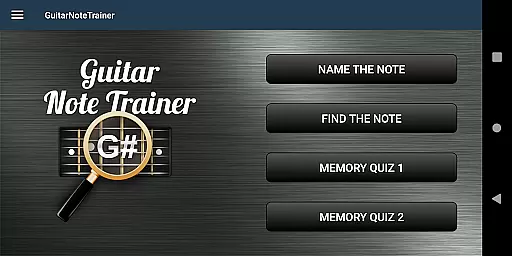
Guitar Fretboard Note Trainer is an innovative app designed to help guitarists master the essential skill of learning notes on the fretboard. The app offers four interactive training modes, including Name The Note, Find A Note, and two Memory Quiz options, each progressively challenging users to improve their knowledge of the guitar neck.
With customizable difficulty levels and an audio feature that lets you hear notes as you select them, this app caters to beginners and advanced players alike. Whether practicing at home or on the go, Guitar Fretboard Note Trainer provides a fun and engaging way to enhance your musical skills through structured learning games.
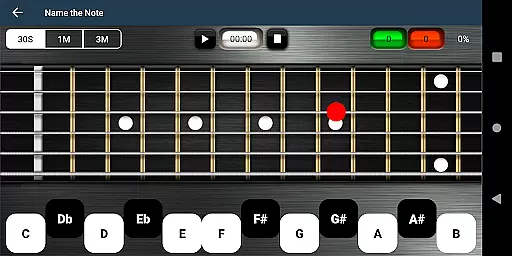
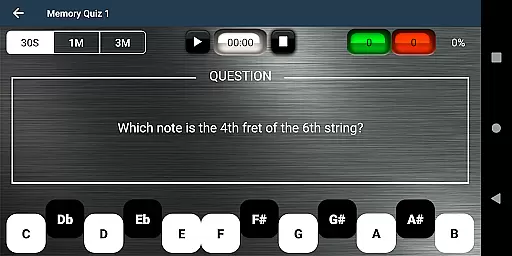
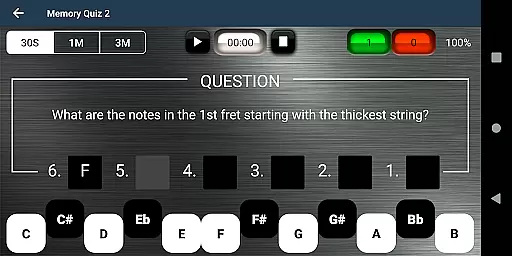
The app's standout feature is its diverse range of training modes, each targeting different aspects of fretboard mastery. In Name The Note mode, users identify notes displayed on the fretboard, while Find A Note challenges them to locate specific notes across all six strings. The two Memory Quiz modes test recall ability, requiring users to name notes based on position or across an entire fret.
Additional features include 'Easy' options for beginners, which limit the range of possible answers, and an audio playback option to reinforce auditory learning. A unique cheat function allows users to swipe diagonally across the fretboard to reveal all notes temporarily, aiding in quick reference during practice sessions.
When it comes to music learning applications, the depth and breadth of the music library are crucial for a comprehensive learning experience. The Justin Guitar Fretboard Note Trainer offers an extensive range of notes and positions across the guitar neck, ensuring that learners have access to a wide array of musical notes and scales.
The app meticulously includes all essential notes, providing users with the ability to explore different positions and octaves. This vast library is not just about quantity but also quality, as each note is accurately represented both in visual and audio formats.
Copyright authenticity is guaranteed, as the application is designed to be an educational tool rather than a music production library. Users can trust that the content provided adheres to legal standards and respects intellectual property rights.
By focusing on authentic representation and a rich selection of notes, this trainer ensures that users receive a legitimate and thorough grounding in guitar music theory.
Audio quality is paramount when training to recognize and play musical notes on a guitar. The Justin Guitar Fretboard Note Trainer places a strong emphasis on delivering high-quality audio experiences to aid in the learning process.
Users can utilize the audio option within the app to hear the notes as they select them on the fretboard. This feature provides immediate auditory feedback, which is critical for developing a keen ear for music.
The clarity and fidelity of the audio output ensure that each note's sound is true to its real-world counterpart, enhancing the overall effectiveness of the training sessions.
With adjustable settings, learners can customize their audio experience to suit their preferences and equipment capabilities, making certain that the sound quality remains consistently excellent.
User-friendly interface
Interactive learning games
Customizable difficulty levels
Auditory reinforcement with audio notes
Progressive challenge system
Limited to fretboard learning
No advanced music theory
Basic visual design
Occasional ads in free version
Requires consistent practice

The Skullcandy App Experience
 3.20
3.20
JBL PartyBox APP works with 110/310/710/120/320/520/Encore/Encore 2/Encore Ess 2
4.80
Walkout Song DJ is the most intuitive app to manage your sports music.
4.70
Visualize the guitar fretboard, master scales & play through changes like a pro!
4.50
24,000 free audio books and no ads!
4.90
Powerful 10-Band equalizer pro with sound booster improves Android audio quality
4.30
Play KORG’s revolutionary touch-based instrument on a variety of devices.
4.40
Get alarms that fit your lifestyle and wake up to the sounds you love.
4.80
Play your music offline without limits
4.80
Voice recorder - Audio recorder. Best recorder for recording
4.90
SqueezePlayer turns your Android phone or tablet into a SqueezeBox on its own!
4.60
The best music and audio player, with beautiful UI, music search and equalizer.
4.60
DJ Music Mixer - DJ Remix: remix songs, make beat music & record mix of DJ.
4.40
A sleek, no-frills player designed for true music lovers.
4.20
No wifi music app. Mp3 offline. Tuner radio, young radio music. Music downloader
4.20
The official Sonos app
4.10
Turn your Android phone into a professional audio analyser with up to 120 bands.
4.00
Background pads for your band
3.80
The Minimalistic Premium Music Player. Handmade with passion for music
2.20


User Reviews