
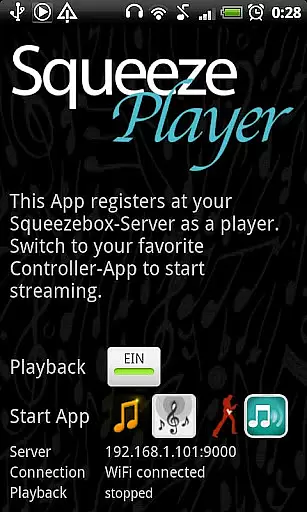
SqueezePlayer is a powerful music streaming application that transforms your Android device into a Logitech Squeezebox, enabling you to stream all your Squeezebox content directly. It supports various music formats including FLAC, MP3, WAV, and PCM natively, while also allowing the streaming of internet radio stations and songs from popular music services like Last.FM, Deezer, or WiMP.
Designed for convenience, SqueezePlayer allows you to enjoy your music library anywhere - whether you're at home, in the car, or at work. The app streams via WiFi or mobile connection, giving you the freedom to access your music without limitations. However, playback via 3G requires specific router configurations and DynDNS setup, which might be challenging for some users.
One of the standout features of SqueezePlayer is its ability to integrate seamlessly with the Logitech Squeezebox Server (now known as Logitech Media Server). This integration allows for on-the-fly transcoding of unsupported file types to ensure smooth playback. Additionally, SqueezePlayer can be controlled through other apps such as OrangeSqueeze, SqueezeCommander, and more, offering a versatile user experience.
The app also provides direct links to compatible control apps from its main screen, ensuring that your device appears among all other players as long as SqueezePlayer is active. Notably, OrangeSqueeze offers high integration by automatically starting SqueezePlayer from the players list, enhancing usability.
When it comes to streaming music, SqueezePlayer offers an extensive music library that includes local music files, internet radio stations, and songs from various apps like Last.FM, Deezer, or WiMP. This vast selection ensures users have access to a wide range of audio content directly on their Android devices.
The app supports popular music formats such as FLAC, MP3, WAV, and PCM natively, meaning these files are decoded directly on your device. Additionally, the Squeezebox Server can convert other file types like Ogg and mp4 to FLAC or MP3 on the fly, expanding the range of playable formats and ensuring compatibility with different music libraries.
Copyright authenticity is maintained through the use of legitimate sources and services. Users can stream their personal collections or explore content from verified platforms, providing peace of mind regarding the legality and origin of the music they enjoy.
SqueezePlayer places a strong emphasis on delivering high-quality audio experiences. By supporting lossless formats like FLAC and high-fidelity options such as WAV and PCM, the app ensures that users can enjoy their music in the best possible quality, preserving the nuances and details of the original recordings.
In addition to native format support, SqueezePlayer benefits from the transcoding capabilities of the Squeezebox Server. This feature allows for the conversion of less common formats into high-quality FLAC or MP3 streams, maintaining audio integrity across different file types and ensuring a consistent listening experience.
Whether you're at home or on the go, SqueezePlayer provides flexible audio quality options that cater to audiophiles and casual listeners alike. The ability to stream via WiFi or mobile connection means you can enjoy premium sound quality wherever you are, making it an ideal choice for those who value both convenience and audio excellence.
User-friendly interface
Wide format compatibility
Seamless server integration
Flexible playback options
Active customer support
Requires separate server app
No standalone control feature
Limited transcoding on Touch
Complex 3G setup process
Pandora and Rhapsody not supported

Fun & Easy Voice Changer – Record, Edit & Add Hilarious Effects!
 4.50
4.50
Simply convert wav to mp3. Clear. Reliable. Safe.
4.5
The Skullcandy App Experience
3.20
Powerful beat maker & DJ mixer to remix tracks, make music, & perform DJ mix
3.70
Walkout Song DJ is the most intuitive app to manage your sports music.
4.70
Guzheng Master supports many playing techniques as an acoustic Guzheng
4.50
A complete sound package for the sound engineer or enthusiast
4.60
Manage your Sonos system directly from your home-screen!
4.40
Play your music offline without limits
4.80
Make songs with AI! Any genre, custom lyric, song generator for music creation!
4.80
Listen to live FM radio stations, sports, music and news on global radios online
4.70
Simple & Intuitive Metronome
4.70
AI Music Maker: Generate And Compose AI Tunes & AI Songs & AI Music & AI Melody!
4.60
Learn the notes on the guitar fretboard fast with this easy and fun app
4.60
Help you quickly get started with Shokz headphones
4.40
Your HD audio recorder on the go for music, meetings, ambience, animal sounds…
4.30
Master Salsa Rhythm quickly and with a lot of fun!
4.30
No wifi music app. Mp3 offline. Tuner radio, young radio music. Music downloader
4.20
Offline Tunes, Unlimited Vibes
3.90


User Reviews