
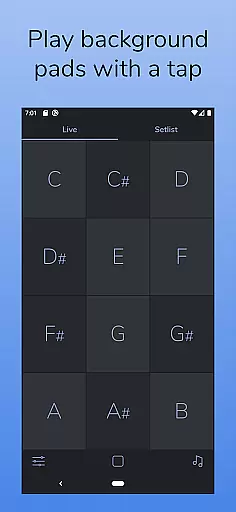
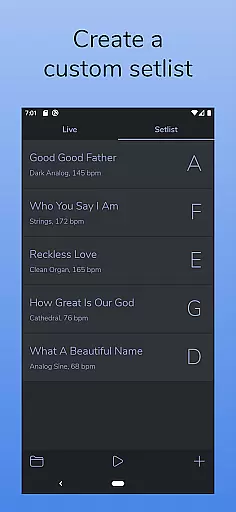
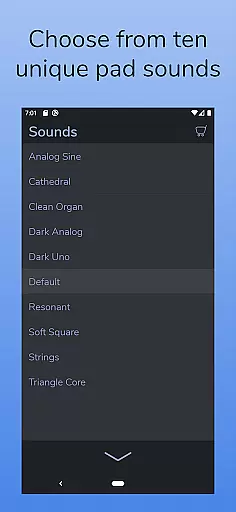
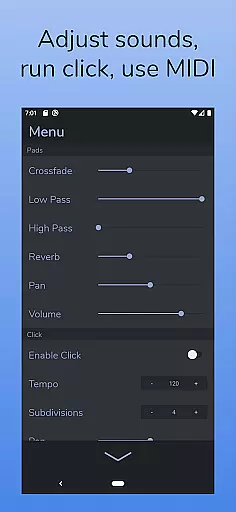
AutoPad is a versatile ambient pad loop application designed to enhance live performances and recordings with seamlessly looped drones. It provides users with 10 carefully crafted pad sounds, each offering a unique atmosphere across all 12 musical keys. The app supports two distinct modes - LIVE mode for instant access to keys and SETLIST mode for custom song lists. AutoPad also features MIDI compatibility (with physical controllers), a built-in metronome, and adjustable sound parameters like crossfade time, filters, reverb, pan, and volume.
This application is particularly useful for musicians who need consistent background soundscapes during performances or studio sessions. Its natural crossfades and easy-to-use interface make it an ideal tool for worship music and other genres where sustained ambient tones are desired. By providing both pre-designed sounds and the option to expand the library through in-app purchases or custom WAV files, AutoPad offers flexibility while maintaining ease of use.
AutoPad stands out with its dual-mode functionality, offering both LIVE mode for quick key access and SETLIST mode for customized performances. The app includes 10 expertly designed pad sounds that create unique atmospheres in all 12 keys, ensuring versatility across different musical contexts. Users can further expand their sound library through in-app purchases or by importing custom WAV files, though Android users should note the current limitation to WAV format only.
The app's built-in metronome helps maintain timing precision without additional equipment, while its comprehensive menu allows detailed control over crossfade times, dual filters, reverb levels, panning, and volume adjustments. MIDI compatibility enables integration with external controllers, though Android users should be aware of the lack of virtual and Bluetooth MIDI support. The dark color scheme not only reduces eye strain but also performs well in stage lighting conditions, making it practical for live performances.
AutoPad offers a diverse music library that caters to various ambient sound needs. With 10 carefully designed pad sounds included, each provides a unique atmosphere across all 12 musical keys.
The app also supports expansion of the sound library through in-app purchases or by importing personal WAV files, thus enhancing its versatility and depth. This ensures users have access to a wide range of high-quality audio options.
Regarding copyright, AutoPad guarantees that all its preset sounds are license-compliant, giving users peace of mind when using them in live performances or recordings. The ability to import personal files further assures authenticity and legal use of content.
AutoPad stands out with its superior audio quality options, ensuring an immersive auditory experience. The app features two filters, reverb controls, pan settings, and volume adjustments, allowing precise tailoring of sound output.
Users can enjoy natural crossfades between keys, handled automatically by the app, which maintains the continuity and smoothness of the audio stream. This feature is crucial for live performances where seamless transitions are required.
Additionally, AutoPad's support for MIDI controllers enables musicians to trigger pads with external keyboards, providing flexibility and enhanced control over their music production process. This integration underscores the appu2019s commitment to delivering professional-grade audio solutions.
User-friendly interface
Versatile sound options
Customizable settings
Built-in metronome
MIDI compatibility
Limited file format support
No virtual MIDI on Android
Basic free sound library
Interface may feel cramped
Steep learning curve

The Music Journey in Your Hands
 4.30
4.30
10-Band Audio Equalizer, Sound / Bass Booster for Spotify Users & Music Players
4.40
Full-featured, High-Quality Groovebox Workstation, perfect for Live Performance!
4.80
The only true audiophile music player with Hi-Fi audio rendering and DSP engine
3.90
The best music and audio player, with beautiful UI, music search and equalizer.
4.60
Simple mp3 and mp4 player with advanced features.
3.40
The Minimalistic Premium Music Player. Handmade with passion for music
2.20
Uninterrupted Tunes, Unmatched Vibes
3.90
One-tap booster for max volume - enjoy powerful sound with this audio booster
4.50
JBL PartyBox APP works with 110/310/710/120/320/520/Encore/Encore 2/Encore Ess 2
4.80
Gorgeous UI, Powerful music Search and Equalizer, the great choice for you!
4.70
SqueezePlayer turns your Android phone or tablet into a SqueezeBox on its own!
4.60
Bass Booster & Volume Equalizer Pro improves your music and video sound quality
4.60
Recording studio w/ 10k beats, pro vocal FX and a network of 20M rappers & fans!
4.60
Learn the notes on the guitar fretboard fast with this easy and fun app
4.60
USB audio recording and playback finally possible on Android 3.1 or higher!
3.90
Control your MIDI USB or Bluetooth devices in app and avoid some trampling
3.30
The Skullcandy App Experience
3.20
Make music anywhere. Turn your device into an instrument.
4.3


User Reviews