
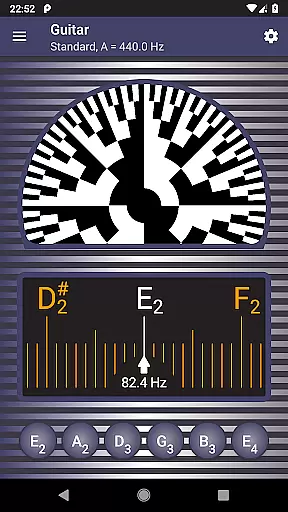
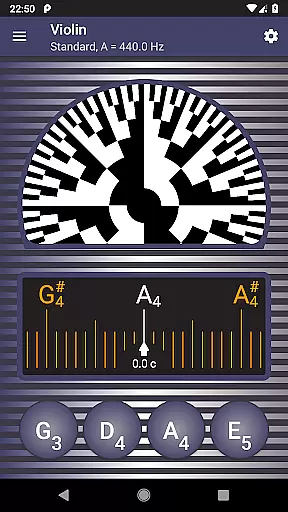
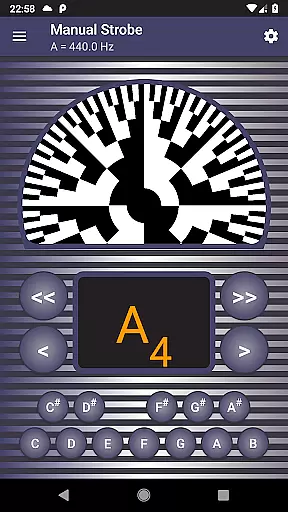
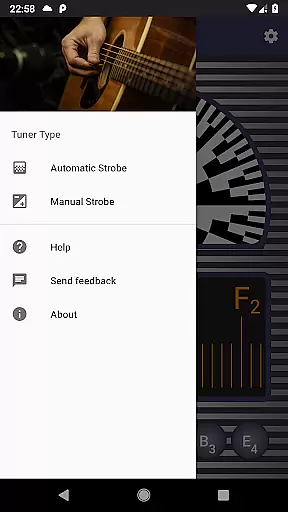
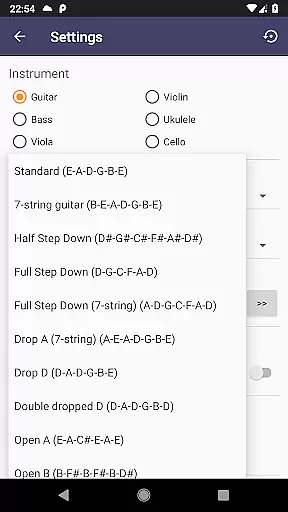
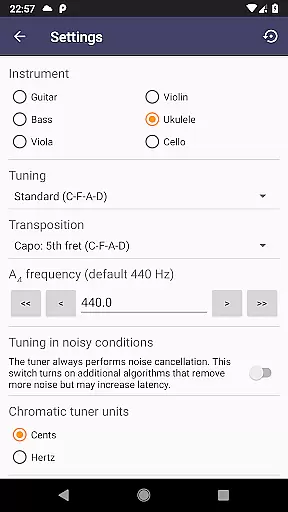
Strobe Tuner Pro is a highly accurate tuning application designed for musicians of all levels, from beginners to professionals. The app replicates the stroboscopic effect on your mobile device, traditionally only found in expensive physical tuners. It supports a wide range of instruments including guitar, violin, bass, ukulele, viola, cello, banjo, and shamisen. With its advanced algorithms, it offers precise tuning capabilities that can save users hundreds of dollars compared to purchasing a dedicated hardware tuner.
The app features two independent tuners - chromatic and strobe - both utilizing the built-in microphone of your phone or tablet. The chromatic tuner helps get your instrument roughly in tune by detecting the frequency of the played note, while the strobe tuner allows for fine-tuning with incredible accuracy. Additionally, Strobe Tuner Pro includes a metronome feature, making practice sessions more efficient by allowing users to control timing and check intonation simultaneously.
Whether you're tuning by ear using reference tones or relying on visual feedback from the strobe tuner, this app provides an invaluable tool for ensuring your instrument sounds its best. Its ease of use, combined with professional-grade precision, makes it suitable for both learning and performing environments.
Strobe Tuner Pro stands out with its dual-tuner system, offering both chromatic and strobe tuning capabilities. The chromatic tuner uses Fast Fourier Transformation (FFT) to detect the frequency of the played note and display it on a chromatic scale, guiding users to their target pitch. This feature is particularly useful when an instrument is significantly out of tune, providing a quick way to get close to the correct pitch before moving on to fine adjustments.
The strobe tuner emulates the traditional stroboscopic effect, typically found in high-end hardware tuners. It processes audio input directly on the device's GPU, delivering real-time feedback through a visually intuitive spinning pattern. When the pattern appears stationary, the instrument is perfectly in tune. This level of precision is unmatched by conventional tuners and is ideal for achieving professional-quality tuning.
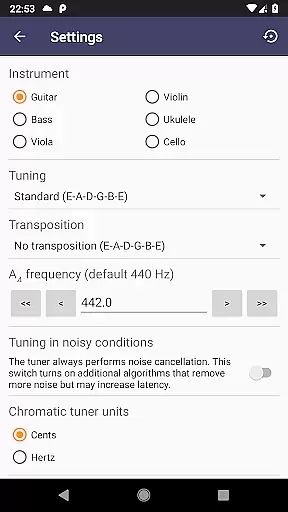
Beyond its core tuning functions, Strobe Tuner Pro also includes several additional features that enhance the user experience. These include a built-in metronome for rhythm practice, support for alternate tunings across various instruments, advanced noise cancellation for use in noisy environments, and customizable settings such as concert pitch frequency and note naming conventions. Whether you're a beginner learning to tune your first instrument or a seasoned musician requiring exacting standards, these features provide comprehensive tools for all your tuning needs.
Strobe Tuner Pro offers a comprehensive music library that caters to a wide range of instruments including guitar, violin, bass, ukulele, viola, cello, banjo, and shamisen. The application ensures that each instrument's tuning is authentic and respects the original sound quality.
The app has been rigorously tested with numerous recordings, ensuring that every note aligns with genuine instrument sounds. This meticulous attention to detail guarantees users an accurate tuning experience that mirrors physical strobe tuners costing hundreds of dollars.
Copyright authenticity is taken seriously within Strobe Tuner Pro. Users can be confident that the reference tones played through the app are synthesized in accordance with legal standards, respecting the intellectual property rights associated with musical compositions.
By providing such a diverse and legally compliant music library, Strobe Tuner Pro not only supports professionals who require precise tuning but also aids beginners in learning correct instrument practices without concerns over improper use of copyrighted material.
Audio quality is paramount in Strobe Tuner Pro, which employs advanced algorithms for its chromatic and strobe tuners. These independent yet complementary systems utilize the deviceu2019s built-in microphone to deliver unparalleled accuracy in frequency detection and stroboscopic effect emulation.
The chromatic tuner uses Fast Fourier Transformation to detect pitch with precision, while the strobe tuner replicates the complexities of an oscilloscope, computing data directly on your deviceu2019s GPU. This dual approach ensures that whether you're tuning by ear or relying on visual cues, the audio feedback is crisp and reliable.
Furthermore, Strobe Tuner Pro includes features like advanced noise cancellation, allowing clear tuning even in noisy environments or when a metronome is running concurrently. Such capabilities make it an indispensable tool for musicians seeking high-quality sound output during practice or performance.
With these sophisticated audio quality options at their disposal, users can achieve professional-grade tuning results on their instruments, enhancing both their playing experience and overall musical enjoyment.
Highly accurate tuning
User-friendly interface
Wide instrument compatibility
Advanced noise cancellation
Cost-effective solution
Requires good microphone quality
May drain battery quickly
Interface could be overwhelming
Limited offline functionality
No automatic tuning feature

VB-AUDIO Software / VBAN-Receptor allows listening to any VBAN Streams
 4.10
4.10
Most Advanced AI Song Generator and Music Creator. Rap, Pop, Rock, Gospel & more
4.70
Powerful beat maker & DJ mixer to remix tracks, make music, & perform DJ mix
3.70
Simple & Intuitive Metronome
4.70
Your song collections with lyrics and chords on Android smartphones and tablets.
4.80
Visualize the guitar fretboard, master scales & play through changes like a pro!
4.50
The only true audiophile music player with Hi-Fi audio rendering and DSP engine
3.90
Offline Music Player & MP3 Player.Powerful equalizer, Lyrics, Themes, Tag Editor
4.80
Full featured mp3 and audio player with Chromecast and Android Auto support.
4.40
Gorgeous UI, Powerful music Search and Equalizer, the great choice for you!
4.70
Listen to live FM radio stations, sports, music and news on global radios online
4.70
Recording studio w/ 10k beats, pro vocal FX and a network of 20M rappers & fans!
4.60
Learn the notes on the guitar fretboard fast with this easy and fun app
4.60
DJ Music Mixer Pro is a real DJ controllers and DJ Music Studio to remix DJ.
4.40
Equalizer, Bass Booster and Volume Booster (Eq & Bass) improve sound quality
4.30
Learn and play 2M+ music tabs & chords on guitar, ukulele, bass, and more
4.30
A High-Precision Audio Spectrum Analysis App
4.20
Smart piano keyboard, Classical to Pop, Real-time multiplayer connection!
4.20
Slow music down without changing pitch.
3.70


User Reviews