
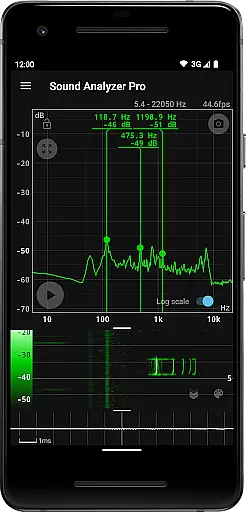
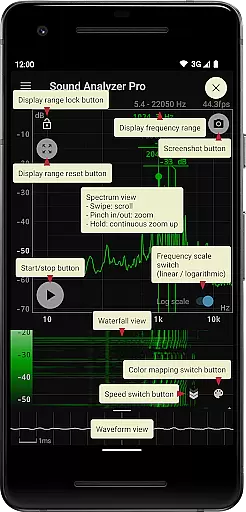
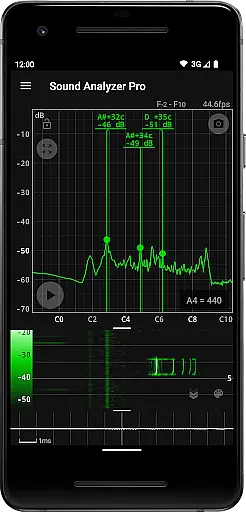
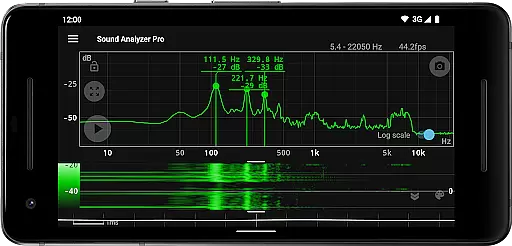
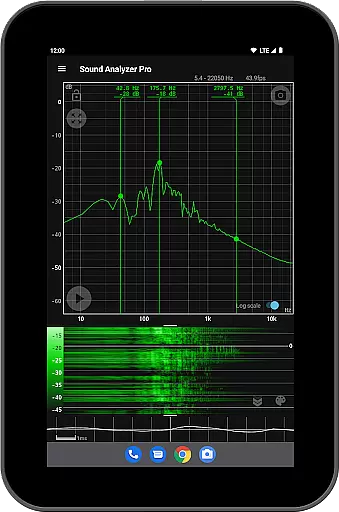
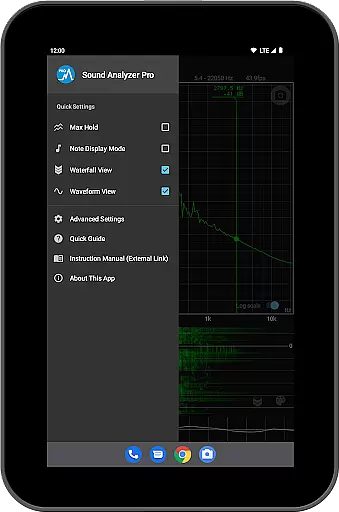
Sound Analyzer is a sophisticated audio analysis tool designed for both professionals and enthusiasts in the music and audio field. This application allows users to analyze audio signals directly from their mobile devices, providing real-time frequency (Hz) and amplitude (dB) spectra. The app's high measurement accuracy, with errors typically within 0.1 Hz in low-noise environments, makes it an invaluable tool for precise audio analysis.
In addition to its core spectrum analysis capabilities, Sound Analyzer offers advanced features such as waterfall view for tracking spectral changes over time, waveform view for visualizing sound waveforms, and note display mode that translates frequencies into musical notes. These features make it suitable for various applications including sound engineering, music production, and acoustic research.
The app's ability to function without advertisements enhances user experience, allowing uninterrupted analysis sessions. Whether you're tuning musical instruments, conducting acoustic experiments, or performing detailed audio assessments, Sound Analyzer provides the necessary tools to achieve professional-grade results.
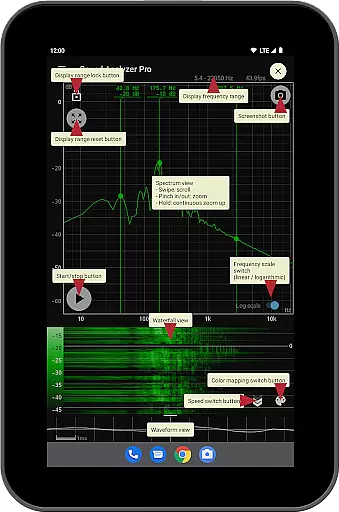
Sound Analyzer distinguishes itself through a comprehensive suite of audio analysis features. Its peak frequency display function provides real-time information on prominent spectral components, while the touch-operated display range adjustment offers unparalleled control over data visualization. Users can switch between logarithmic and linear frequency scales, catering to different analysis requirements.
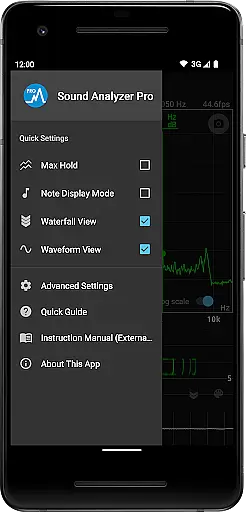
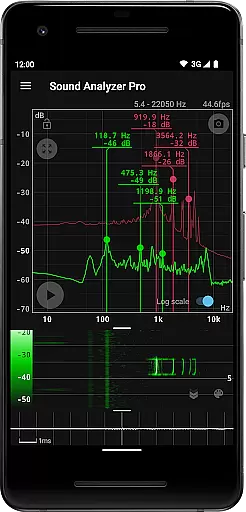
The app's innovative features include max hold functionality for capturing peak values, waterfall view for temporal spectral analysis, and waveform view for examining sound wave patterns. Additionally, the note display mode helps musicians by showing pitch in terms of musical notes with cent accuracy. These specialized tools demonstrate the app's commitment to serving diverse user needs.
Practical features like screenshot capability with timer function and the absence of advertisements enhance usability. The app also acknowledges device limitations regarding high-frequency spectrum analysis above 22.05 kHz, maintaining transparency about its technical capabilities. This combination of advanced features and practical considerations makes Sound Analyzer a versatile tool for audio professionals.
Sound Analyzer does not focus on providing a vast music library but rather emphasizes real-time audio signal analysis. The app allows users to analyze audio signals directly through their mobile devices, presenting frequency and amplitude spectra with high accuracy.
The application supports detailed spectrum analysis up to 96 kHz, although this is more suited for high-performance devices. For most standard devices, the meaningful frequency range lies below 22 kHz due to hardware limitations. This limitation ensures that all analyzed data remains authentic and unaltered by unnecessary noise.
While Sound Analyzer doesn't provide a traditional music library, its ability to display pitch in musical note terms (A to Gu266f) adds a layer of interaction with audio content that is both educational and precise. This feature enhances user understanding of sound properties without concerns about copyright issues.
One of the standout features of Sound Analyzer is its superior audio quality analysis capabilities. The app measures frequency with an impressive accuracy, ensuring that errors remain within 0.1 Hz in low-noise environments. This precision makes it an invaluable tool for users who require exacting standards in their audio assessments.
In addition to basic spectrum displays, Sound Analyzer offers advanced views such as waterfall and waveform modes. These options allow users to observe changes in spectra over time and visualize sound waveforms, providing deeper insights into audio characteristics. Such comprehensive tools ensure high-quality audio analysis tailored to various needs.
Furthermore, the app includes a max hold function and switchable frequency scales between logarithmic and linear, enhancing the detail and flexibility of audio examinations. With these robust features, Sound Analyzer delivers top-tier audio quality options that cater to both casual users and professionals alike.
High measurement accuracy
Real-time spectrum analysis
No advertisements
Comprehensive feature set
Musical note display
Complex for beginners
Limited high-frequency support
Device compatibility issues
Advanced features may be overwhelming
Requires technical knowledge

Turn your phone into a musical instrument from the future!
 3.90
3.90
Equalizer, Bass Booster and Volume Booster (Eq & Bass) improve sound quality
4.30
Control your MIDI USB or Bluetooth devices in app and avoid some trampling
3.30
Gorgeous UI, Powerful music Search and Equalizer, the great choice for you!
4.70
Bass Booster Pro takes auto-equalizing to the next level!
4.30
Unleash your creativity! Turn simple prompts into full fledged songs.
4.70
Music, News & Sports Radio Tuner App. Tune in Live FM & AM Radio Stations.
4.80
Smart piano keyboard, Classical to Pop, Real-time multiplayer connection!
4.20
Simple mp3 and mp4 player with advanced features.
3.40
Responsive piano with great sounds, graphics, and songs
4.80
SqueezePlayer turns your Android phone or tablet into a SqueezeBox on its own!
4.60
Over 100 million tracks available for high quality streaming and download
4.60
Pay Once, no monthly payment
4.60
Fun & Easy Voice Changer – Record, Edit & Add Hilarious Effects!
4.50
Enhance the sound quality of your devices, listen to what you want
4.50
Time Guru will strengthen your internal sense of musical time via random muting.
4.30
Next generation modular control surface
4.10
The iconic iOS metronome app is now on Android.
3.70
Make music anywhere. Turn your device into an instrument.
4.5


User Reviews