
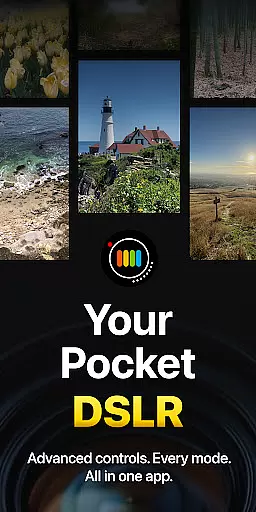
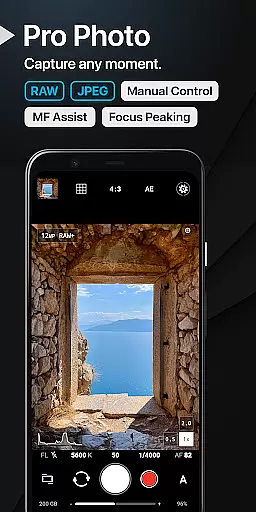
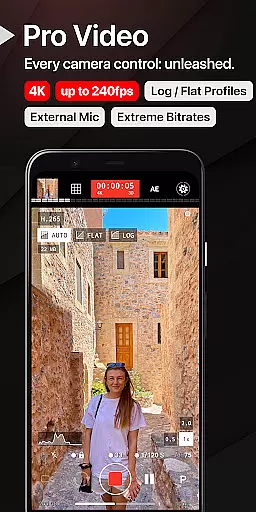
ProShot is a professional-grade photography and filmmaking application designed for Android users who demand full creative control over their mobile photography experience. This app offers an extensive range of manual controls akin to those found in DSLR cameras, including ISO, shutter speed, white balance adjustments, and more, all powered by the camera2 API. Whether capturing images in RAW format or recording videos in up to 8K resolution, ProShot ensures that both amateur and professional photographers can achieve outstanding results.
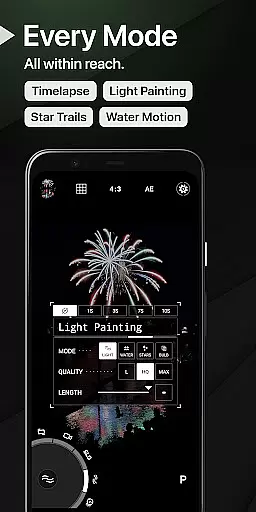
Beyond its core functionality, ProShot provides unique features such as Light Painting modes for artistic long-exposure effects, Bulb mode for astrophotography, and advanced video capabilities like LOG color profiles for post-production flexibility. The app also emphasizes user privacy by not collecting or transmitting personal data, making it a secure choice for image and video capture. With its intuitive interface and customizable settings, ProShot adapts to various shooting scenarios while maintaining ease of use.
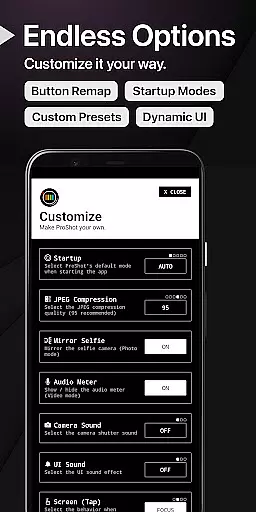
ProShot's versatility makes it suitable for diverse photography needs, from casual snapshots to professional assignments. Its Dual Dial system allows quick navigation through settings, while specialized modes cater to specific creative visions. Users can seamlessly integrate their camera roll into the viewfinder, adjust JPEG quality, and even set custom aspect ratios. These features collectively ensure that photographers can focus on capturing the perfect moment without being hindered by technical limitations.
ProShot distinguishes itself with a comprehensive suite of photographic tools that rival professional equipment. The app includes multiple shooting modes—Auto, Program, Manual, and two Custom modes—each offering different levels of control over camera settings. Photographers can fine-tune exposure, flash, focus, ISO, shutter speed, and white balance, ensuring optimal image quality in any environment. Additionally, ProShot supports RAW (DNG), JPEG, and RAW+JPEG formats, along with HEIC support on compatible devices, providing flexibility in post-processing workflows.
In video mode, ProShot continues to impress with capabilities such as up to 8K video recording, adjustable frame rates from 24 FPS to 240 FPS, and LOG/FLAT color profiles for enhanced dynamic range. The app also supports H.264 and H.265 codecs, external microphones, and real-time monitoring of audio levels and video file size. Advanced features like Timelapse, intervalometer functionality, and simultaneous audio playback during recording make ProShot a versatile tool for filmmakers. Furthermore, the app's commitment to privacy ensures that no personal data is stored, collected, or transmitted, safeguarding user content.
Usability enhancements include a Dual Dial system for swift setting changes, manual focus assist with focus peaking, and a histogram with three display modes. ProShot also offers customization options such as accent color selection, zero-lag bracket exposure, and shortcuts for GPS, screen brightness, and camera shutter. These features, combined with the ability to adjust JPEG quality, Noise Reduction, and storage location, empower users to tailor the app to their specific preferences and workflow requirements.
Real-time capture and preview functionality is essential for photographers who need to see exactly what their camera is capturing before taking the shot. ProShot offers a sophisticated real-time preview system that ensures what you see on your screen is what you get in your final image. This feature leverages advanced processing capabilities to provide an accurate representation of exposure, white balance, and other critical settings.
The application supports a dual-dial system for swift adjustments to camera settings, ensuring users can fine-tune their captures without missing a moment. Whether adjusting ISO, shutter speed, or white balance, the changes are reflected instantly in the preview, empowering photographers with precise control over their images.
Additionally, ProShot's real-time capabilities extend to its video mode, where all photo adjustments can be made while recording. This seamless integration allows creators to maintain their desired aesthetic across different media formats, enhancing both productivity and creative freedom.
By providing reliable and responsive real-time capture and preview features, ProShot enables photographers to focus on their art without worrying about technical discrepancies between the preview and the final output.
While ProShot does not explicitly market itself as an AI beauty enhancement tool, it incorporates several features that contribute to natural-looking enhancements. The app provides extensive manual controls over various parameters such as tone mapping, sharpness, and noise reduction, which collectively allow for subtle yet effective image improvements.
Photographers can adjust these settings to enhance the natural beauty of their subjects without resorting to heavy-handed filters or effects. For instance, by carefully managing noise reduction levels, users can preserve skin texture while minimizing unwanted graininess, resulting in more lifelike portraits.
Moreover, ProShot's support for RAW (DNG) format empowers users to make non-destructive edits during post-processing. This flexibility ensures that any enhancements applied remain true to the original scene, maintaining authenticity and detail.
Ultimately, ProShotu2019s approach to beauty and enhancement lies in giving photographers the tools they need to bring out the best in their subjects naturally, preserving the integrity and realism of each photograph.
User-friendly interface
Extensive manual controls
Privacy-focused design
High-quality video options
Versatile shooting modes
Steep learning curve
Requires high-end device
Limited free features
No built-in editor
Occasional bugs

AI portrait generator and polaroid AI selfie, fun AI generated AI photo creator!
 4.30
4.30
All-in-One Editor & AI Photo Enhancer, Beautify & Retouch, Collage, Cartoonify
4.20
Perfect photos with body shaping, BG changer and object remover.
3.70
How old age camera Gender Swap App Face Shape Hairstyle App Hair Styler App fun!
4.00
Be your best in every shot! Fix, edit and retouch your face in selfies & photos.
3.70
The #1 app for B&W film developing featuring an advanced darkroom timer.
4.10
Professional photography on your mobile phone
4.20
Easily view, share, delete photos with Gallery.
4.70
The original Rarevision VHS look seen everywhere!
4.70
Collage your moments in one tap: 1000+ layouts, filters, stickers, and texts.
4.90
A collection of tools and reference tables for DPs, ACs, DITs and Operators.
4.70
Amazing Photo Effects - The most fun you can have with your photos!
4.70
Your personal guide to the sun and moon. Plan ahead, visualize and predict!
4.70
Enhance, retouch & create your story - Share the moment with Photoshop Express.
4.60
AI photo editor with hair editor, retouch tools, hair color changer & filters!
4.50
Photo editor & gallery. Crop pictures & edit photos offline, no wifi!
4.50
Search, tag and rate your way to an organized image gallery
4.40
Turn your phone into a professional camera - full DSLR manual photography
4.30
Remote control the phone camera shutter from your smartwatch and take a picture
1.60


User Reviews