
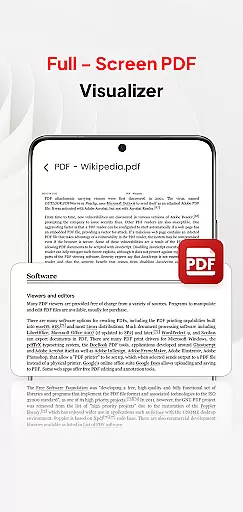
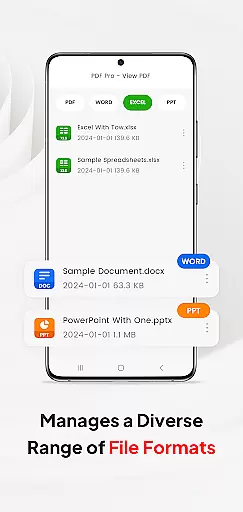
PDF Pro-View PDF is a comprehensive business application designed to streamline PDF management for professionals and casual users alike. This app offers instant access to PDF files with a single click, providing a seamless reading experience without any waiting time. Its sleek and intuitive interface makes file navigation effortless, while supporting multiple document formats including Doc, PPT, and Excel.
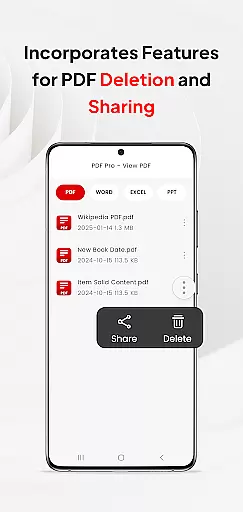
Beyond basic viewing, the app enables efficient file organization by consolidating all PDFs in one place, eliminating the need to search through various directories. The inclusion of smooth page navigation enhances readability, making it ideal for reviewing lengthy business documents. Additionally, its sharing functionality allows users to distribute files easily, adding practical value for collaborative work environments.
This app is particularly useful for business professionals who need reliable access to important documents on-the-go. With compatibility across different file types and essential features like automated folder operations, it ensures that users can manage their files effectively regardless of location. For Android 11+ users, the app requires MANAGE_EXTERNAL_STORAGE permission to guarantee uninterrupted access to stored documents.
PDF Pro-View PDF stands out due to its robust feature set tailored for efficient document handling. One of its key strengths is instant PDF access, allowing users to open files with just one click, which significantly reduces loading times. The app also provides complete file accessibility, organizing all PDFs into a single, easy-to-navigate interface, thus simplifying document management.
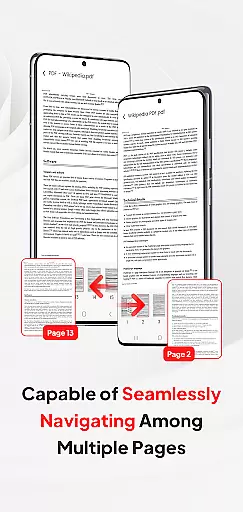
In addition to handling PDFs, the app supports multiple document formats such as Doc, PPT, and Excel. This versatility ensures that users can manage various file types within a unified platform, enhancing productivity. Smooth page navigation further enriches the user experience by enabling rapid flipping through pages, which is especially beneficial when reviewing large documents or reports.
Another notable feature is the app's seamless sharing capability, allowing users to send files to colleagues or clients effortlessly. For Android 11+ users, the app integrates essential permissions like MANAGE_EXTERNAL_STORAGE to enable reliable offline access and background management. These features collectively make PDF Pro-View PDF an indispensable tool for anyone needing efficient and flexible document management solutions.
In today's interconnected work environments, the ability to collaborate efficiently is paramount. PDF Pro-View PDF offers a streamlined solution for teams and professionals who need to handle PDF documents collaboratively. The application supports not only viewing but also managing and sharing PDF files, which is essential for collaborative projects.
One of the key collaborative features of PDF Pro-View PDF is its seamless document sharing capability. Team members can quickly send PDFs to each other without leaving the app, ensuring that everyone has access to the necessary documents when needed. This feature facilitates real-time collaboration, allowing teams to work together regardless of their physical location.
Moreover, the app's compatibility with multiple document types, including Doc, PPT, and Excel, enhances its collaborative potential. Users can manage various file formats within a single platform, reducing the time spent switching between different applications. This unified approach simplifies workflow and increases productivity during collaborative tasks.
The intuitive interface of PDF Pro-View PDF further supports collaborative efforts by providing quick page navigation and easy access to all PDF files stored on the device. These features ensure that team members can swiftly locate and review the required documents, making collaborative work more efficient and effective.
Effective task management is crucial for maintaining productivity and meeting deadlines in any business setting. PDF Pro-View PDF contributes to this aspect by offering tools that help users organize and prioritize their document-related tasks efficiently. With its comprehensive file accessibility, users can manage all their PDF files from one central location, streamlining their workflow.
The app's instant PDF access feature plays a significant role in task management. By eliminating waiting times, users can immediately start reading and processing their PDF documents. This immediacy allows for quicker decision-making and task completion, which is vital in fast-paced work environments.
Additionally, the smooth page navigation offered by PDF Pro-View PDF enhances the user's ability to manage tasks effectively. Rapid page flipping enables users to find specific information within documents swiftly, saving valuable time when working on time-sensitive assignments. This functionality ensures that users can focus on their tasks without being hindered by slow or cumbersome document handling.
For Android 11+ users, the app requests the MANAGE_EXTERNAL_STORAGE permission to maintain full file access. This permission supports reliable offline or background management of documents, which is essential for uninterrupted task management. By ensuring that core features like PDF preview and persistent document access function correctly, PDF Pro-View PDF empowers users to manage their tasks with confidence and efficiency.
User-friendly interface
Instant PDF loading
Multi-format support
Efficient file organization
Seamless sharing options
Requires special permissions
Limited free features
Occasional bugs reported
No cloud integration
Heavy on storage

ANDROID'S TOP MOBILE OFFICE - Word, Excel, PowerPoint and PDF at your fingertips
 4.50
4.50
Measure distances, surfaces and draw plans in seconds with CamToPlan!
4.40
Create curriculum vitae, a professional cover letter creator and resume designer
4.80
Amazon A to Z is the place to manage your work-life at Amazon.
4.50
Master crypto trading with real-time simulations and exciting challenges!
4.50
Earn money with the driver & delivery partner app for Uber, UberEats & Postmates
4.60
ADP Mobile Solutions is an employee self service app
4.50
On the go? Take FedEx with you.
4.00
Chat, meet, and collaborate to achieve more together, all in one place on Teams
4.60
Recover what matters — quickly and easily.
4.70
All your team communication in one place
4.70
Access to Paylocity, empowering employees with information they need 24/7.
4.70
Find jobs and make money fast with JobStack.
4.60
Your employer must have UKG Ready software configured for Mobile.
4.60
Collaborate seamlessly with Google Chat, part of Google Workspace
4.50
The revolutionary flexible staffing platform
4.40
Say hello to the mobile work experience built to help you thrive at work.
4.30
Formerly Facebook Ads Manager. Manage and create ads on the go.
4.20
Build a store in minutes with our full suite of AI tools. Start for free!
4.20


User Reviews