





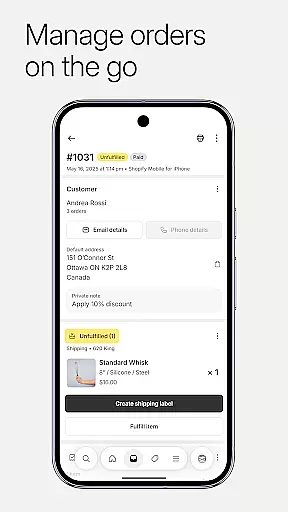


Shopify stands as a comprehensive commerce platform tailored for entrepreneurs seeking to establish and manage their businesses across multiple channels. It enables users to sell both online and offline, locally and globally, directly or wholesale, all from a single interface. The app is particularly designed for those who wish to operate without any coding or design expertise, making it accessible to everyone.
One of the key strengths of Shopify is its ability to empower users to handle their entire business operations on the go. This includes processing orders, tracking inventory, analyzing sales, and launching marketing campaigns directly from a mobile device. Whether you're managing dropshipping logistics, fulfilling orders, or engaging with customers, Shopify provides the tools necessary to streamline these processes efficiently.
The platform's versatility extends to integrating with major social media platforms like Instagram and Facebook, allowing merchants to reach customers wherever they are. With real-time insights into sales and visitor traffic, alongside powerful marketing and financial management tools, Shopify equips entrepreneurs with everything needed to grow and scale their businesses effectively.
Shopify boasts an extensive array of features that cater to various aspects of running an ecommerce business. Its AI-powered tools enable users to upload product photos, set pricing, and organize items into collections effortlessly. The app also supports barcode scanning for real-time inventory adjustments, ensuring accuracy and efficiency in stock management.
Order processing is streamlined through intuitive functionalities that allow users to fulfill, refund, or archive orders with minimal effort. Additionally, Shopify simplifies shipping logistics by enabling users to purchase and print labels directly within the app. For marketers, the platform offers robust tools to launch Google Smart Shopping campaigns and create social media ads on the fly, complete with performance tracking capabilities.
Customer relationship management is another area where Shopify excels. Users can view and edit customer details, communicate directly via the app, and add timeline comments to orders for enhanced tracking. Financial management features include organizing finances with Balance accounts, applying for funding, monitoring cash flow, and executing secure transactions—all contributing to a seamless operational experience.
Collaborative work features are essential for modern businesses that require seamless interaction among team members. Shopify excels in this area by providing tools that allow entrepreneurs to manage their entire business on the go. The platform enables users to process orders, track inventory, and analyze sales directly from their mobile devices.
Shopify's collaborative environment is designed to ensure that all team communications are streamlined. Users can communicate seamlessly with their team through the app, ensuring everyone stays informed about order statuses and customer interactions. This feature significantly enhances productivity by centralizing information and making it accessible to all relevant parties.
Moreover, Shopify offers integration capabilities with various social media platforms like Instagram, Facebook, and Messenger. This interconnected ecosystem allows businesses to synchronize inventory and orders across multiple channels effortlessly. As a result, teams can focus on strategic tasks rather than getting bogged down by manual updates and cross-referencing data.
Effective task management is crucial for maintaining an organized workflow within any business operation. Shopify addresses this need by offering robust tools that simplify order processing and fulfillment. With just a few taps, users can fulfill, refund, or archive orders, which streamlines daily operations significantly.
The app also supports buying and printing shipping labels without hassle, allowing users to track conversion details efficiently. These functionalities not only save time but also reduce errors associated with manual entry, thereby improving overall operational efficiency. Real-time notifications further enhance task management by keeping users updated on new orders as they come in.
In addition to these core features, Shopify provides real-time business insights such as live sales and visitor traffic monitoring. Entrepreneurs can leverage these analytics to make informed decisions quickly. By having instant access to critical metrics, businesses can optimize their strategies continuously, ensuring sustained growth and success.
User-friendly interface
Comprehensive feature set
Robust integration options
Real-time analytics
Accessible customer support
Subscription costs may be high
Limited free themes
Transaction fees apply
Steep learning curve
Occasional bugs reported

AI-powered document scanner with auto enhance for perfect PDFs.
 4.60
4.60
FaxCover - Create fax cover pages. Works with any app or fax machine.
4.90
Convert Your Lovable.dev Website into a Mobile App Instantly!
4.0
Your employer must have UKG Ready software configured for Mobile.
4.60
Find the right fit, faster.
4.70
Manage Your Shop
4.70
Paychex Flex - Save Time and Stay Connected
4.60
A secure, all-in-one team collaboration app
4.30
All your team communication in one place
4.70 4.70
4.70
We help people get jobs
4.70
Find jobs near you and temp work in minutes, from your phone.
4.50
From Gone to Back Again — In Just a Few Taps
4.50
The revolutionary flexible staffing platform
4.40
Measure distances, surfaces and draw plans in seconds with CamToPlan!
4.40
Scan Business Cards & Conference Badges - Capture Leads at Events & Tradeshows
4.20
The Penny Puss app with DG penny finder
4.10
Find part-time earning opportunities near you that pay within days.
3.20
Completed Course Lectures on how to use IBM Maximo in Maintenance issues
4.0


User Reviews