
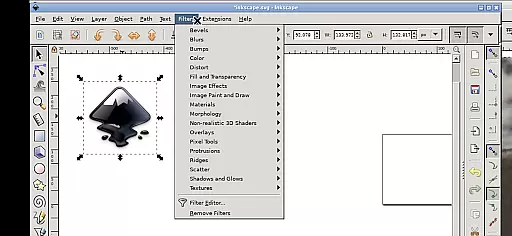
Inky is a powerful vector graphics editor that brings the full functionality of Inkscape to your mobile device. This professional-grade application allows users to create and edit vector images in Scalable Vector Graphics (SVG) format, with support for importing and exporting other file types.
The app supports rendering of primitive vector shapes, text manipulation, and offers advanced features like adjustable transparency, pattern fills, and gradient effects. Its intuitive touch-based interface makes it perfectly suited for Android devices, enabling creative professionals to design on-the-go.
Whether you're a graphic designer, illustrator, or digital artist, Inky provides a complete mobile solution for creating professional-quality vector artwork. The app's seamless integration with Android's file system and its support for various input methods make it an invaluable tool for mobile-based design projects.
Inky stands out with its comprehensive set of vector editing tools specifically adapted for mobile use. The application maintains all core features of desktop Inkscape while implementing a touch-friendly interface optimized for Android devices.
Key features include primitive shape rendering, advanced text tools, gradient and pattern fills, and support for raster image tracing. Users can manipulate objects through intuitive gestures - zooming, panning, and scrolling are all easily accessible through multi-touch controls.
The app's unique selling point is its ability to run the full Linux version of Inkscape on Android, providing unparalleled functionality in a mobile vector graphics editor. With direct access to Android's file system and support for both finger and stylus input, Inky delivers a professional design experience without compromising on features or capability.
Inky provides a comprehensive suite of creative tools that cater to both professional designers and hobbyists. The app allows users to create vector images using Scalable Vector Graphics (SVG) format, offering extensive features for rendering primitive vector shapes such as rectangles, ellipses, polygons, arcs, spirals, stars, and 3D boxes.
Users can fill these objects with solid colors, patterns, radial or linear color gradients, and adjust the transparency of borders. This flexibility ensures that every design need is met with precision and creativity. Additionally, Inky supports embedding and optional tracing of raster graphics, enabling the creation of vector graphics from photos and other raster sources.
The ability to manipulate created shapes with transformations like moving, rotating, scaling, and skewing adds another layer of versatility. These robust features make Inky an indispensable tool for anyone looking to produce high-quality vector art on their mobile device.
Inky offers remarkable canvas and format flexibility, allowing users to work seamlessly across different file types and dimensions. The app supports importing and exporting various formats, ensuring compatibility with other design software and making it easy to integrate into existing workflows.
One of the standout features is the direct access to files from the rest of Android. Useful links in the home directory lead to places like Documents and Pictures, eliminating the need for cumbersome import or export processes. This seamless integration enhances productivity and convenience.
Moreover, Inky's interface is optimized for touchscreens, providing intuitive controls such as pinch-to-zoom, pan with press-and-hold, and scroll with two-finger slides. These functionalities ensure a smooth user experience whether you're working on a tablet with a stylus or a phone with your finger. Such adaptability makes Inky a powerful ally in creative endeavors.
Full-featured vector editor
Touch-optimized interface
Professional-grade tools
Direct file system access
Open-source flexibility
Steep learning curve
Complex interface
High system requirements
Limited mobile optimization
No cloud integration

Pose and morph realistic male and female models! 3D poser app
 3.00
3.00
Floor Plan Creator lets you create, edit and share floor plans.
4.00
Design your dream room with AI. Get decor ideas & plan home interiors
3.90
Sketch, plan, take notes and illustrate on an infinite canvas.
4.20
Castle is social media for creating and playing games!
4.60
800+ Drawing, Painting Lessons App to Practice, Sketch & Paint Art.
4.30
Get an overview over all your embroidery threads, projects and more.
4.60
Experience next-gen icons with a modern liquid glass look.
3.60
All-in-One art, logo & collage maker. Design photos and edit video backgrounds
4.80
Draw on screen: FP sDraw is a simple and lightweight drawing app
4.70
Kling AI is an image and video generation and editing studio powered by AI.
4.50
AI Tattoo Generator: Create Tattoo Designs & Get Ideas! Ink & Stencil Maker
4.50
Just trace a projected picture on paper and color! Draw & Paint with AR drawing
4.40
Bring One UI 8.5 Icons to life -elegant dark icons with a modern, premium touch.
4.30
Customizable Outlined Fonts. Watch Face Format. Battery friendly Digital Clock.
4.20
Custom Character Creator & PFP Maker!
4.20
Sketch and paint on your device with the feel and freedom of drawing on paper
4.00
Create cute cat emojis & PFPs! Fun, custom avatars for cat lovers.
3.70
Vidu is an AI video generator made for creators and aspiring makers.
3.30


User Reviews