
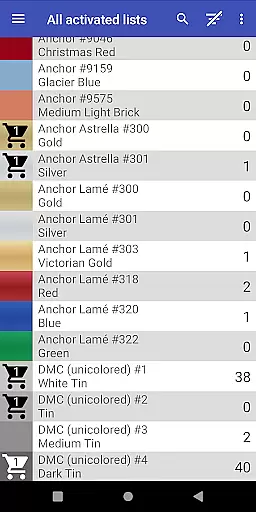
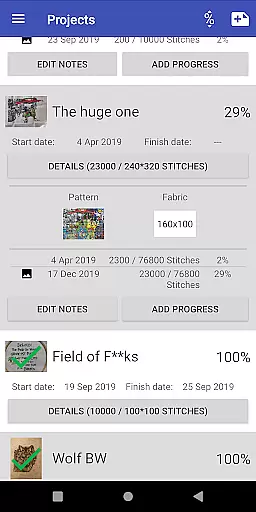
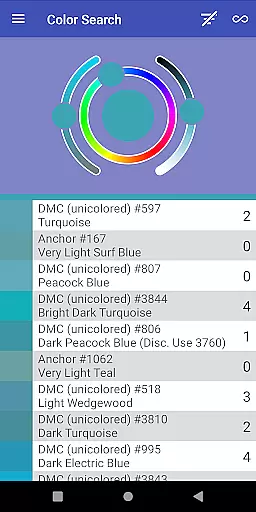
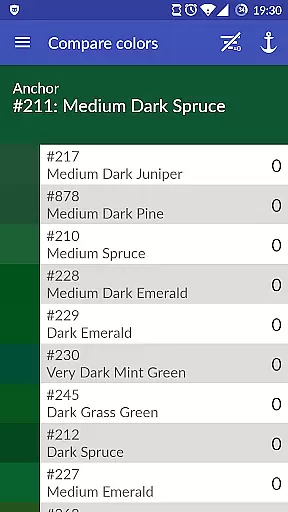
Cross Stitch Thread Organizer is a comprehensive tool designed for cross-stitch enthusiasts, providing an efficient way to manage thread collections on the go. With support for approximately 160 thread vendors, users can easily navigate through extensive lists of threads, fabrics, and patterns.
The app allows users to track inventory, search for specific colors, and calculate project sizes. Its intuitive interface ensures smooth performance without any unnecessary features or advertisements, making it an essential companion for both amateur and professional stitchers.
This application stands out with its robust set of features tailored for the art and design community. Users can save thread amounts, add items to a shopping cart, and search for color matches or substitutes.
Additionally, the app supports project management by letting users track daily progress, assign required threads, and choose from standard frame sizes for their projects. The inclusion of custom lists empowers users to add missing vendors, ensuring a personalized experience that caters to individual preferences.
Cross Stitch Thread Organizer offers a comprehensive suite of creative tools tailored for embroidery enthusiasts. The app supports an extensive list of thread vendors, providing users with access to approximately 160 individual thread lists. This includes popular brands such as DMC, Anchor, and many others, ensuring that no matter your preference, you'll find the exact match for your project.
Each vendor list comes with full-color display options, covering different thread types like cotton, silk, variegated colors, and metallics. This level of detail allows users to make informed decisions about their thread choices, enhancing the overall quality and accuracy of their work. Additionally, the custom lists feature empowers users to add missing vendors, making the tool adaptable to individual needs.
The app's functionality extends beyond thread management. Users can track daily project progress, manage fabric and patterns, and calculate final piece sizes. These features collectively ensure that every aspect of the creative process is covered, from planning to execution, offering a complete solution for cross-stitch artists.
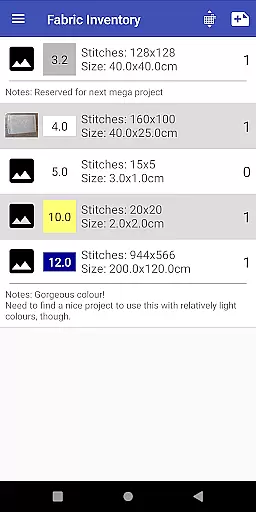
Flexibility in canvas and format options is crucial for any design application, and Cross Stitch Thread Organizer excels in this area. The app allows users to manage all their fabric and patterns efficiently, providing a seamless experience when transitioning between different projects or materials. Whether working on a small piece or a large tapestry, users can easily adapt the app to suit their specific requirements.
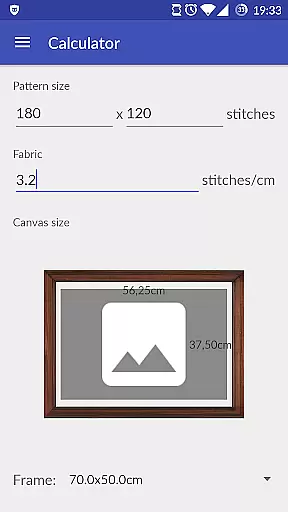
One standout feature is the ability to calculate the final size of your piece and choose a matching frame from a long list of standard frame sizes. This ensures that your finished work will fit perfectly into its intended display setting without any guesswork. The inclusion of various thread typesu2014such as cotton, silk, and metallicu2014further enhances this flexibility, allowing for experimentation with textures and finishes.
Moreover, the app's support for custom lists means that users are not limited to predefined options. If a particular vendor or thread type is not available, it can be added manually, giving users unparalleled control over their creative resources. This adaptability makes Cross Stitch Thread Organizer an invaluable tool for both amateur hobbyists and professional designers alike.
User-friendly navigation
Comprehensive vendor support
Efficient inventory management
Customizable thread lists
Ad-free experience
Limited to cross-stitching
No integrated shopping
Occasional bugs reported
Vendor list not exhaustive
Requires manual updates

Learn how to draw with step-by-step tutorials, fun lessons & multiplayer drawing
 4.70
4.70
Easy 3D drawing design maker & creator. Model designing, Sculpting. Create&paint
4.00
Create stylish invitation cards using templates for weddings, birthdays & RSVP.
4.20
Digital illustration drawing & painting pad app to paint Anime and Manga art
4.50
Create color palette from Image, RGB & RYB Color wheel harmonies, Color Scheme
4.50
Draw, make movies & animate cartoons easily with our 2D animation maker app
4.40
How to draw anime step by step for beginner easily by AR drawing sketch & paint.
3.60
Multiplayer Drawing game, Coloring, Painting・Sketch, Handwriting・Paint, draw
4.30
AI-powered photo & video creation—fast, fun, and effortless with Quick Actions
4.60
See Color, Paint Color
4.90
Convert image to JPG PNG HEIC PDF, support almost all kinds of image formats
4.70
Draw beautiful mandala's very easily
4.60
Share the joy of painting with ibis Paint! Drawing anime and manga art.
4.50
Video AI: Revolutionize Your Content Creation with Advanced Video Generation
4.50
AI generated images & photos, turn your words into drawing, painting & pictures.
4.30
Unleash the artist in you with our AR drawing and tracing tool for photo drawing
4.10
Design your dream room with AI. Get decor ideas & plan home interiors
3.90
Your homescreen as an elegant glass with customized blur, lighting, and visuals.
3.70
Vidu is an AI video generator made for creators and aspiring makers.
3.30


User Reviews