
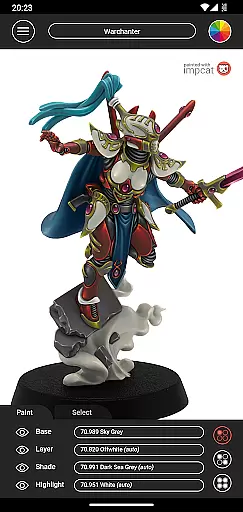
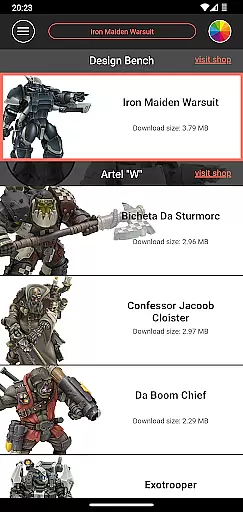
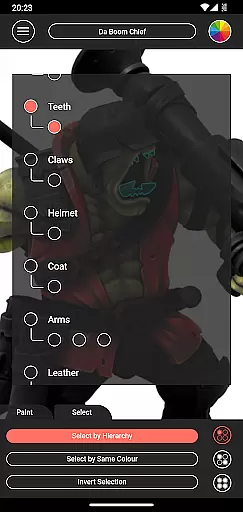
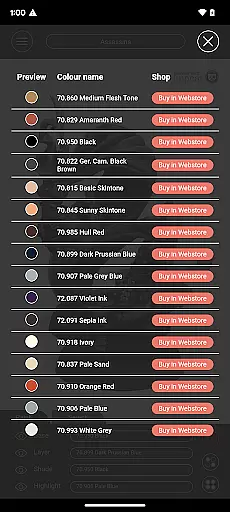
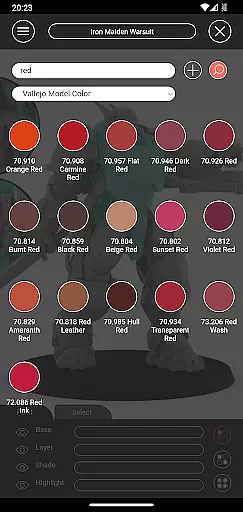
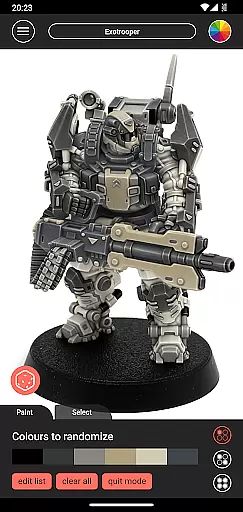
impcat, short for Interactive Miniature Painting Catalogue, is a powerful simulator designed for hobbyists and professional miniature painters. This app allows users to achieve photorealistic painting results on gaming and tabletop miniatures by simulating a four-step process: base coloring, layering, shading, and highlighting. With predefined color palettes from leading manufacturers like Vallejo, impcat provides an immersive experience for both casual users and serious artists.
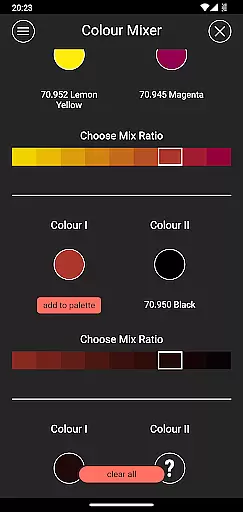
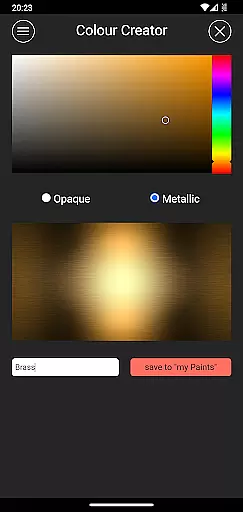
One of the standout features of impcat is its compatibility with downloadable content (DLCs), which includes additional miniature templates and color palettes that are updated regularly at no extra cost. The app also offers advanced tools such as a color mixer, a color creator, and a randomizer tool that distributes colors across models. These features make it easy for users to experiment with different color schemes and techniques without needing physical materials.
Whether you're planning your next project or looking to refine your painting skills digitally, impcat serves as an invaluable resource. Its ability to generate shopping lists based on selected colors ensures that transitioning from digital experimentation to real-world application is seamless. This makes impcat particularly useful for both beginners learning the craft and experienced painters seeking new inspiration.
impcat stands out due to its comprehensive set of features tailored specifically for miniature painting enthusiasts. At its core, the app provides six built-in miniatures and over 300 predefined colors from popular brands like Vallejo Model Color and Vallejo Game Color. Users can select these colors to paint virtual miniatures while following a structured four-step painting process that mirrors real-world techniques.
Beyond the basic functionality, impcat offers innovative tools such as complement recommendation mode, where selecting a base color automatically applies harmonizing layers, shades, and highlights. This feature significantly reduces the complexity involved in choosing complementary colors. Additionally, the app includes a color mixer tool for blending paints in multiple steps and a color creator tool for crafting custom hues. For those who enjoy spontaneity, the randomizer tool distributes colors randomly across a model, providing unexpected yet inspiring results.
The app's commitment to accessibility extends to its DLC offerings, which include free updates to templates and color palettes. Furthermore, the integrated shopping list generator simplifies the process of purchasing required paints by compiling links to relevant online stores. These thoughtful additions ensure that impcat not only enhances creativity but also streamlines workflow for all types of users.
Customization options in applications refer to the ability of users to modify and tailor their experience according to personal preferences. For impcat, this is evident through its diverse features that cater to miniature painting enthusiasts.
The app provides a rich selection of built-in miniatures and color palettes from renowned manufacturers, allowing users to experiment with different color schemes and products they own or wish to purchase. With access to additional downloadable content (DLCs) for miniatures and color palettes, users can continuously expand their creative horizons without worrying about extra costs.
Furthermore, impcat offers advanced tools such as the complement recommendation mode, which suggests harmonizing colors, and a photorealistic simulation feature that previews the applied paints on the models. These customization options not only enhance user engagement but also provide practical value by simulating real-world painting outcomes.
Ultimately, the extensive customization options within impcat empower users to explore their creativity fully, making each project unique while providing valuable resources like shopping lists for purchasing desired paints.
Theme compatibility refers to an application's ability to adapt its appearance and functionality seamlessly across various themes or design systems. In the case of impcat, theme compatibility ensures that all visual elements and interactive features maintain consistency and quality regardless of the chosen aesthetic.
impcat excels in this area by offering high-quality, photorealistic simulations of paint jobs on miniatures. The app supports multiple-step operations such as base coloring, layering, shading, and highlighting, ensuring that every detail translates well into different thematic contexts. This meticulous attention to detail guarantees that users receive accurate representations of their work under any visual setting.
Additionally, impcat includes specialized tools like the color mixer and creator, enabling users to generate custom colors that integrate smoothly into their projects. Such features reinforce the appu2019s commitment to maintaining top-notch theme compatibility, thus enhancing overall user satisfaction.
By prioritizing theme compatibility, impcat ensures that whether users are working on vibrant fantasy designs or subtle realistic tones, the final output remains consistently impressive and true to their artistic vision.
User-friendly interface
Extensive color library
Free DLC updates
Advanced painting simulation
Shopping list generator
Limited initial miniatures
Requires internet for updates
No direct painting tutorials
Premium palette costs
Complex for beginners

Stunningly Different look with Line Icons and Neon Colors
 4.60
4.60
Glass style colourful icons with a One UI look and feel
4.60
Make your phone look simple & luxury, like iDevice
4.60
Sparkle your screen with Glitter Wallpapers For Girls and Cute Backgrounds!
4.80
Dark icon pack based on One 8
4.80
Adaptive Dot Style IconPack with Light & Dark Theme.
3.70
Customize your home screen with stunning themes, blur, widgets & icons.
4.60
Icons made of colorful linear lines
4.60
Create stunning widgets with Widget 2026: Aesthetic Widgets for Android!
4.60
A minimalist productivity launcher. One-hand-friendly. Zero ads.
4.70
300+ Beautifully crafted widgets inspired by OneUI.
4.60
Beautiful realistic hybrid watch face with numerous customization options.
4.50
Color phone with cool effects for call screen, flash alert & ringtones music
4.50
AI-powered Copilot. Personalized keyboard with gifs, stickers & themes
4.40
Art & Emoji Keyboard with Cool Fonts, Cute Themes and Custom Designs.
4.40
The definitive Icon pack maker and editor
4.30
Romantic Kiss Stickers App. Start romantic messaging now!
4.30
Organize and manage your photos and videos effortlessly with Photo Gallery
4.20
Design your screen with unique, vibrant clocks
3.80


User Reviews