
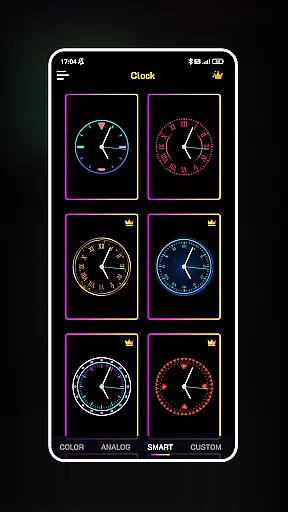
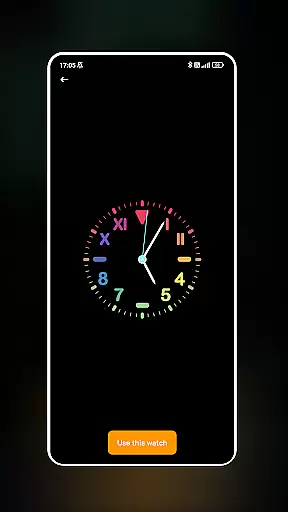
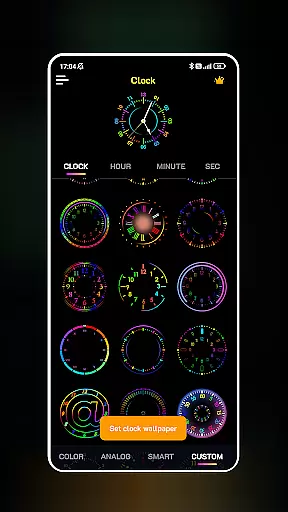
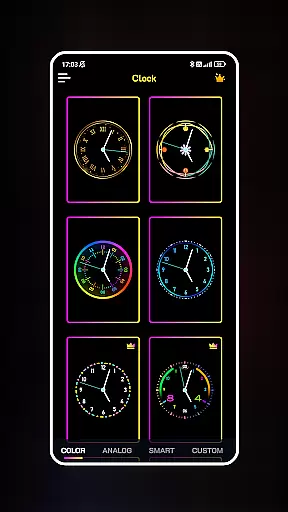
Neon Clock Wallpaper is a dynamic personalization app that allows users to design and set unique, art-inspired clocks as their device's wallpaper. This app caters to those looking to express their individuality through creative clock designs on both home screens and lock screens.
The app offers diverse templates with customizable features such as colors, sizes, and styles, along with stunning neon effects. Whether you're seeking a vibrant aesthetic or a minimalist look, Neon Clock Wallpaper provides the tools to craft a personalized digital environment that stands out.
Ideal for users who appreciate aesthetics and functionality, this app transforms any smartphone into a personal canvas, enhancing both the visual appeal and utility of your device.
Neon Clock Wallpaper boasts an array of features designed to maximize customization. Users can choose from a wide selection of pre-made clock templates, each offering various designs and color schemes to suit different tastes.
For those seeking complete creative control, the app enables the creation of custom clocks by combining preferred components and adjusting settings like colors, sizes, and styles. The inclusion of vibrant neon effects adds an eye-catching touch to every design.
Additionally, the app supports dual functionality by allowing users to set their creations as both wallpaper and lock screen displays. This versatility ensures that your personalized clock remains visible and accessible at all times, making it both a stylish and practical addition to your device.
Customization is at the heart of Neon Clock Wallpaper, allowing users to express their unique style through diverse clock designs. This app offers a rich selection of customization options that cater to various preferences and aesthetics.
The app provides an extensive range of pre-made clock templates, each with unique designs and color schemes. Users can choose from these templates to instantly transform their device's appearance or take it a step further by personalizing every element of the clock. From adjusting colors and sizes to selecting different styles, the level of control ensures that no two clocks will look the same.
With features like vibrant neon effects, users can add an eye-catching touch to their screens. These effects not only enhance visual appeal but also make each clock truly unique. The ability to customize every detail means that users can create a clock that perfectly matches their personal taste and device aesthetics.
This high degree of customization provides significant value to users who want their devices to stand out. Whether for personal satisfaction or to showcase individuality, Neon Clock Wallpaper empowers users to design a clock background that is distinctly their own.
Theme compatibility is crucial for ensuring that customized clocks maintain visual consistency across different devices and operating systems. Neon Clock Wallpaper excels in this area by providing seamless integration with various device themes and settings.
The app supports both wallpaper and lock screen customization, allowing users to apply their designed clocks consistently across different display modes. This ensures that the clock remains visible and functional whether the device is in use or locked. The application maintains perfect synchronization between the home screen and lock screen displays, creating a cohesive visual experience.
Neon Clock Wallpaper achieves excellent compatibility with most modern Android devices, adapting to different screen resolutions and aspect ratios. The app automatically adjusts clock elements to fit various screen sizes without compromising quality or design integrity. This adaptability ensures that custom clocks look sharp and professional on any device.
By maintaining consistent theme compatibility, the app enhances user experience while preserving the intended design aesthetic. This feature allows users to enjoy their personalized creations without worrying about formatting issues or visual inconsistencies across different device states.
Highly customizable
Vibrant neon effects
User-friendly interface
Dual screen support
Unique templates
May drain battery
Limited free options
Design complexity
Occasional glitches
Ads in free version

A Colorful and Minimal icon pack in an Outline Style - Over 13,600 icons!
 4.70
4.70
A light in the dark, a unique style and an andless cutomization!
4.30
A launcher for Samsung Good Lock and Good Guardians modules without ads
4.70
Over 28,000 high quality icons to bring color & homogeneity to your phone.
4.60
Want to make your phone more special than ever?
4.60
Launcher OS™ Pro without ads help make your phone simple and pretty
4.30
HappyLighting is a Bluetooth lamp control software.
3.40
Yandex Browser — stylish and secure, with voice search and data compression
4.40
One 8 icons glass color version
4.80
Gun Chase - Let the chase begin.
4.80
Wallpaper HD 4K Live - Thousands of high-quality Anime backgrounds for you.
4.80
Personalize your phone with stunning HD and 4K wallpapers!
4.70
Classic analogue watch face. For wear os devices.
4.60
Unique Android Launcher
4.60
Themes - Widget & Wallpaper: Customize home screen, icon changer w unique themes
4.30
Romantic Kiss Stickers App. Start romantic messaging now!
4.30
Wear Os Watch Face - Seasonal - Animated Snow Effect - 9 Animals
4.20
Organize and manage your photos and videos effortlessly with Photo Gallery
4.20
Prank your friends with realistic broken screen and cracked HD effects!
4.3


User Reviews