
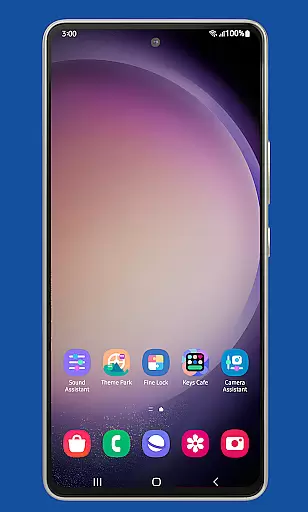
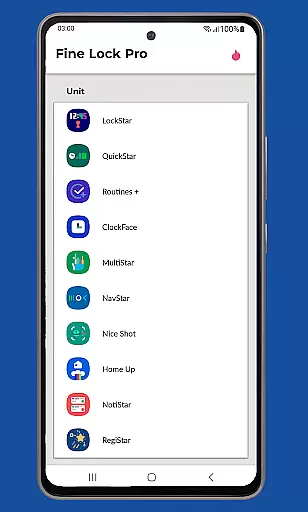
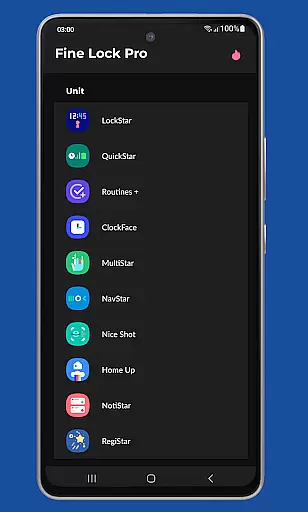
Fine Lock is a specialized launcher app designed exclusively for Samsung devices running official One UI. It enables users to access and utilize Good Lock and Galaxy Labs modules, which are typically restricted to specific markets. By creating shortcuts to these modules on the home screen, Fine Lock streamlines the customization and optimization of the Android experience on Samsung devices.
The app offers PRO features such as dynamic wallpapers that adapt to Dark/Night modes, background update checks, and the ability to hide uninstalled modules. These functionalities enhance user convenience while maintaining compliance with Google Play policies. Fine Lock is an essential tool for power users seeking advanced personalization options on their Samsung smartphones.
Fine Lock stands out with its unique ability to act as a launcher for Good Lock and Galaxy Labs modules, making advanced customization accessible to more users. The app provides dynamic wallpaper functionality that automatically adjusts based on the device's Dark/Night mode settings, offering a personalized visual experience.
Additional notable features include module app shortcuts on the home screen for quick access, background checks for updates to ensure modules are current, and the option to hide modules that aren't installed. These features collectively enhance usability and streamline the management of customization modules, providing a seamless experience for Samsung device owners.
Fine Lock offers a unique approach to personalizing Samsung devices by acting as a launcher for Good Lock and Galaxy Labs modules. These modules provide an extensive range of customization options that allow users to tailor their Android experience on Samsung devices with official Oreo and One UI.
With Fine Lock, users can access features such as module app shortcuts on the home screen and dynamic wallpapers that adapt to the device's Dark/Night modes. This level of customization ensures that each user can create a personalized interface that suits their preferences and needs.
The availability of PRO features enhances the customization experience by allowing background checks for updates and the ability to hide uninstalled modules. Such options ensure that the user's home screen remains clutter-free and up-to-date with their preferred functionalities.
Theme compatibility is at the heart of Fine Lock's functionality, ensuring that all visual customizations are seamlessly integrated into the Samsung deviceu2019s One UI. The app supports themes that change based on the device's Dark/Night mode settings, provided the device runs on Android 9 or later.
Users looking for a cohesive look across their device will appreciate how Fine Lock maintains theme consistency even when switching between different modes. This compatibility allows for a smooth transition and unified aesthetic throughout the user interface.
It is important to note that Fine Lock is specifically optimized for Samsung devices running official Samsung's Android versions. This targeted optimization guarantees that themes and customizations display correctly without causing instability or crashes on supported models.
Enhances Samsung device UI
Dynamic wallpaper feature
Background update checks
Module shortcut creation
Compliance with Google Play
Limited to Samsung devices
Doesn't support AOSP OS
Modules need separate download
PRO features require purchase
Potential compatibility issues

Customizable Glass widgets. Over 360+ stunning widgets and more!
 4.70
4.70
Ultra realistic high quality analog watch face for Wear OS.
4.60
A retro cartoon style watch face and a punch right in the face of the copyright
4.60
More than 3000+ themes and 9000+ wallpapers for everybody!
4.10
300+ Stunning and well-designed widgets inspired by NOTHING.
4.70
Enjoy a variety of amazing live wallpapers and colorful EDGE lighting borders!
4.80
Magic fluids wallpaper 4D: Relax with stunning fluid simulation wallpaper app
4.20
Fast SMS & group chat - use GIFs and emojis from your home screen launcher.
4.50
Install amazing sticker packs: endless styles, always cool.
4.70
Only for Wear OS devices!
4.90
Unique Android Launcher
4.60
Stylish Pink Cute Hippo keyboard with 10000+ customized keyboard themes!
4.60
Transform your phone with Launcher iOS 26 - Smooth & elegant iOS experience
4.50
200+ Material Inspired Widgets
4.50
Launcher OS™ Pro without ads help make your phone simple and pretty
4.30
Adult video chat, dating, making friends, random matching
4.20
Realistic animated snow on your wrist, with 10 images landscapes to choose from
4.00 3.50
3.50
Interactive Miniature Painting Catalogue
3.30


User Reviews