
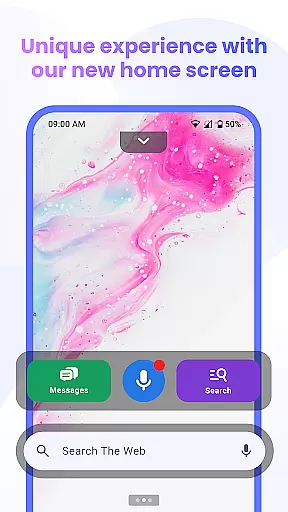

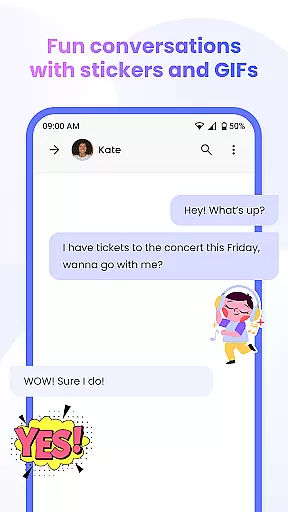
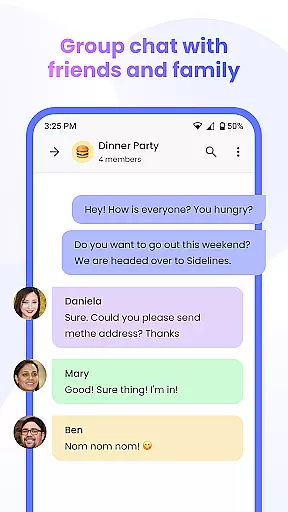
Messenger Chat Home is a unique personalization app that transforms your Android home screen into an efficient messaging hub. This innovative application allows users to send and receive SMS & MMS messages, initiate group chats, and express themselves with free stickers, GIFs, and emojis without leaving the home screen. The app combines the simplicity of traditional texting with the advanced functionality of a modern launcher, offering a clutter-free communication experience.
Designed for users seeking speed and organization, Messenger Chat Home provides instant access to the inbox and recent chats through its home screen launcher. The inclusion of creative elements like stickers and GIFs enhances personal expression while maintaining a lightweight, ad-light environment. Whether you're handling quick texts or managing group conversations, this app ensures every interaction is smooth, private, and easily accessible.
Messenger Chat Home stands out with its comprehensive feature set tailored for seamless communication. One of its key features is the ability to send and receive SMS & MMS messages directly from the home screen, eliminating the need to switch between apps. The home screen launcher offers one-swipe access to your inbox and recent chats, streamlining the messaging process.
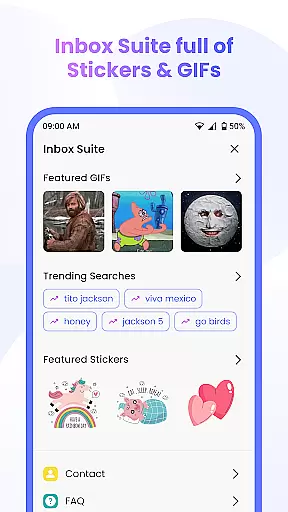
The app also includes creative tools such as free stickers, GIFs, and emojis, allowing users to personalize their chats. Group chat functionality supports media sharing, making it easy to connect with friends and family. Additionally, the smart widget enables quick previews and replies to unread texts. With voice-to-text capabilities, users can dictate messages hands-free, enhancing convenience. These features collectively deliver a fast, reliable, and expressive messaging solution adaptable to everyday needs.
Customization is at the heart of Messenger Chat Home, allowing users to tailor their messaging experience to fit their personal style. With a wide array of customization options, users can modify their chat backgrounds, choose from different themes, and even adjust notification settings to suit their preferences.
The app offers thousands of free stickers, GIFs, and emojis that bring conversations to life. These elements not only enhance expressiveness but also provide a fun way to communicate with friends and family. The ability to personalize messages ensures that every interaction can be as unique as the user desires.
Messenger Chat Home's customization extends beyond aesthetics; it includes functional aspects such as voice-to-text dictation, which allows for hands-free messaging. This feature is particularly useful when multitasking or in situations where typing is not convenient, making communication seamless and efficient.
Theme compatibility in Messenger Chat Home ensures that users can enjoy a consistent and visually pleasing experience across different devices and screen sizes. The app supports various themes, enabling users to switch between light and dark modes or apply custom themes that match their device's overall look and feel.
This flexibility in theme selection helps reduce eye strain and makes reading messages more comfortable, especially during nighttime use. By prioritizing user comfort and accessibility, Messenger Chat Home demonstrates its commitment to delivering a superior user experience.
In addition to aesthetic benefits, theme compatibility contributes to the app's performance optimization. Themes are designed to be lightweight, ensuring that they do not consume excessive battery or storage space. This attention to detail underscores the app's dedication to maintaining both form and function without compromising on quality.
User-friendly interface
Free creative content
Fast message access
Lightweight design
Privacy-focused
Limited customization
Few third-party integrations
Occasional bugs
No iOS support
Basic privacy features

Ultra realistic gold analog watch face with lots of customization options.
 4.50
4.50
Fingerprint Lock Screen & Live Animations with 4K Wallpapers as Live Wallpaper
4.40
Over 28,000 high quality icons to bring color & homogeneity to your phone.
4.60
Transfer your live wallpapers from Windows to Android using Wallpaper Engine!
4.00
Stylish Pink Cute Hippo keyboard with 10000+ customized keyboard themes!
4.60
300+ Stunning and well-designed widgets inspired by NOTHING.
4.70
400+ Beautifully crafted widgets inspired by NOTHING.
4.70
Your home screen, just the way you like it.
4.30
Cool custom fonts & keyboard themes! Symbols & font changer for Instagram
4.50
Ultimate Gallery Lock App - Hide Pictures, Videos and Lock Apps Instantly!
4.60
Stunningly Different look with Line Icons and Neon Colors
4.60
Embrace the Night. Unleash the power of darkness with Raven Dark Icon Pack
4.60
A light in the dark, a unique style and an andless cutomization!
4.30
The definitive Icon pack maker and editor
4.30
Run multiple accounts of the same app on a single device
4.10
Customizable flower power digital watch face for Wear OS watches.
4.00
Create unique, fun emojis with Funny Emoji Maker! Unlimited creativity!
4.00
Prank your friends with realistic broken screen and cracked HD effects!
4.4
Modern Glass Icon Pack with glossy icons, clean minimal theme & aesthetic style
4.5


User Reviews