
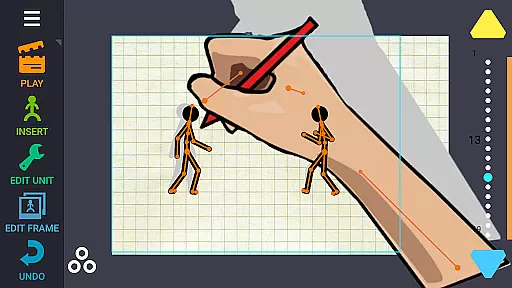
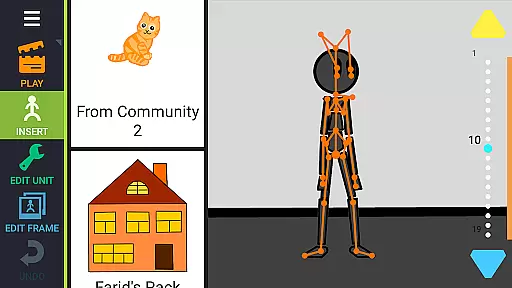
Draw Cartoons 2 PRO is a comprehensive 2D animation application designed for both beginners and advanced animators. The app simplifies the complex process of cartoon creation through innovative motion smoothing techniques, allowing users to set only the start and end positions of characters. This feature creates smooth, natural movements without requiring frame-by-frame animation.
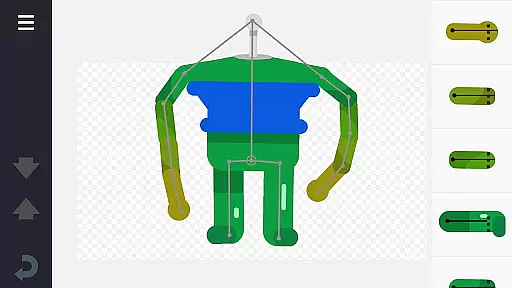
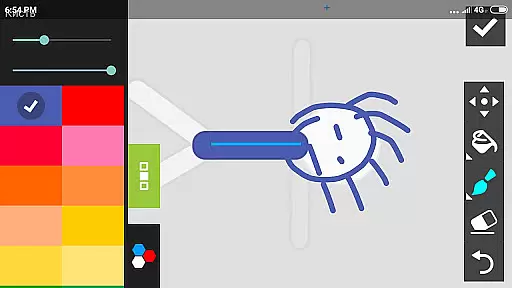
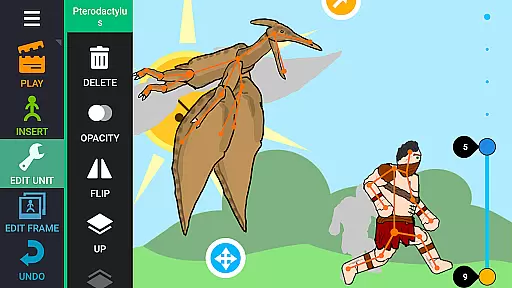
The app provides an extensive library of pre-made characters and objects, including dragons, people, cars, and more. Additionally, it features a powerful character editor that enables users to create custom creatures and objects using 'bones.' Users can draw directly within the app or import images from photos. Advanced tools like dramatic camera angles and speed effects offer professional-grade capabilities for creating dynamic animations.
With Draw Cartoons 2 PRO, you can add music or voiceovers to your cartoons, save them as MP4 videos or GIFs, and share them on platforms like YouTube using the tag #drawingcartoons2. The app also supports saving and sharing individual elements, fostering a collaborative community of animators who can exchange assets and ideas.
Draw Cartoons 2 PRO stands out with its unique combination of user-friendly features and advanced animation tools. One of its key features is the motion smoothing technique, which drastically reduces the complexity of animating by automatically generating intermediate frames between key poses. This allows even novice animators to create professional-looking animations with minimal effort.
The app includes a vast library of ready-to-use characters and objects, each constructed from a skeleton of several bones. These elements can be easily manipulated to create custom animations. For those seeking more creative control, the built-in character editor lets users design their own characters and objects by assembling 'bones' and drawing directly within the app. You can also import external images to incorporate into your projects.
Advanced animators will appreciate the additional tools available, such as the virtual camera for dramatic close-ups and speed effects for controlling the pacing of individual scenes. The ability to add music and voiceovers enhances storytelling possibilities, while the option to export animations in MP4 or GIF formats ensures compatibility with various platforms. Furthermore, the active community and asset-sharing system encourage collaboration and creativity among users.
In Draw Cartoons 2 PRO, the comprehensive suite of creative tools empowers users to craft intricate 2D animations with ease. The application provides a library filled with diverse characters and objects, ranging from mythical creatures like dragons to everyday items such as cars.
With the built-in character editor, animators can construct unique figures by assembling 'bones' into custom creations. This feature is complemented by the ability to either draw directly within the app or import images to be used as bones, thus offering flexibility in design.
Beyond basic animation capabilities, advanced features include dramatic camera angles for those intense close-up scenes and speed effects that allow manipulation of time - slowing down or speeding up sequences at will. These tools ensure that every animator has what they need to bring their vision to life.
The canvas and format flexibility in Draw Cartoons 2 PRO allows creators to produce animations that are not only visually captivating but also versatile in their final output. Users can save their masterpieces in various formats, ensuring compatibility across different platforms and uses.
Animations crafted within the app can be exported as high-quality MP4 video files or GIFs, making it convenient for sharing on social media or uploading to platforms like YouTube. By using the tag #drawingcartoons2, animators can connect with a community of fellow creators and showcase their work.
Moreover, individual elements created within the app can be saved separately and shared with others, fostering a collaborative environment where unique characters and objects can be exchanged among users. This ecosystem encourages creativity and expands the possibilities for all members involved.
User-friendly interface
Extensive library of assets
Powerful character editor
Advanced animation tools
Active community support
Steep learning curve
High system requirements
Limited free content
Occasional bugs
Premium price tag

AI generated images & photos, turn your words into drawing, painting & pictures.
 4.30
4.30
Stylish letters, Stylish Keyboard, Symbols, Emojis, Cool nickname
4.40
Art of Combination Wear OS Watch faces
4.5
Draw beautiful mandala's very easily
4.60
Turn your drawings into flipbook-style animations with simple creative tools
4.60
Unleash the artist in you with our AR drawing and tracing tool for photo drawing
4.10
Share the joy of painting with ibis Paint! Drawing anime and manga art.
4.50
How to draw anime step by step for beginner easily by AR drawing sketch & paint.
3.60
Multiplayer Drawing game, Coloring, Painting・Sketch, Handwriting・Paint, draw
4.30
Convert image to JPG PNG HEIC PDF, support almost all kinds of image formats
4.70
Create neon drawing with magic doodle and fun doodle art effects!
4.50
AI Tattoo Generator: Create Tattoo Designs & Get Ideas! Ink & Stencil Maker
4.50
Photo blender app to create overlay photos & double exposure.
4.40
Create Logos, Tattoos, AI Art & more with our AI Photo Generator & Design Editor
4.20
AR Anime Drawing: How to draw anime with AR drawing & sketching apps!
4.00
Resize photos and print photos in exact size with our powerful photo printer!
3.80
Your homescreen as an elegant glass with customized blur, lighting, and visuals.
3.70
Download now for a stylish and functional timepiece
4.1
A luxurious gold watch face for an elegant and refined look.
4.1


User Reviews