
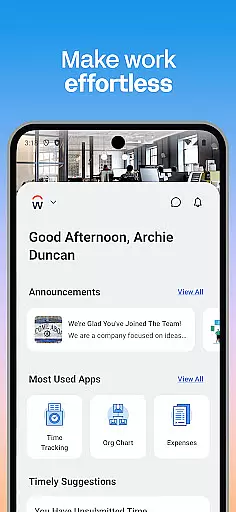
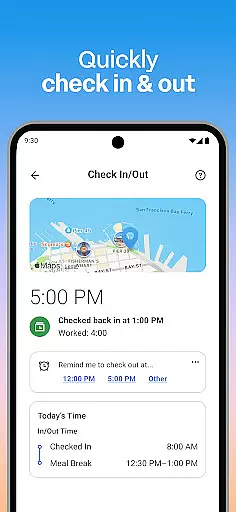
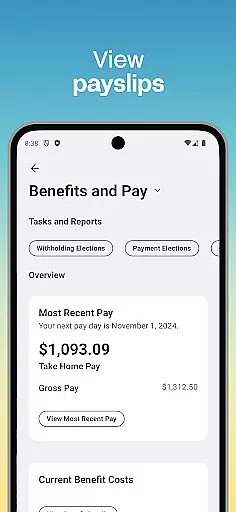
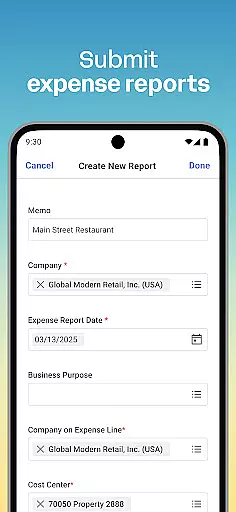
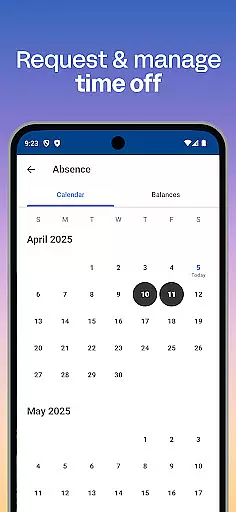
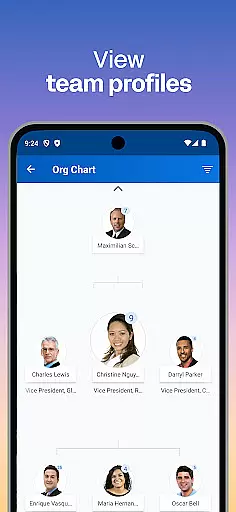
Workday is a comprehensive business management application designed to enhance workplace productivity through its all-in-one platform. The app provides users with essential tools and insights needed for efficient task management, team collaboration, and personal development. With features ranging from time tracking and payroll access to learning new skills, Workday ensures that both employees and managers can maintain high levels of productivity while on the go.
A key highlight of Workday is its ability to cater to various user roles within an organization. Employees can easily check in to work, request time off, and view payslips, while managers gain additional capabilities such as approving requests, managing employee roles, and conducting performance reviews. This versatility makes Workday suitable for diverse business environments where flexibility and accessibility are crucial.
The true value of Workday lies in its intuitive design and robust security measures. By organizing essential workplace functions into a single, easy-to-navigate interface, the app streamlines daily operations and enhances user experience. Furthermore, with enterprise-grade security features including biometric authentication and cloud-based data storage, users can trust that their information remains protected and up-to-date, even if their device is lost or stolen.
Workday distinguishes itself through a rich set of features designed to optimize business operations across multiple dimensions. One of its most notable aspects is the comprehensive task management system that allows users to handle nearly all Workday-related activities from their mobile devices. From submitting timesheets and expenses to requesting time off and viewing payslips, the app consolidates essential HR functions into a single, accessible platform.
For managerial staff, Workday offers advanced tools that simplify team oversight and administrative duties. Managers can approve employee requests with a simple tap, adjust roles, manage payroll, and conduct performance evaluations using interactive reports and dashboards. These features not only save time but also improve decision-making by providing real-time insights into team performance and organizational metrics.
Beyond its core functionalities, Workday excels in delivering a personalized and secure user experience. The app's flexible interface allows users to customize their workspace and quickly access frequently used features. Meanwhile, enterprise-level security measures, including biometric authentication and cloud-based data storage, ensure that sensitive information remains protected. This combination of customization options and robust security protocols makes Workday an ideal solution for modern businesses seeking to enhance operational efficiency while maintaining data integrity.
Collaboration is at the heart of workplace productivity, and Workday excels in providing tools that enhance team cooperation. Through its intuitive interface, users can easily connect with teammates, approve employee requests, and manage team roles with a simple tap.
The app offers interactive reports and dashboards, allowing managers to efficiently track hours and view employee timesheets. This functionality ensures that teams are always aligned and informed about project progress and individual contributions.
Workday also supports seamless communication by integrating learning opportunities directly into the workflow. Employees can access training videos and discover internal gigs or job opportunities, fostering both personal and professional growth within the organization.
By centralizing these collaborative features, Workday not only streamlines daily operations but also strengthens team dynamics, ultimately driving better business outcomes.
Effective task management is crucial for maintaining productivity, and Workday provides comprehensive tools to help users stay on top of their responsibilities. With features like push notification reminders, employees never miss important deadlines or tasks such as submitting timesheets and expenses.
For managers, the ability to approve requests, adjust employee roles, and give performance reviews through the app ensures that administrative duties do not hinder overall productivity. These streamlined processes save time and reduce the complexity often associated with HR tasks.
Additionally, employees can conveniently request time off, check in and out of work, and view payslips directly from their mobile devices. This level of accessibility empowers users to manage their work-life balance effectively while staying engaged with their professional responsibilities.
Overall, Workday's robust task management capabilities ensure that both employees and managers can focus on what truly matters u2013 achieving organizational goals efficiently and effectively.
User-friendly interface
Comprehensive HR tools
Real-time notifications
Cloud-based security
Customizable features
Limited free version
Occasional bugs
Steep learning curve
High subscription cost
Complex setup process

Find jobs and make money fast with JobStack.
 4.60
4.60
All Your Gig Work. One App.
4.30
FX Plus adds media, networking, and cloud capabilities to FX File Explorer.
4.10
VSD Viewer - Visio Drawings Viewer for Android Preview VSD, VDX, VSDX drawings
4.10
FaxCover - Create fax cover pages. Works with any app or fax machine.
4.90
Earn free swag, G-Cards & food • Enter sweepstakes • Find stores • So much more.
4.70
Use Generative Summary to understand your rental or insurance docs in seconds.
4.70
Find jobs near you and temp work in minutes, from your phone.
4.50
Earn money with the driver & delivery partner app for Uber, UberEats & Postmates
4.60
Get instant construction estimates: accurate home repair & material calculator.
4.70
AI-powered document scanner with auto enhance for perfect PDFs.
4.60
Finance, Investing, Stocks, Trading and Stock news
4.60
Paychex Flex - Save Time and Stay Connected
4.60
Mobile POS for any business: sales, invoices, retail, restaurants & appointments
4.60
From Gone to Back Again — In Just a Few Taps
4.50
Shop, deliver, and earn with the Spark Driver™ App
4.10
Zoom built for Chrome OS
3.90
Simple, Fast & Lightweight
3.90
Roadie connects people with stuff to send with drivers already going that way.
3.50


User Reviews