

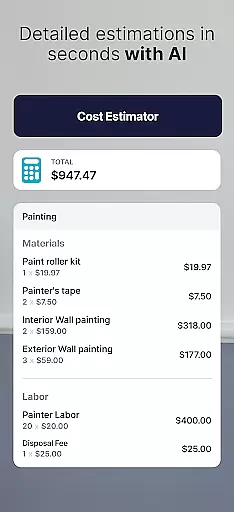


SimplyWise Cost Estimator is a cutting-edge construction cost estimation tool designed to streamline the planning of home repair and renovation projects. This app leverages advanced AI technology to deliver precise cost estimates for both labor and materials within just six seconds. Whether you're a homeowner planning a small DIY project or a contractor managing multiple construction sites, SimplyWise provides reliable financial insights that help you stay within budget and avoid unexpected expenses.
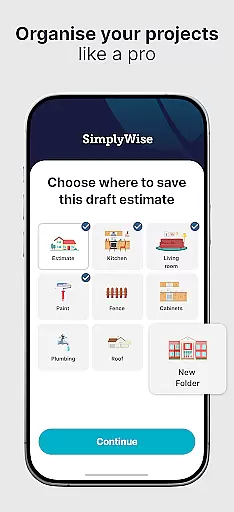
The app goes beyond basic estimation by offering integrated receipt scanning and document management features. Users can create custom folders to organize their project expenses, while the built-in OCR technology automatically categorizes and tracks spending. The system generates detailed financial reports that break down costs, helping users maximize tax returns and maintain meticulous financial records. This comprehensive approach to project cost management makes SimplyWise an indispensable tool for anyone involved in construction or home improvement projects.
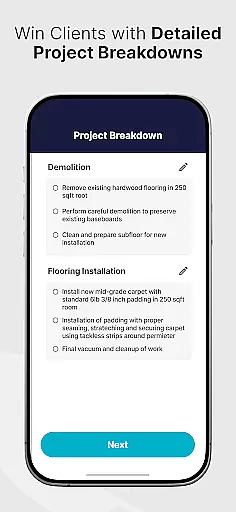
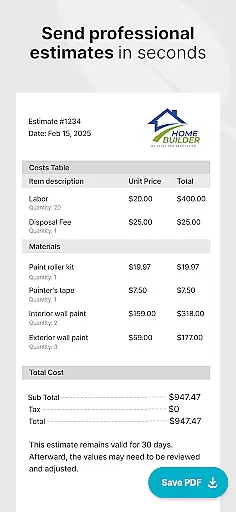
SimplyWise Cost Estimator distinguishes itself through its innovative combination of AI-powered estimation and robust expense management features. The core functionality begins with its intelligent photo-based estimation system, where users simply capture images of their project space and describe their requirements. The AI engine then analyzes these inputs to generate detailed cost breakdowns that include both material and labor expenses, complete with professional-grade PDF reports ready for client presentation.
Beyond estimation, the app incorporates enterprise-grade OCR technology for receipt and document scanning. This feature allows users to digitize physical receipts and automatically categorize expenses into customizable folders. The system's automated reporting capabilities provide itemized financial summaries that help users track project spending and optimize tax deductions. Additionally, the platform supports real-time estimate adjustments and includes AI-driven quality checks that ensure accuracy before finalizing any cost projections.
These features collectively enable contractors and homeowners to maintain complete financial control over their projects while benefiting from professional-grade documentation and reporting tools.
Effective collaboration is essential for successful project management, and the SimplyWise Cost Estimator excels in this area. The app allows users to seamlessly share detailed estimates with clients in PDF format, ensuring clear communication between all parties involved.
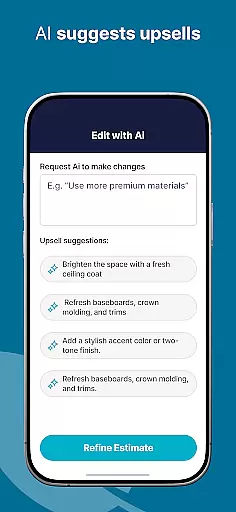
The collaborative features extend beyond simple sharing. Contractors can easily adjust construction estimates based on client feedback, while the AI-powered system flags important details for review. This ensures that every stakeholder remains informed and engaged throughout the project lifecycle.
Furthermore, the app's document scanning OCR technology enables teams to organize project-related expenses efficiently. Custom folders help maintain structured financial records, making it easier for multiple team members to access and manage crucial project information.
This collaborative approach not only streamlines communication but also helps prevent costly misunderstandings. By providing a centralized platform for sharing and updating estimates, SimplyWise facilitates better decision-making and more efficient project execution across all team members.
Task management is a critical component of any construction project, and SimplyWise Cost Estimator offers robust tools to keep projects organized and on track. The app allows users to create and save detailed project estimates, which can be updated as work progresses, ensuring accurate tracking of evolving project requirements.
Each estimate includes comprehensive breakdowns of material and labor costs, enabling precise financial planning. Users can easily modify these estimates based on changing project needs or unexpected developments, maintaining complete control over their budgeting process.
The app's receipt scanning feature enhances task management by automatically categorizing expenses and generating itemized financial reports. This functionality helps users monitor actual spending against estimated costs, facilitating better financial oversight throughout the project duration.
Additionally, the ability to save and update projects as they progress provides valuable historical data for future reference. This feature not only improves current project management but also serves as a learning tool for enhancing estimation accuracy in subsequent projects.
Accurate Estimates
User-Friendly Interface
Advanced AI Technology
Comprehensive Reporting
Integrated Expense Tracking
Premium Subscription Required
Limited Free Features
Occasional AI Errors
Internet Connection Needed
Learning Curve Present

The revolutionary flexible staffing platform
 4.40
4.40
viewing and sharing PDFs and other files—anytime, anywhere!
4.0
Amazon A to Z is the place to manage your work-life at Amazon.
4.50
One marketplace. Hundreds of services. Unlimited possibilities. All on Fiverr.
4.40
USPS Mobile®Access USPS.com’s most popular tools on-the-go.
4.70
Job search app that finds jobs for you! Takes the work out of looking for a job!
4.90
Permission Guard is a security app that helps you manage app permissions.
4.80
Say hello to the mobile work experience built to help you thrive at work.
4.30
Make money as a delivery driver with DoorDash and work when you want as a Dasher
4.30
AI-powered document scanner with auto enhance for perfect PDFs.
4.60
Finance, Investing, Stocks, Trading and Stock news
4.60
Mobile POS for any business: sales, invoices, retail, restaurants & appointments
4.60
No more passwords, easier sign-in, and greater protection for your accounts.
4.60
From Gone to Back Again — In Just a Few Taps
4.50
Scan Business Cards & Conference Badges - Capture Leads at Events & Tradeshows
4.20
Smarter career moves start here. AI job alerts, insights & the right tools.
4.20
The Penny Puss app with DG penny finder
4.10
Shop, deliver, and earn with the Spark Driver™ App
4.10
viewing and sharing of PDFs
3.60


User Reviews