
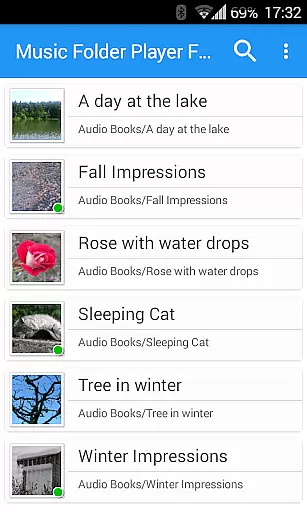
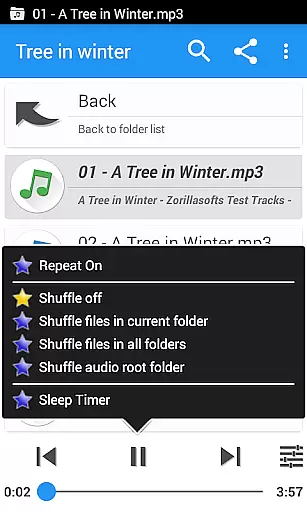
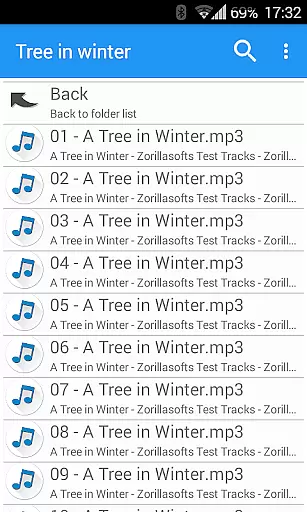
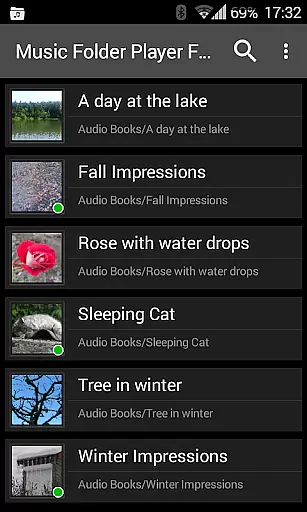
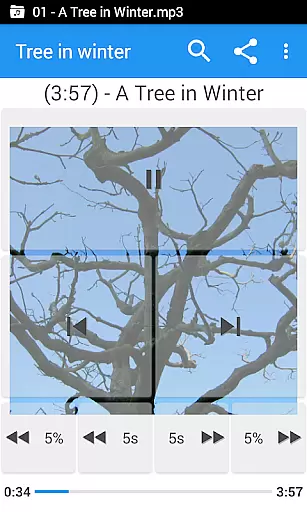
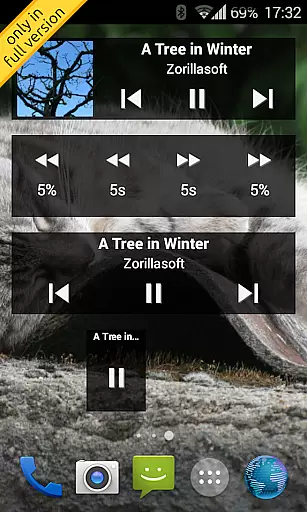
Music Folder Player Full is a specialized audio player designed for users who prefer organizing their music files in folders rather than traditional categories like artist or album. The app offers a unique folder-based playback experience, making it ideal for those with custom file organization systems.
The player stands out with its advanced features tailored for audiophiles and podcast enthusiasts alike. Key functionalities include resume playback where you left off in each folder, multiple homescreen widgets for quick access, and a sophisticated equalizer with customizable settings. Whether you're managing a small music collection or a large library, this app provides intuitive navigation options and enhanced playback controls.
This full version removes ads and includes exclusive features like homescreen widgets and 432 Hz playback mode. The app's versatility extends to its support for various audio formats, speed control with pitch correction, and virtual room effects, making it an excellent choice for both casual listeners and audio professionals.
Music Folder Player Full boasts an impressive array of features that cater to diverse listening needs. The app implements Material Design principles, ensuring a modern and user-friendly interface across different Android versions. Its unique selling point is the comprehensive folder management system that allows users to maintain their preferred file hierarchy while enjoying seamless playback.
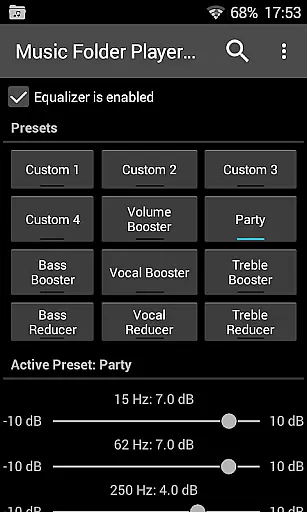
Among its standout features are four configurable seek buttons, perfect for navigating through podcasts and audiobooks with precision. The equalizer comes with eight predefined settings, including Bass Booster and Vocal Booster, alongside four customizable profiles. Advanced audio processing capabilities such as virtual room/reverb effects and pre-amplification enhance the listening experience significantly.
Additional professional-grade features include playback speed control with pitch correction (ideal for spoken content), Car/Sports mode with enlarged controls, and innovative gesture controls for volume adjustment. The implementation of these features demonstrates the developer's commitment to providing both basic playback functionality and sophisticated tools for audio enthusiasts.
Music Folder Player Full offers an extensive music library management system that allows users to organize their audio tracks in folders rather than traditional artist, album, or playlist categories. This unique approach provides a personalized and intuitive way to manage your music collection.
The application supports various audio formats, ensuring wide compatibility and reducing the need for format conversion. By organizing music into folders, users can easily locate and play their favorite tracks while maintaining full control over their library's structure and presentation.
Regarding copyright authenticity, Music Folder Player Full respects digital rights management (DRM) protocols, ensuring that all audio files are legally acquired and used according to their licensing agreements. This commitment to legal compliance protects users from potential copyright infringement issues.
With features like virtual folders for favorite songs and advanced search capabilities, users can create customized playlists and quickly find specific tracks or folders. These organizational tools enhance the overall music listening experience while maintaining the integrity of the original audio files.
One of Music Folder Player Full's standout features is its comprehensive audio quality options, which cater to both casual listeners and audiophiles. The application includes a powerful equalizer with four customizable settings and eight predefined options, such as Bass Booster, Vocal Booster, and Party setting, allowing users to fine-tune their listening experience.
For those seeking even more control, the app offers virtual room and reverb effects, creating immersive audio environments that enhance the depth and clarity of your music. These effects are particularly noticeable when using high-quality headphones or speakers.
The speed control feature with pitch correction enables users to adjust playback speed without affecting audio quality, making it ideal for podcasts and audiobooks. Additionally, the pre-amplifier function increases the volume of low-level recordings without introducing distortion or noise.
Advanced options like 432 Hz playback mode provide alternative tuning frequencies that some believe offer therapeutic benefits. All these features combine to create a versatile audio player that maintains exceptional sound quality across various listening scenarios.
User-friendly folder navigation
Advanced equalizer settings
Speed control with pitch correction
Configurable playback options
Ad-free experience
Limited traditional music library views
Complex for casual users
Requires file management skills
No built-in streaming services
Premium price tag

Fun & Easy Voice Changer – Record, Edit & Add Hilarious Effects!
 4.50
4.50
Make music anywhere. Turn your device into an instrument.
4.4
Enhance the sound quality of your devices, listen to what you want
4.50
Music Streaming suite for Ampache, Nextcloud Music and compatible backends.
4.1
Bass Booster & Volume Equalizer Pro improves your music and video sound quality
4.60
Super Sound Editor, Song Maker & Mixer, Vocal Remover, Voice Recorder & Changer!
4.60
Powerful 10-Band equalizer pro with sound booster improves Android audio quality
4.30
Play KORG’s revolutionary touch-based instrument on a variety of devices.
4.40
Versatile MP3 recorder with auto-backup to Dropbox and Google Drive
4.10
More downloads than any other metronome. Includes drum machine & tempo trainer.
4.80 4.70
4.70
Save hundreds of dollars for a physical strobe tuner and instead use this app.
4.50
Time Guru will strengthen your internal sense of musical time via random muting.
4.30
Bass Booster Pro takes auto-equalizing to the next level!
4.30
A sleek, no-frills player designed for true music lovers.
4.20
Sing, record, and create music together — enhanced by smart voice tools.
4.00
The ultimate media player for Android devices
3.90
Simple mp3 and mp4 player with advanced features.
3.40
Simply convert wav to mp3. Clear. Reliable. Safe.
4.4


User Reviews