

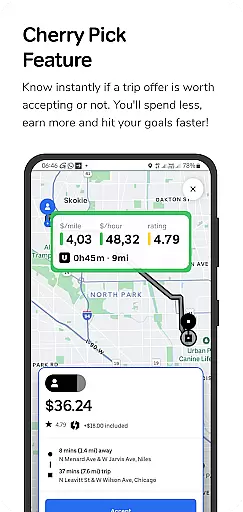
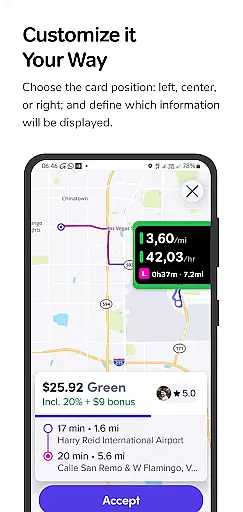
GigU is a smart assistant designed specifically for rideshare drivers in the US, helping them optimize their earnings on platforms like Uber and Lyft. The app's standout feature is its Cherry Pick system, which instantly evaluates trip offers to determine if they're worth accepting. This allows drivers to maximize their income while minimizing time spent on less profitable trips.
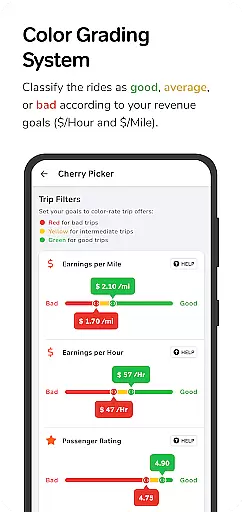
The application provides real-time analytics through its live smart indicators, showing key metrics such as earnings per mile, hour, and minute. It also features a colored grading system that rates trips based on user-defined preferences, making decision-making both fast and intuitive. With additional tools like quick map shortcuts and voice notifications, GigU ensures drivers can operate safely and efficiently without constant phone monitoring.
Whether you're a full-time rideshare driver or use it to supplement your income, GigU helps you hit your financial goals faster by ensuring every trip counts. Its privacy-focused design means no personal information is stored or shared, giving users peace of mind while they work.
GigU stands out with its comprehensive suite of features tailored for rideshare drivers. The Live Smart Indicators provide instant access to critical data points such as earnings per mile, hour, and minute, enabling drivers to make informed decisions about which rides to accept. This level of detail ensures maximum profitability for every trip taken.
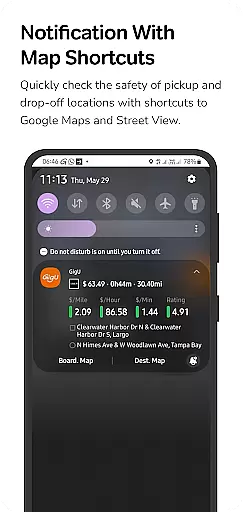
The Colored Grading System adds another layer of efficiency by categorizing trips into color-coded ratings based on user settings. This visual cue makes it easy to identify high-value trips at a glance, streamlining the selection process. Additionally, the Quick Maps Shortcut Notification allows drivers to quickly assess the safety of pickup and drop-off locations using Google Maps and Street View, enhancing overall security.
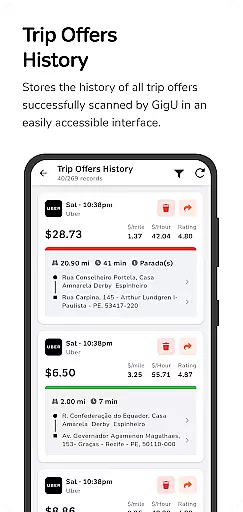
Voice notifications further improve usability by allowing drivers to receive important updates hands-free. Combined with the Trip Offers History feature, which logs all scanned ride offers, GigU creates a seamless experience that empowers drivers to focus on what matters most - earning more while driving less.
In the ridesharing industry, having access to detailed vehicle and trip information is crucial for drivers seeking to maximize their earnings. GigU provides comprehensive data on each ride offer, empowering drivers with critical insights before accepting a trip.
The app's smart indicators display essential metrics such as earnings per mile, hour, and minute, giving drivers a clear understanding of potential profitability. This granular information helps users make informed decisions about which rides to accept or decline.
GigU's colored grading system evaluates trips based on user-defined parameters, presenting quick visual cues through color-coded ratings. This innovative approach ensures drivers can rapidly assess trip quality while maintaining complete control over their selection process.
Price transparency is vital in the ridesharing ecosystem, and GigU excels in providing drivers with clear insights into the financial aspects of each ride offer. The application goes beyond basic fare information by offering detailed breakdowns of potential earnings.
Through its Cherry Pick feature, GigU instantly analyzes trip offers, displaying crucial financial metrics that help drivers understand their expected income. This includes precise calculations of earnings relative to time and distance, enabling better decision-making.
The app maintains complete transparency regarding its own operations as well. It clearly communicates that no personal information is collected or shared, and its accessibility services are exclusively used for analyzing ride offers when activated by the user.
User-friendly interface
Real-time earnings analysis
Enhanced security features
Customizable grading system
Privacy-focused design
Limited to rideshare platforms
Requires accessibility permissions
Premium features may cost extra
Occasional notification delays
Dependent on stable internet

OBD1 ECMs application. Data log or tune directly from your phone or tablet!
 4.60
4.60
Ferrari inspired analog & digital watch face with quick access and premium style
4.3
AlfaOBD software for Fiat Group cars native diagnostic
3.70
Better fuel to help keep you on the road
3.20
Buy and sell your boat
4.70
View your car’s service records and find out when maintenance is due.
4.70
Instantly redesign your car with AI. From sporty to futuristic, try it all.
4.50
Take state-specific DMV permit tests and ace the exam.
3.90
PayByPhone: A quick and easy way to pay for parking.
3.80
Get more out of your AAWireless adapter with this companion app | aawireless.io
4.80
The ExtraMile App allows you to pay for fuel from the comfort of your car!
4.70
Quick and easy car diagnostics to get you the right fix.
4.70
Find Fast EV Chargers | Charge Your Vehicle at 1,100+ Fast Car Charging Stations
4.60
CVT diagnostics with ELM327 for Nissan-based vehicles
4.40
Control maps, media and messaging, with the Google Assistant while you drive
4.10
BlueDriver® is a Premium Diagnostic OBD2 Scan Tool. www.BlueDriver.com
3.90
Discover new and used cars in Syria easily! Browse ads and connect with sellers.
3.70
O'Reilly Pro will streamline your parts lookup and ordering process!
3.20
DIY Vehicle Wheel Alignment
4.3


User Reviews