
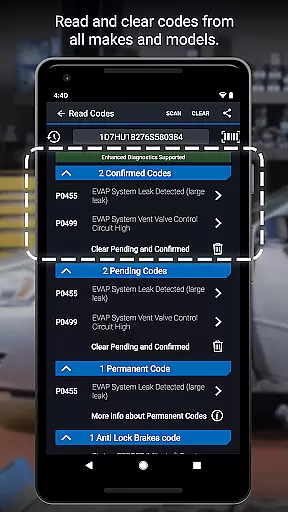
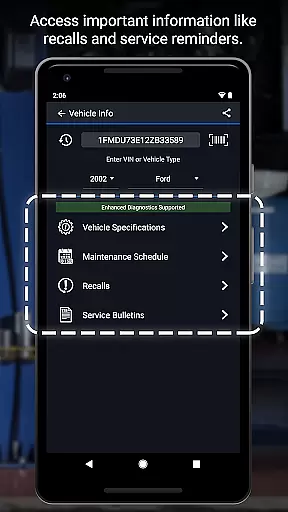
BlueDriver OBD2 Scan Tool is a professional-grade automotive diagnostic application that transforms your smartphone or tablet into an advanced vehicle scanning device. By pairing with the BlueDriver Bluetooth Sensor, this app allows users to read and clear diagnostic trouble codes, generate detailed repair reports, and access live data from their vehicle's onboard systems.
The application supports a wide range of enhanced diagnostics including ABS, airbag, transmission, and check engine codes. Its key advantage lies in providing specific repair solutions based on millions of real-world fixes, all without requiring a subscription. Whether you're a professional mechanic or a DIY enthusiast, BlueDriver helps you understand your vehicle's issues through clear, easy-to-interpret information and enables smarter repair decisions.
This wireless diagnostic solution is particularly useful for annual vehicle inspections, pre-purchase evaluations, or routine maintenance checks. The ability to save and share professional-grade Repair Reports makes it an invaluable tool for both personal and commercial use, while its compatibility with multiple vehicle brands ensures broad usability across different markets.
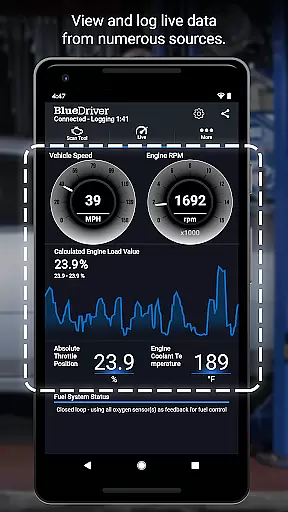
BlueDriver distinguishes itself through several innovative features that enhance the diagnostic experience. The app provides comprehensive Mode 6 on-board monitoring test results and allows users to view live data through multi-PID interactive graphing, enabling precise analysis of vehicle performance. Its wireless Bluetooth connectivity eliminates cumbersome cables while maintaining reliable communication with the vehicle's diagnostic port.
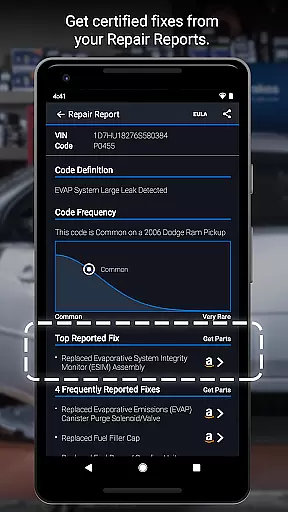
A standout feature is the app's ability to generate vehicle-specific Repair Reports based on VIN and trouble codes. These reports include likely fixes explained in plain language, making complex diagnostic information accessible to non-professionals. The application supports enhanced diagnostics for major manufacturers including GM, Ford, Toyota, and Nissan, with specific coverage varying by region and model year.
Additional notable features include metric/imperial unit selection, smog readiness checks, and freeze frame data capture. The app maintains a database of millions of real-world fixes and works globally with the BlueDriver Sensor. Users can even preview Repair Reports without a sensor by entering their VIN and trouble code, demonstrating the app's commitment to accessibility and user-friendly design.
Accessing detailed vehicle information is crucial for effective diagnostics and maintenance. BlueDriver OBD2 Scan Tool provides comprehensive data about your vehicle's condition, including trouble codes from various systems like ABS, airbag, and transmission.
The app generates professional-grade Repair Reports tailored to your specific vehicle's year, make, and model. These reports not only list the issues but also suggest likely fixes in plain language, making it easier for both professional mechanics and DIY enthusiasts to understand and address problems.
With features like Mode 6 on-board monitoring test results and live data graphing, users can dive deep into their vehicle's performance metrics. This level of detail ensures that you have all the necessary information at your fingertips to make informed repair decisions.
By offering enhanced diagnostics coverage for a wide range of car models and brands, BlueDriver empowers users with precise insights into their vehicleu2019s health, ensuring optimal performance and safety.
Price transparency is essential when selecting an automotive diagnostic tool. BlueDriver OBD2 Scan Tool stands out by being free to install, allowing users to explore its features without any initial cost. The only expense comes from purchasing the separate BlueDriver Bluetooth Sensor, which unlocks the full functionality of the app.
Unlike many other diagnostic tools that require subscriptions or additional fees, BlueDriver offers a one-time purchase solution. This approach eliminates recurring costs while still providing access to millions of real-world fixes and advanced diagnostic capabilities.
Users can preview Repair Reports using just their Vehicle Identification Number (VIN) and a trouble code, giving potential buyers insight into what they will receive before committing financially. This openness helps build trust and confidence in the product's value proposition.
Overall, BlueDriver ensures that customers know exactly what they are paying for upfront, enhancing satisfaction and trust through clear pricing structures and no hidden fees.
User-friendly interface
Comprehensive diagnostic coverage
No subscription fees required
Wireless Bluetooth functionality
Detailed Repair Reports
Sensor sold separately
Limited free features
Device compatibility issues
Occasional connection problems
Regional restrictions apply

ODB2 based monitoring application for the Chevy Bolt (2017-2021)
 4.00
4.00
Taximeter; the professional's choice
4.30
Realtime Charts is a plugin for the Torque Pro App (OBD 2 & Car)
4.20
Buy and sell your boat
4.70
Club Car Wash Mobile App—the fast lane to managing your wash membership.
3.30
Control maps, media and messaging, with the Google Assistant while you drive
4.10
By enthusiasts, for enthusiasts
4.00
Find, search, and browse 40,000+ used cars, SUVs, and trucks.
4.50
Marathon ARCO Rewards members earn rewards & apply the rewards for fuel savings!
4.80
Take Control of Your Car
4.80
Lexus app currently supports 2010 or newer vehicles (2018 or newer for Hawaii).
4.80
Find Your Local Store or Shop Online for the Car, Truck, or SUV Parts You Need
4.70
Browse millions of cars, track vehicle listings or sell your car today
4.70
OBDII - ELM327 Terminal tool for 96-00 Volvos
4.50
Autolist - The Largest Selection of Local Used Cars and Trucks
4.50
Your Path to Driving Licensing Success Begins Here! Develop your driving skills.
4.40
OBD2 car scanner and diagnostics: read Check Engine, DTC, economy....
4.30
Your car is talking. Start listening.
4.30
Theme for Car Launcher
4.2


User Reviews