
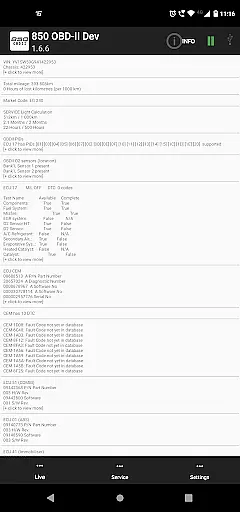
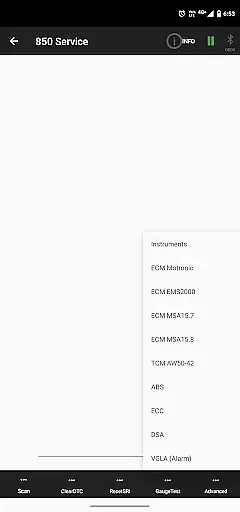
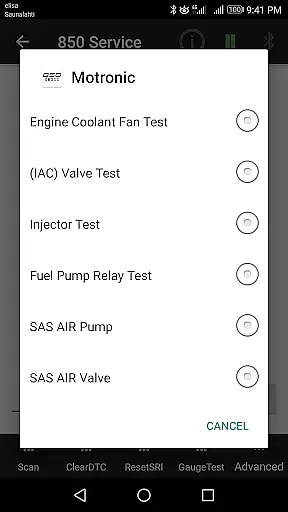
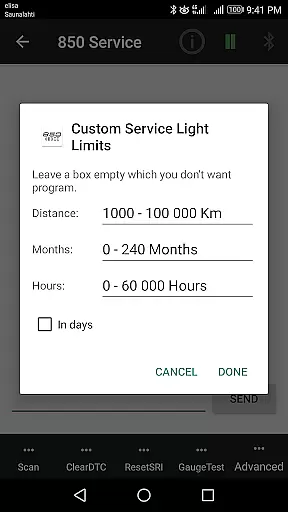
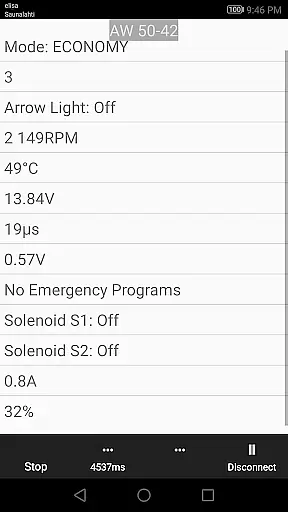
850 OBD-II is a specialized diagnostic tool designed for Volvo vehicles from 1996-2000, with support for P1 and P2 platforms. This app works seamlessly with ELM327 Bluetooth/Wi-Fi/USB dongles to provide advanced vehicle diagnostics and programming capabilities beyond standard OBD-II functions. It allows users to directly read individual modules, helping pinpoint issues that regular OBD-II scanners might miss.
The application supports a wide range of Volvo models including 850/900 series, S40/V40 up to 2004, S70/V70/XC70, C70 up to 2004, and P2 platform models from 2000 onwards. With features like Service Light reset, Fault Code reading and clearing, live sensor data monitoring, and advanced commands such as Injector Testing and VGLA Remote Programming, it offers comprehensive control over vehicle systems. Its detailed module coverage makes it an invaluable tool for both professional mechanics and car enthusiasts.
By providing access to Volvo-specific DTCs and live data from various systems like ABS, SRS, and ECM, this app delivers exceptional value for diagnosing and maintaining older Volvo models. The ability to customize and adjust module parameters through advanced commands adds another layer of functionality, making it possible to perform tasks previously only available at dealerships.
850 OBD-II stands out with its extensive feature set tailored specifically for Volvo vehicles. The app's main functionalities include Service Light reset, Fault Code reading and clearing, and real-time sensor data monitoring. These features allow users to not only diagnose but also program certain aspects of their vehicle's systems, going far beyond the capabilities of standard OBD-II scanners.
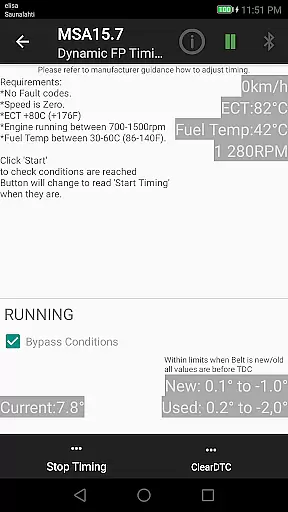
One of the key strengths of 850 OBD-II is its support for advanced commands across multiple vehicle systems. For instance, users can perform Injector Testing on Motronic M4.4 engines, adjust TDi Fuel Pump Dynamic Timing on MSA15.7 systems, and even conduct VGLA Remote Programming without needing dealership assistance. The app also provides detailed information about system components, including part numbers and configurations of ECUs, giving users unprecedented insight into their vehicle's inner workings.
Another notable feature is the app's ability to function as a terminal for ELM327, enabling users to send custom handwritten commands. This flexibility, combined with support for multiple command transmissions and comprehensive DTC translation for various Volvo-specific systems, makes 850 OBD-II an indispensable tool for in-depth vehicle analysis and maintenance. The app's continuous updates based on user feedback ensure that it remains relevant and effective for diagnosing a wide range of Volvo models.
Accessing detailed vehicle information is crucial for effective diagnostics and maintenance. The 850 OBD-II app goes beyond standard OBDII capabilities to provide comprehensive data about individual modules within supported Volvo models. This includes reading part numbers of ECUs, configurations, and even advanced commands like Injector testing and TDi Fuel pump Dynamic Timing.
The app supports a wide range of Volvo models, including 850/900 series, S40/V40 up to 2004, S70/V70/XC70, P80 year models 1999-2000, C70 up to 2004, and P2 platform models from 2000 onwards. Each model has specific module support, such as CDM, ABS, TCM, ECM, ECC, VGLA, and more. This ensures that users can access the exact information needed for their particular vehicle.
By providing access to Volvo-specific DTCs and live scrolling values from various systems like ABS/BCM, SRS, Instrument panel, and Automatic Gearbox, the app empowers users with precise diagnostic capabilities. This level of detail allows for accurate problem identification and resolution, saving both time and money in the maintenance process.
Price transparency in automotive diagnostic tools is essential for user trust and informed decision-making. The 850 OBD-II app offers its comprehensive diagnostic features free of charge, ensuring users have access to critical vehicle information without hidden costs. This approach contrasts with many other diagnostic tools that may require expensive subscriptions or offer limited functionality in their free versions.
All core functionalities, including Service Light reset, Fault Code Read & Clear, Live real-time sensor data, and Advanced Commands, are available without additional fees. Users can perform complex tasks like programming modules' parameters via Service Advanced commands or read basic standard OBDII information through Scan(P0* -codes) without worrying about extra charges.
The developer maintains transparency by clearly stating that the app doesn't have any tracking of users, and permissions requested are solely for Bluetooth functionality. This commitment to openness extends to acknowledging potential errors and bugs while actively seeking user feedback for continuous improvement. Such practices build confidence in the app's reliability and value proposition.
User-friendly interface
Comprehensive diagnostic tools
Advanced programming capabilities
Wide model compatibility
Regular updates and improvements
Requires specific hardware (ELM327)
Limited to supported Volvo models
Some features need CAN Bus adjustment
Potential firmware compatibility issues
No responsibility for damages

Taximeter; the professional's choice
 4.30
4.30
OBD2 car scanner and diagnostics: read Check Engine, DTC, economy....
4.30
AlfaOBD software for Fiat Group cars native diagnostic
3.70
Simplify your drive
3.90
The ExtraMile App allows you to pay for fuel from the comfort of your car!
4.70
View your car’s service records and find out when maintenance is due.
4.70
O'Reilly Pro will streamline your parts lookup and ordering process!
3.20
Earn and save with Fuel Rewards®
3.20
Autotrader is your online solution for buying and selling new and used cars.
4.40
The Texaco App allows you to pay for fuel from the comfort of your car!
4.80
Easy connect & control your cars from afar. Remote Lock & unlock car and carplay
4.60
Find, search, and browse 40,000+ used cars, SUVs, and trucks.
4.50
Get price alerts, vehicle history details and more for cars near you!
4.50
Automotive Electrical Wiring Diagrams
4.40
A full featured, real-time transit locator system
4.30
Car Sounds Engine Sounds app welcomes Auto Lovers to feel Car Simulator Sound
4.20
PayByPhone: A quick and easy way to pay for parking.
3.80
Monitor specific TOYOTA parameters by adding this plugin to Torque Pro.
2.00
Easily notify car owners in urgent situations, safe, fast, multilingual.
4.3


User Reviews