
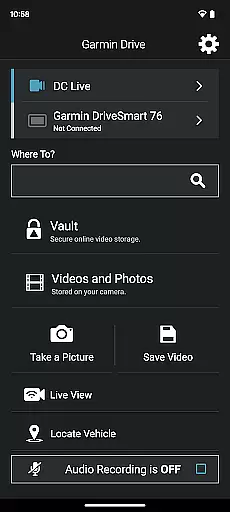
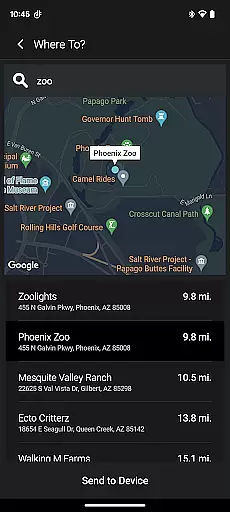
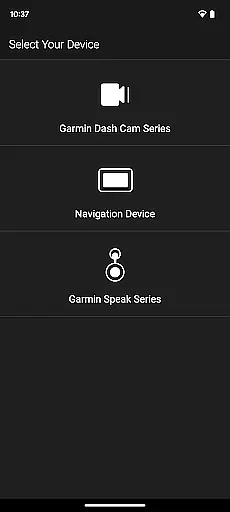
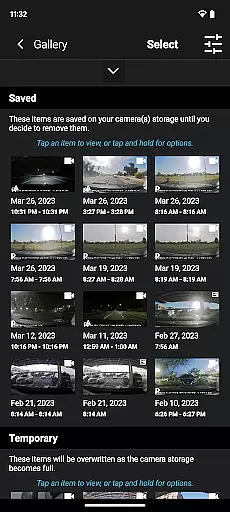
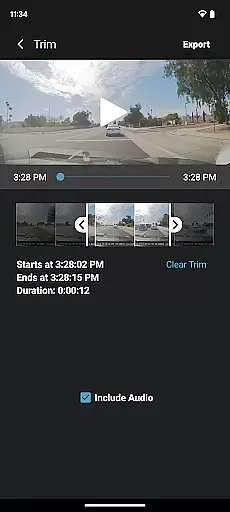
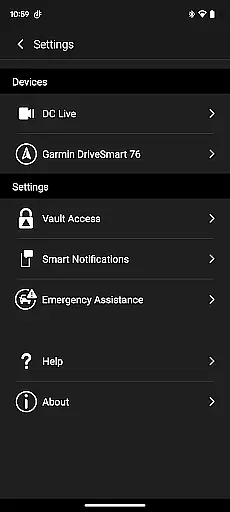
Garmin Drive is a versatile mobile application tailored for Garmin automotive navigators and dash cams. It offers real-time traffic updates, parking information, advanced weather alerts, and access to photoLive traffic cameras. The app also facilitates communication by enabling calls, texts, and notifications from Bluetooth-enabled devices. For dash cam users, it provides comprehensive camera controls and the ability to manage up to four wirelessly connected cameras, offering extensive vehicle coverage. Additionally, Garmin Speak integrates Amazon Alexa for an enhanced in-vehicle experience, allowing voice-controlled music and news along with Garmin's renowned turn-by-turn navigation.
This app is particularly beneficial for drivers who require reliable navigation tools and wish to maintain connectivity while driving. With its ability to sync multiple camera feeds and provide crucial driving information, Garmin Drive ensures both convenience and safety on the road.
Garmin Drive stands out with its multifaceted features designed to enhance the driving experience. The app delivers real-time data such as traffic conditions, parking availability, and weather forecasts directly to compatible Garmin navigators. Its integration with Bluetooth allows seamless handling of calls and messages, ensuring drivers remain connected without compromising safety.
For dash cam users, Garmin Drive offers unparalleled control over their recording devices. The Dash Cam Auto Sync feature supports up to four cameras, providing a holistic view of the vehicle's surroundings. This functionality not only aids in accident prevention but also simplifies video management by creating 'picture-in-picture' views from different camera angles. Furthermore, the inclusion of Garmin Speak with Amazon Alexa enriches the driving experience by bringing smart home capabilities into the car, making every journey more enjoyable and connected.
The Garmin Drive app provides comprehensive details about your vehicle's status and surroundings, ensuring you have all the necessary information at your fingertips. This includes real-time traffic updates, parking availability, and advanced weather conditions tailored specifically for drivers.
For users with compatible Garmin navigators, the app enhances driving experiences by delivering crucial data such as photoLive traffic cameras. These features allow drivers to make informed decisions on the road, avoiding congestion and planning efficient routes.
In addition to navigation data, Garmin Drive also supports connectivity with Bluetooth-enabled devices. This means you can receive calls, texts, and notifications directly through the app, keeping your focus on the road while staying connected.
One of the standout features of the Garmin Drive app is its ability to provide clear and accurate pricing information for various services. Whether it's parking fees or subscription costs for premium features, users are always aware of their expenses.
For those using Garmin dash cams, the app offers a seamless way to manage recordings without any hidden costs. With support for up to four wirelessly connected dash cams via Dash Cam Auto Sync, users get complete coverage around their vehicle without worrying about additional charges.
Moreover, the integration with Garmin Speak and Amazon Alexa ensures that there are no surprises when it comes to utilizing voice-activated functionalities. Users can enjoy music, news, and navigation prompts without incurring unexpected fees, making Garmin Drive a transparent choice for vehicle management.
User-friendly interface
Real-time traffic updates
Multi-camera support
Voice-controlled assistant
Comprehensive vehicle coverage
Limited device compatibility
Requires stable internet
Premium feature costs
Complex initial setup
Dependent on third-party services

The Smarter Way Forward
 3.30
3.30
Launcher for use in the car
4.40
Buy and sell your boat
4.70
Autolist - The Largest Selection of Local Used Cars and Trucks
4.50
DMV Test Pro offers all the updated FREE DMV tests online.
4.60
Lexus app currently supports 2010 or newer vehicles (2018 or newer for Hawaii).
4.80
Secure mobile payments & fuel savings at Phillips 66®, Conoco® and 76® stations
4.40
7-Day Returns on All Cars
4.80
Shop, finance, or sell today.
4.80
Marathon ARCO Rewards members earn rewards & apply the rewards for fuel savings!
4.80
Oil change service & coupons for car maintenance at Valvoline Instant Oil Change
4.70
OBD1 ECMs application. Data log or tune directly from your phone or tablet!
4.60
Autotrader is your online solution for buying and selling new and used cars.
4.40
Taximeter; the professional's choice
4.30
Your car is talking. Start listening.
4.30
Monitor your behind-the-wheel behavior to become a safer driver and save.
4.10
PayByPhone: A quick and easy way to pay for parking.
3.80
DIY Vehicle Wheel Alignment
4.3
Theme for Car Launcher
4.3


User Reviews