
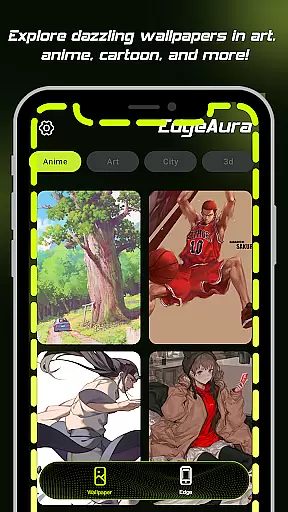
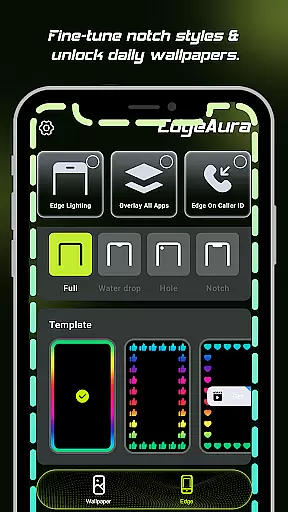
EdgeAura is a personalization app that enhances your device's visual appeal with stunning edge glow effects and dynamic live wallpapers. The app allows users to customize their phone screens with a vibrant aura of light that elegantly outlines the edges, making each device uniquely eye-catching.
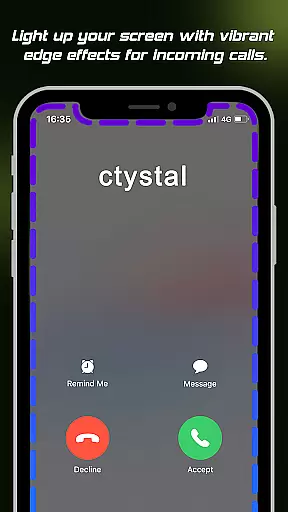
The standout feature of EdgeAura is its ability to create a floating overlay effect that works seamlessly over other applications. This ensures an immersive experience without disrupting normal phone usage. Additionally, the app provides visually striking incoming call alerts by lighting up the screen edges in your chosen color, offering both functionality and style.
With an extensive collection of high-quality animated live wallpapers, EdgeAura lets you refresh your home and lock screens instantly. Whether you want to personalize your device for aesthetic pleasure or practical notifications, EdgeAura offers a comprehensive solution tailored to enhance your smartphone experience.
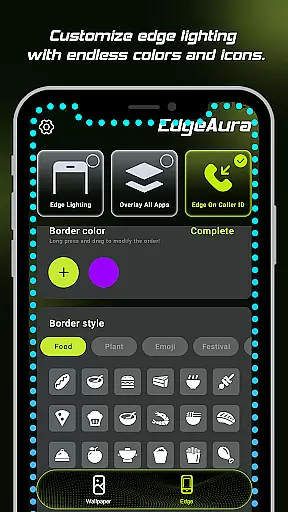
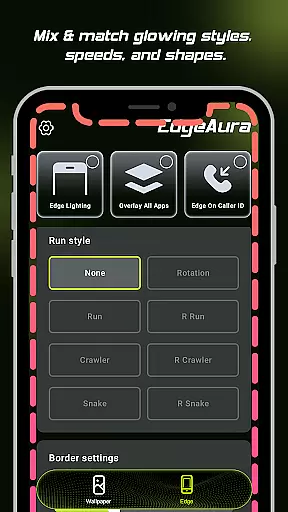
EdgeAura boasts several key features that set it apart in the realm of personalization apps. One of the most notable is the Dynamic Edge Glow, which frames your screen with a smooth, colorful glow. Users can customize the color, width, and intensity of this light to perfectly match their style and existing wallpaper, ensuring a personalized touch.
In addition to the edge glow, EdgeAura offers a Floating Overlay Effect that ensures the elegant glow works on top of other applications. This continuous visual experience does not interfere with normal phone use, providing both beauty and functionality. Another innovative feature is the Incoming Call Alert, where the screen edges light up with your chosen color when receiving a call, adding a modern twist to notification alerts.
Furthermore, EdgeAura includes an Extensive Live Wallpaper Collection. This library is regularly updated with high-quality, animated live wallpapers, allowing users to refresh their home and lock screens instantly. These features collectively ensure that EdgeAura delivers a uniquely vibrant and personalized look for any device.
EdgeAura offers a wide array of customization options that allow users to personalize their device's visual experience extensively. The app provides dynamic edge glow effects which can be tailored in terms of color, width, and intensity, ensuring that each user can craft a look that perfectly aligns with their personal style and chosen wallpapers.
Beyond the basic adjustments, EdgeAura supports an extensive live wallpaper collection. This feature enables users to select from a diverse library of high-quality, animated live wallpapers that are regularly updated, providing fresh content that keeps the deviceu2019s home and lock screens vibrant and engaging.
The ability to customize is not just about aesthetics; it also extends to functionality. Users can set their preferred settings for different scenarios, such as incoming call alerts, where the screen edges light up with a selected color. This ensures that the customization enhances both the visual appeal and the practical usability of the device.
Overall, the comprehensive customization options available in EdgeAura empower users to make their devices truly unique. By offering versatile settings and features that cater to individual preferences, EdgeAura delivers a personalized experience that stands out in the realm of mobile personalization.
Theme compatibility is a crucial aspect of EdgeAura, ensuring that its stunning visual effects integrate seamlessly with the user's chosen themes and wallpapers. The app is designed to work harmoniously across various themes, preserving visual consistency and enhancing the overall aesthetic without causing any disruptions or inconsistencies.
EdgeAura achieves this by intelligently adapting its edge glow effects to complement the existing screen environment. Whether the user opts for a dark theme, a colorful wallpaper, or a minimalist design, the app adjusts the glow parameters accordingly. This adaptability ensures that the elegant outlines provided by EdgeAura enhance rather than clash with the current theme.
In addition to visual harmony, EdgeAurau2019s compatibility extends to functional integration. The floating overlay effect operates smoothly over other applications, maintaining the integrity of the user interface while delivering its immersive glow. This means users can enjoy a continuous visual experience without any interference with normal phone use.
By prioritizing theme compatibility, EdgeAura guarantees that users enjoy a cohesive and visually pleasing experience. This dedication to seamless integration underscores EdgeAurau2019s commitment to delivering a top-tier personalization tool that respects and enhances the useru2019s thematic choices.
Stunning visual effects
Highly customizable options
Unique incoming call alerts
Wide variety of live wallpapers
Seamless overlay integration
Requires accessibility permission
May drain battery faster
Limited to Android devices
Premium features may cost extra
Some features might be too flashy

Capture moments that pass like a storm, second by second.
 4.3
4.3
Ultra realistic high quality analog watch face for Wear OS.
4.60
The definitive Icon pack maker and editor
4.30
Run multiple accounts of the same app on a single device
4.10
Vibrant Adaptive Icons with Material You and Enhanced Monet Colors.
4.50
Embrace the Night. Unleash the power of darkness with Raven Dark Icon Pack
4.60
Emoji Maker app - Design custom emojis and effortlessly blend them with Mixer
3.80
Amazing letter fonts in your messages and social statuses
4.70
Transform your phone with stylish zipper lock themes and 4D live wallpaper
4.10
Dark icon pack based on One 8
4.80
100+ Stylish Fonts, Emojis, Symbols keyboard for Instagram & TikTok!
4.80
One 8 icons glass color version
4.80
Zip lock screen with magic wallpaper to decorate your phone with fun zipper lock
4.60
Icons made of colorful linear lines
4.60
Beautiful realistic hybrid watch face with numerous customization options.
4.50
200+ Material Inspired Widgets
4.50
Unique Fonts, typefaces and stylish text. Fonts for Instagram, Whatsapp & others
4.20
Ultimate widget creator. Design custom widgets for a truly unique home screen!
3.90
Interactive Miniature Painting Catalogue
3.30


User Reviews