
bimmer-tool is a comprehensive diagnostic application specifically designed for BMW car owners and enthusiasts. This app allows users to read and clear fault codes, request DPF regeneration, and access real-time engine data from their vehicles. Compatible with a wide range of BMW models, bimmer-tool provides an invaluable resource for monitoring vehicle health and performance.
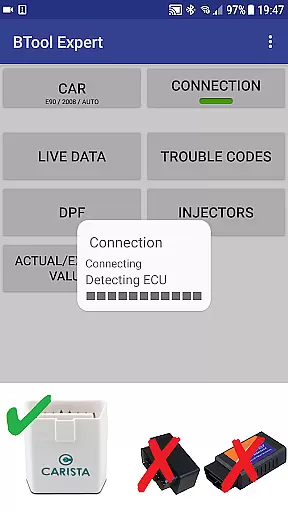
For older BMW models manufactured before 2008, the app recommends using a K+DCan USB cable connection for optimal functionality. It supports various OBD adapters including ENET adapters for newer F/G series cars, and specific Bluetooth adapters like Vgate vLinker and UniCarScan. These features make it an essential tool for both professional mechanics and DIY enthusiasts who want to maintain their BMWs efficiently.
The true value of bimmer-tool lies in its ability to empower users with detailed vehicle information that was previously only accessible to professional technicians. Whether you're diagnosing engine issues or performing routine maintenance tasks, this app streamlines the process and helps ensure your BMW remains in top condition.
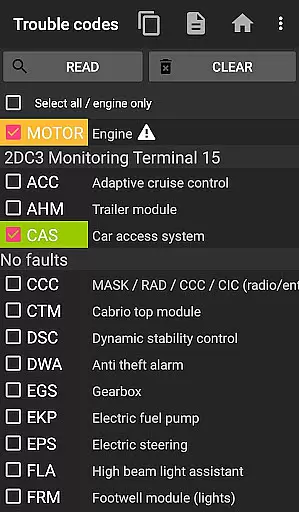
bimmer-tool offers an impressive array of features that cater to the needs of BMW owners and mechanics alike. The app's primary function is its diagnostic capabilities, allowing users to read and clear fault codes directly from their vehicle's onboard computer. This feature alone saves considerable time and money by enabling users to identify and potentially resolve minor issues before they become major problems.
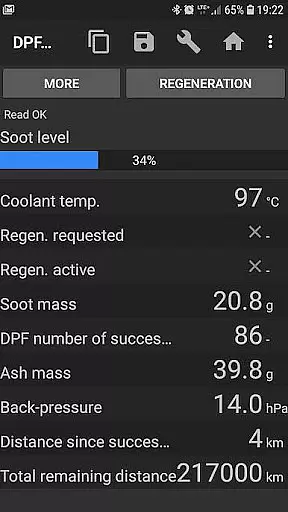
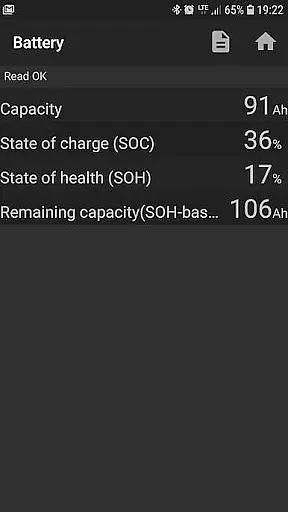
In addition to basic diagnostics, bimmer-tool provides advanced functions such as DPF regeneration requests, injector adjustment readings, and exhaust fume pressure measurements. Users can log critical engine data to CSV files for further analysis, making it an excellent tool for tracking long-term vehicle performance trends. The app also includes specialized functions for resetting service intervals and registering battery replacements without altering battery properties.
What sets bimmer-tool apart from other diagnostic apps is its compatibility with multiple connection types and adapter models. From reliable K+DCan USB cables to modern ENET adapters and Bluetooth solutions, the app ensures seamless communication between your smartphone and BMW's onboard systems. This versatility, combined with its comprehensive feature set, makes bimmer-tool an indispensable companion for maintaining and troubleshooting BMW vehicles.
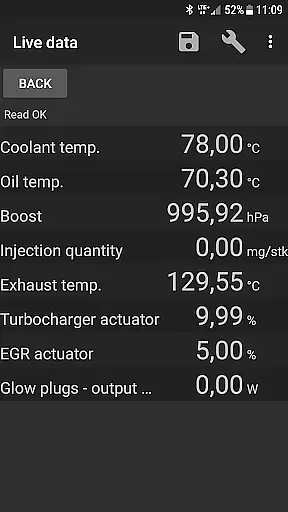
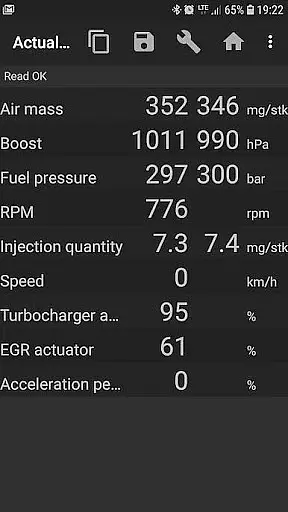
bimmer-tool provides comprehensive access to detailed vehicle information, which is crucial for BMW owners who want to understand their car's performance and health. The app allows users to read engine live data, including parameters such as air mass, intake manifold pressure, and fuel pressure. This real-time insight into the vehicle's operations enables proactive maintenance and troubleshooting.
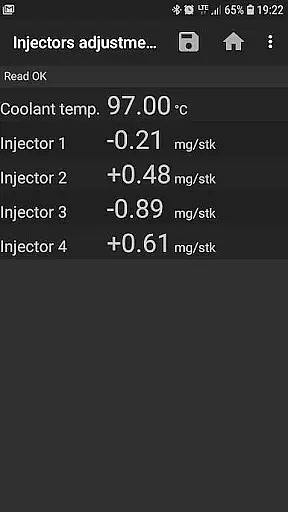
Additionally, bimmer-tool supports reading injectors adjustments and exhaust fumes pressure, offering a deeper understanding of engine conditions. These features are particularly beneficial when diagnosing issues or assessing the impact of recent repairs or modifications. With this level of detail, users can make informed decisions regarding further actions or adjustments needed for optimal vehicle performance.
The application also facilitates logging data to CSV files for in-depth analysis. This functionality is invaluable for enthusiasts and professionals alike, allowing them to track changes over time and identify patterns that may not be immediately apparent during routine checks. By maintaining a historical record of vehicle data, users can better predict future maintenance needs and potentially prevent costly repairs.
While bimmer-tool itself does not directly deal with monetary transactions, it promotes price transparency by detailing the costs associated with vehicle diagnostics and maintenance. Users can avoid unnecessary expenses by performing many diagnostic functions themselves, such as reading and clearing fault codes without needing a professional service.
Moreover, the app recommends specific OBD adapters that vary in cost and functionality, providing clear options based on budget and required features. For example, K+D-Can USB cables are highlighted as reliable choices, alongside Bluetooth and WiFi adapter alternatives. This guidance helps users select an adapter that best fits their financial situation while ensuring compatibility with their BMW model.
By outlining limitations and potential additional costsu2014such as the need for certain cables or adapters for older modelsu2014the app ensures there are no hidden fees. Users appreciate knowing upfront what they might need to invest in terms of accessories, making bimmer-tool a transparent and trustworthy tool for managing BMW vehicle diagnostics.
User-friendly interface
Comprehensive diagnostic tools
Wide adapter compatibility
Detailed engine data logging
Regular feature updates
Limited old model support
Requires compatible adapter
Occasional connection issues
Professional use may need experience
Additional hardware investment

Ultimate OBD2 Car Scanner: Diagnostics, Service and Modification Tool
 4.30
4.30
On the CarShield app, you can view contracts, make payments, & request roadside.
4.40
Taximeter; the professional's choice
4.30
Attention! This is the theme for the Car Launcher app
4.1
DIY Vehicle Wheel Alignment
4.5
Launcher for use in the car
4.40
myAudi offers users services and Audi connect services for Audi drivers
4.10
The ExtraMile App allows you to pay for fuel from the comfort of your car!
4.70
DMV practice test 2025: Driver License permit test & written test for all states
4.70
Play what you want through Android Auto
4.90
7-Day Returns on All Cars
4.80
Listings of Tesla's with FSD - Included package
4.60
Instantly redesign your car with AI. From sporty to futuristic, try it all.
4.50
Automotive Electrical Wiring Diagrams
4.40
OBD2 car scanner and diagnostics: read Check Engine, DTC, economy....
4.30
Your car is talking. Start listening.
4.30
* This app needs an adapter cable and a certain OBD2 adapter to work *
4.20
Get your personalized financing options and shop for used cars today!
4.20
ODB2 based monitoring application for the Chevy Bolt (2017-2021)
4.00


User Reviews