
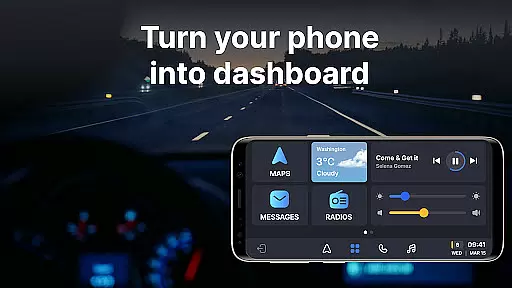
Auto Sync for Android/Car Play is a comprehensive vehicle management app that transforms your smartphone into an advanced car dashboard. The app provides real-time monitoring of essential car metrics such as fuel level, battery status, engine oil life, and tire pressure through seamless integration with both Apple CarPlay and Android Auto systems. This ensures drivers can maintain safety and make informed decisions while on the road.
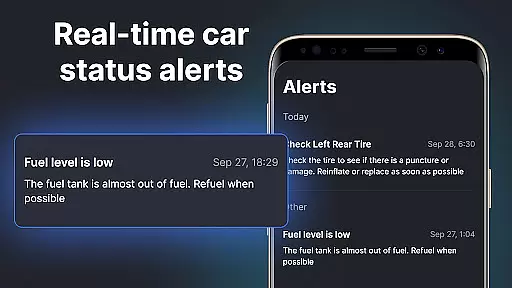
Beyond basic monitoring, the app features a wireless Driving Mode that optimizes the driving experience by enabling easy access to navigation maps, hands-free calling, and music controls. Its user-friendly interface delivers timely alerts and notifications about vehicle maintenance, low fuel levels, and other critical parameters directly to the driver's phone screen. These features help users stay focused on driving while keeping their vehicles in optimal condition.
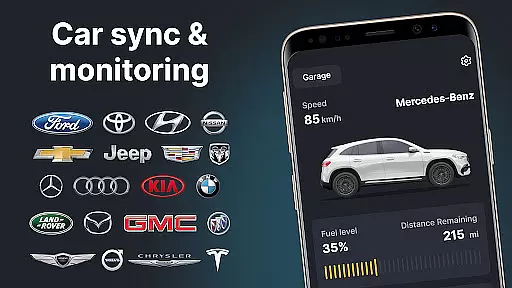
The app also includes a Digital Garage functionality, allowing users to manage multiple vehicles from different brands within a single platform. Whether you own a Tesla or a Toyota, Auto Sync supports a wide range of car manufacturers, making it a versatile tool for all drivers. With its innovative combination of digital car key functionalities, screen mirroring, and smart alerts, this app redefines convenience and connectivity for modern car owners.
Auto Sync for Android/Car Play offers a robust set of features designed to enhance the driving experience. One standout capability is its real-time vehicle monitoring system, which tracks crucial metrics like fuel levels, battery health, mileage, and tire pressure. These insights are presented on a sleek car dashboard interface, ensuring drivers have instant access to their vehicle's status at all times.
In addition to vehicle monitoring, the app integrates seamlessly with Apple CarPlay and Android Auto, offering a wireless Driving Mode that simplifies navigation, communication, and entertainment. Drivers can use voice commands or touch controls to operate maps, take calls, and play music without distraction. The app also supports screen mirroring, allowing users to project their phone’s display onto their car’s infotainment system for added convenience.
Another notable feature is the Digital Garage, which lets users manage multiple vehicles across various brands in one place. Whether scheduling maintenance reminders or receiving low-fuel alerts, this functionality ensures no detail goes unnoticed. By combining these tools with intuitive alerts and notifications, Auto Sync empowers drivers to maintain their vehicles proactively while enjoying a safer and more connected journey.
Accessing detailed vehicle information is crucial for maintaining your car's performance and safety. Auto Sync for Android/Car Play provides comprehensive data about your vehicle's status directly on a car dashboard. This includes essential details such as fuel level, battery life, engine oil condition, mileage, and tire pressure.
The app ensures real-time updates and notifications, allowing you to address any issues immediately. With features like the digital car key and launcher, it simplifies managing your vehicleu2019s needs. These tools help you maintain optimal driving conditions by alerting you to potential problems before they become serious.
By presenting this information in an easy-to-understand format, Auto Sync empowers drivers to make informed decisions. Whether monitoring regular maintenance or responding to urgent alerts, users can ensure their cars remain safe and efficient. The convenience of having all these details at your fingertips enhances both peace of mind and overall driving experience.
Price transparency is vital when managing multiple vehicles, ensuring there are no hidden costs. Auto Sync for Android/Car Play offers clear insights into various expenses associated with owning a car. By integrating seamlessly with different brands, it provides accurate pricing information across Tesla, Toyota, Ford, BMW, and more.
This app supports a wide range of manufacturers including Honda, Kia, Lexus, Nissan, Mercedes, Subaru, GMC, Hyundai, Ram, Rivian, Audi, Dodge, Infiniti, Mazda, Lincoln, Volvo, Acura, Genesis, Buick, Cadillac, Volkswagen, Porsche, Chrysler, Land Rover, Mitsubishi, Lamborghini, Lucid, Mini, Ferrari, Fisker, Jaguar, Alfa Romeo, Polestar, Hummer, Fiat, Maserati, Peugeot, Opel, Citroen, Vauxhall among others.
With its wireless Digital Garage feature, Auto Sync consolidates all your vehicles within one platform. This makes tracking expenditures straightforward and transparent. Users benefit from knowing exactly what theyu2019re spending on each vehicle, helping them budget effectively while enjoying a seamless connection between their smartphones and cars.
User-friendly interface
Real-time vehicle monitoring
Supports multiple car brands
Wireless Driving Mode
Comprehensive alerts system
Limited offline functionality
Premium features require subscription
Dependent on car compatibility
Occasional sync issues
Notifications may be intrusive

Easily notify car owners in urgent situations, safe, fast, multilingual.
 4.1
4.1
The Smarter Way Forward
3.30
OBD2 car scanner and diagnostics: read Check Engine, DTC, economy....
4.30
App Mirroring for Tesla Car's Browser
2.80
Theme for Car Launcher
4.5
Discover new and used cars in Syria easily! Browse ads and connect with sellers.
3.70
Club Car Wash Mobile App—the fast lane to managing your wash membership.
3.30
MySubaru: Download. Connect. Love.
4.70
Your go-to app for car, truck & SUV parts, DIY tools, and expert repair help.
4.70
Marathon ARCO Rewards members earn rewards & apply the rewards for fuel savings!
4.80
Take Control of Your Car
4.80
1M+ high-quality auto parts at your fingertips. Fitment guaranteed.
4.70
OBD1 ECMs application. Data log or tune directly from your phone or tablet!
4.60
Easy connect & control your cars from afar. Remote Lock & unlock car and carplay
4.60
Find, search, and browse 40,000+ used cars, SUVs, and trucks.
4.50
Your Path to Driving Licensing Success Begins Here! Develop your driving skills.
4.40
Ultimate OBD2 Car Scanner: Diagnostics, Service and Modification Tool
4.30
A full featured, real-time transit locator system
4.30
Simplify your drive
3.90


User Reviews