
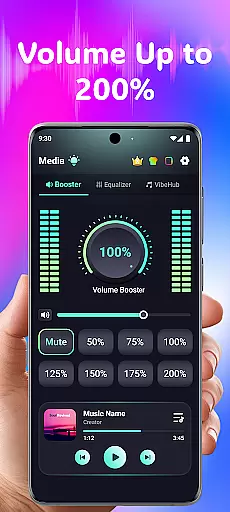
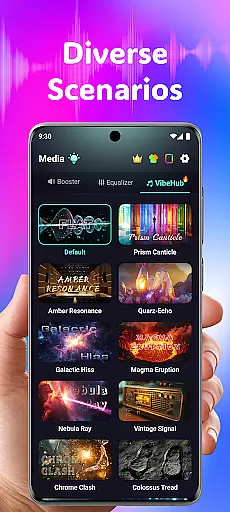
Volume Booster Bass Booster EQ is a versatile audio enhancement application designed to elevate your sound experience across various scenarios. The app's core functionality lies in its ability to amplify media volume up to 200%, making it an ideal solution for outdoor parties, movie watching, and gaming sessions where audio clarity is crucial.
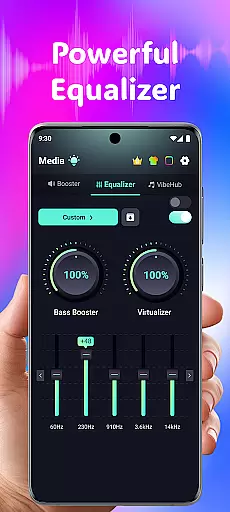
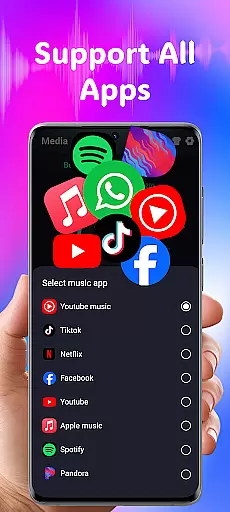
Beyond simple volume control, the application offers advanced features like a 5-band equalizer with precise frequency adjustments, wide app compatibility with popular streaming services, and optimized performance for different audio output devices. Its specialized hearing support mode provides independent ear adjustments and real-time noise reduction, making it particularly valuable for users with specific auditory needs.
The combination of entertainment-focused features and hearing assistance capabilities makes this app especially useful for individuals seeking both recreational audio enhancement and practical hearing support solutions. Whether you're looking to boost your party sound system or need help with everyday listening situations, this application delivers a comprehensive audio solution that adapts to various user requirements.
The application distinguishes itself through several key features that cater to diverse audio needs. Most notably, its Powerful Volume Boost function allows users to precisely control sound amplification up to 200%, while the Advanced Equalizer provides detailed 5-band frequency adjustment (60Hz to 14kHz) for customized sound profiles.
For users with hearing challenges, the app implements sophisticated AI-powered technology including Independent Left & Right Ear Control with real-time visual feedback, and Advanced Frequency Amplification across six distinct sound ranges. These features work together to create a personalized listening experience that can accommodate asymmetrical hearing patterns and enhance speech clarity in noisy environments.
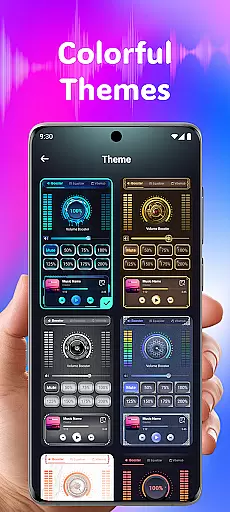
Additional notable features include Wide App Compatibility with major streaming platforms, a selection of customizable interface themes, and specialized functions like 3D Surround Sound Effect and Real-Time Noise Reduction. Each feature is designed to provide maximum flexibility and control over audio experiences, whether for entertainment purposes or practical hearing assistance.
In the realm of medical applications, content credibility is paramount. Volume Booster Bass Booster EQ addresses this by integrating advanced features that are designed and reviewed by audio experts to ensure users receive a reliable and safe auditory experience.
The app's Advanced Hearing Mode includes independent left and right ear control, as well as advanced frequency amplification across six sound ranges. These features have been fine-tuned to support hearing needs effectively, with real-time visual feedback and AI-powered noise reduction for clear sound in any environment.
Furthermore, the app provides an equalizer tailored for different types of audio content, enhancing the listening experience while maintaining the integrity of the original sound. This attention to detail reassures users that they are not only enjoying their media but doing so in a way that is mindful of their health.
By offering these specialized tools, Volume Booster Bass Booster EQ demonstrates its commitment to delivering credible and expert-reviewed content that users can trust when managing their audio experiences.
While Volume Booster Bass Booster EQ does not provide teleconsultation services in the traditional sense, it enhances remote communication quality through superior audio management. Clear sound transmission is crucial during virtual meetings or calls, and this app ensures that every word is heard with precision.
With features like real-time noise reduction powered by AI, background disturbances such as wind or crowd chatter are minimized, allowing for crystal-clear conversation. This creates an atmosphere akin to a professional teleconsultation setting where focus remains on the dialogue between participants.
The inclusion of a Live Sound Recorder & Playback feature also supports effective communication by enabling users to record and review important conversations. This can be particularly useful in scenarios where medical advice or instructions are given over the phone and need to be referenced later.
By prioritizing high-quality audio interactions, Volume Booster Bass Booster EQ indirectly contributes to better teleconsultation experiences, ensuring that users can rely on their deviceu2019s sound fidelity when it matters most.
Advanced hearing support
Wide device compatibility
Powerful volume amplification
Customizable equalizer settings
User-friendly interface design
Potential hearing risks
Limited free features
Device compatibility issues
High power consumption
Complex for beginners

myVCA is your tailor-made guide to raising a healthy and happy pet.
 4.90
4.90
Patient Health Portal
4.20
Enables quick access to medical data and contacts in case of emergency (ICE)
4.70
Care Simplified by MyChart
3.40
Your donation experience just got smoother; Donor Hub is your go-to place.
4.70
Take your aphasia therapy to the next level with 4 evidence-based advanced apps
4.70
CPR Timer for High Performance AHA BLS / ACLS
5.00
The world's best selling 3D Human Anatomy app with groundbreaking 3D technology
2.00
Continuous Glucose Monitoring
3.40
Spruce is the leading platform for HIPAA-compliant communication and care.
4.90
A comprehensive 3D atlas of the human body
4.80
Behavioral Health Portal
4.70
Remote, medical-grade heart care at your fingertips
4.70
Health Care at Your Fingertips
4.60
Adaptive-learning flashcards and quizzes for the Top 250 Drugs
4.60
Perform pure-tone audiometry and a speech intelligibility test on your phone.
4.50
Radiographic Positioning Guide for Medical Imaging Professionals and Students
4.50
Assess and treat left neglect more effectively in stroke and brain injury rehab.
4.30
Good for You. Great for Life.
4.00


User Reviews