

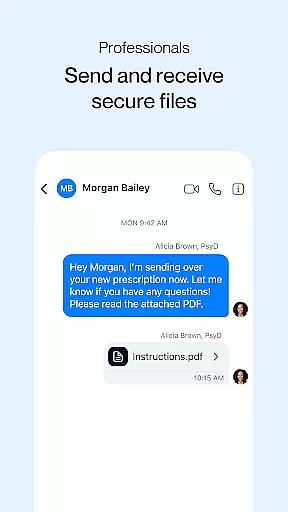
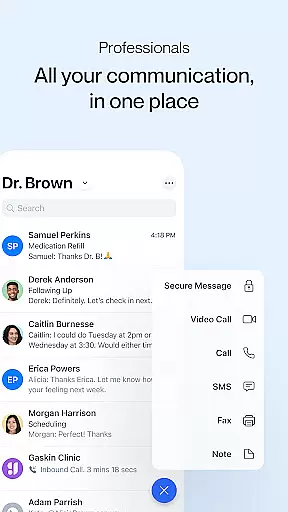

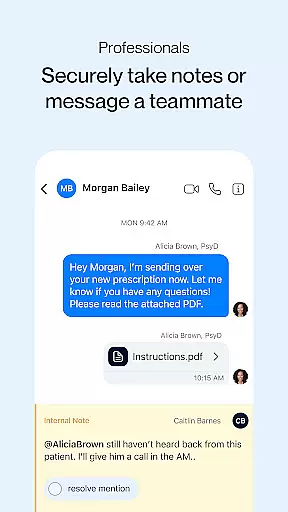


Spruce is a comprehensive medical communication platform designed to facilitate HIPAA-compliant interactions between healthcare professionals and their patients. This secure application supports various forms of communication including calling, texting, faxing, secure messaging, and video chatting, all integrated into a unified team inbox. It is tailored for healthcare environments, enhancing clinical operations with tools for team collaboration, telehealth services, business phone functionalities, and automated custom communications.
With Spruce, healthcare providers can manage patient panels effectively, using features like contact tagging, bulk messaging, and custom communication routing. The platform also offers advanced phone system capabilities such as phone trees and secure voicemail, alongside built-in compliance measures ensuring adherence to healthcare regulations. For patients, Spruce provides a free, secure app to connect with their care teams through messaging and telehealth services, making it an essential tool for modern medical practices.
Spruce stands out with its robust feature set tailored for healthcare professionals. The platform allows users to either acquire new phone and fax numbers or transfer existing lines, providing flexibility in communication setup. Security is prioritized with automatic HIPAA BAA, two-factor login security, SOC 2 auditing, HITRUST certification, and automatic audit logging, ensuring that all communications are safeguarded against unauthorized access.
The telehealth capabilities include secure video calling and adaptive clinical questionnaires for efficient patient intake and screening processes. Additionally, Spruce's automation tools enable users to save messages for reuse, schedule future deliveries, and set up automatic responses to common inquiries. These features collectively enhance productivity and streamline workflows within healthcare settings, allowing teams to focus more on patient care rather than administrative tasks.
In the realm of digital health, the credibility of medical content is paramount. Spruce: Medical Communication upholds this standard by providing a platform specifically designed for healthcare professionals and their patients. The app ensures that all communications, whether through secure messaging, video calls, or telehealth services, adhere to HIPAA compliance, thus maintaining the integrity and confidentiality of medical information.
Spruce goes beyond mere communication by integrating features such as adaptive clinical questionnaires for patient intake and screening. These tools are crafted with input from medical experts to ensure they meet clinical standards and facilitate accurate data collection. Furthermore, the platform's HITRUST certification and automatic audit logging underscore its commitment to maintaining high levels of security and accountability in every interaction.
For healthcare providers, Spruce offers advanced functionalities like panel management and team collaboration, which are essential for efficient practice operations. By enabling contact tagging, bulk messaging, and custom communication routing, it empowers medical teams to manage patient panels effectively while ensuring that expert-reviewed protocols guide each step. This comprehensive approach not only enhances operational efficiency but also reinforces trust between patients and healthcare providers.
Teleconsultations have become an integral part of modern healthcare delivery, and Spruce excels in providing high-quality telehealth services. With secure video calling capabilities, healthcare professionals can conduct virtual consultations that mimic in-person visits. This feature is particularly beneficial for follow-up appointments, chronic disease management, and urgent care scenarios where physical presence may not be necessary.
The quality of teleconsultations on Spruce is further enhanced by robust support features such as automated schedules and after-hours settings. These ensure that both healthcare providers and patients can engage in consultations at appropriate times without disruptions. Additionally, the platform's two-factor login security and SOC 2 auditing provide peace of mind regarding the privacy and safety of sensitive medical discussions during these virtual sessions.
Patients using Spruce benefit from seamless integration across mobile and desktop platforms, allowing them to receive video calls and send secure messages, including photos, effortlessly. Alerts for new activities keep users informed about their consultation status and any subsequent steps needed. By prioritizing user experience alongside stringent security measures, Spruce sets a benchmark for reliable and effective teleconsultation services within the medical community.
User-friendly interface
Comprehensive security features
Integrated telehealth solutions
Efficient team collaboration tools
Customizable communication options
Requires internet connection
Limited free trial period
Premium features come at a cost
Steep learning curve for some users
Occasional technical glitches reported

Donating blood and platelets is easier than ever with The American Red Cross.
 4.80
4.80
Sync your blood glucose device, log values automatically and tame your diabetes!
4.60
HealtheLife lets you easily manage your health online.
3.20
OKN Strips, OptoDrum, OKN
4.1
Manage your prescriptions and pharmacy care anytime, anywhere.
4.80
MHealth is the mobile version of MEDITECH’s Patient and Consumer Health Portal.
3.10
Your donation experience just got smoother; Donor Hub is your go-to place.
4.70
Donating plasma just got easier with the BioLife Plasma Services mobile app.
3.90
Update medical records, view upcoming appointments, message your provider & more
3.80
Manage your healthcare through the FollowMyHealth® Universal Health Record.
4.80
Be more confident prescribing homeopathy at home for your family.
4.80
Modivcare members can book and manage trips.
4.50
Secure video visits with your VA care team from anywhere
4.50
The Omada app enhances your program experience and helps you stay engaged.
4.50
3rd trimester? Counting Kicks is what moms should do-It’s important & easy too!
4.30
A rapid reference for healthcare professionals caring for pediatric patients.
4.30
The Client Portal app empowers you to manage care from one secure place
4.10
MySafeRide simplifies booking and managing rides for health plan members.
3.50
Continuous Glucose Monitoring
3.40


User Reviews