
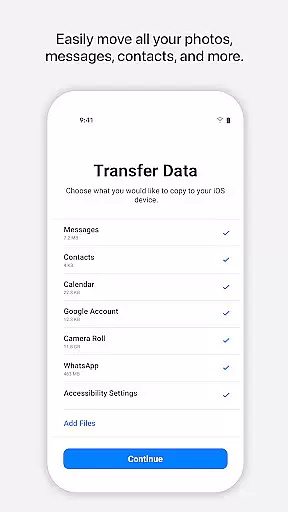
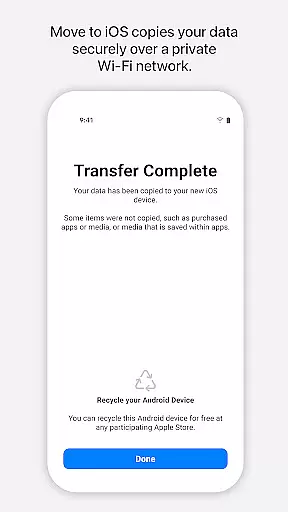
Move to iOS is a powerful migration tool designed to simplify the transition from Android to iPhone or iPad. This application enables users to transfer all essential content securely and automatically, including contacts, photos, videos, message history, and even WhatsApp data. The app creates a private Wi-Fi network between devices, ensuring a seamless and secure data migration process.
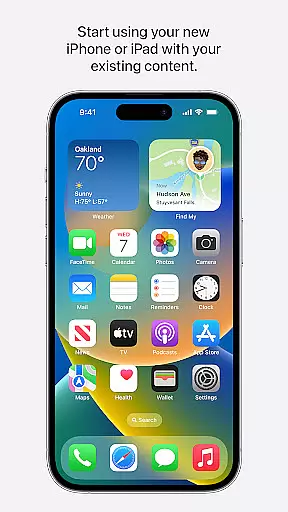
One of the standout features of Move to iOS is its ability to place transferred content in the correct locations on the new device. Whether it's apps, calendars, call logs, or voice memos, users can expect everything to be organized just like it was on their Android device. This makes the switch to iOS not only easy but also efficient, allowing users to start enjoying their new Apple device immediately after the migration is complete.
Move to iOS offers several notable features that enhance the migration experience. First, the app provides a comprehensive transfer solution, covering everything from basic contacts and photos to more complex data like WhatsApp conversations and mail accounts. This ensures that users don't lose any important information during the switch.
Another key feature is the app's use of a private Wi-Fi network for data transfer. By creating a direct connection between the Android device and the new iPhone or iPad, Move to iOS eliminates the need for external storage solutions or cloud services. Additionally, the app requests minimal permissions, with only location being required, while other permissions such as SMS and photos are optional, giving users control over what they want to migrate.
The security code verification adds an extra layer of protection, ensuring that only authorized devices can access the transferred data. This combination of comprehensive data coverage, secure transfer methods, and user-controlled permissions makes Move to iOS a reliable choice for anyone looking to switch to an Apple device.
Move to iOS offers a seamless and secure way to transfer content from an Android device to an iPhone or iPad. The app's core functionality lies in its ability to migrate a wide range of data types, including contacts, message history, photos, videos, mail accounts, calendars, and even WhatsApp content.
The effectiveness of Move to iOS is evident in its straightforward process. By creating a private Wi-Fi network between devices, the app facilitates a direct and secure transfer without the need for third-party storage solutions. This ensures that personal information remains protected throughout the migration.
Users benefit from the app's comprehensive approach to data migration. With just a few steps, all essential content can be transferred automatically, saving time and effort. The app handles various data formats and ensures they are placed correctly on the new iOS device.
This level of accuracy and effectiveness provides peace of mind for users switching platforms. Knowing that their valuable data is transferred intact allows them to focus on exploring the features of their new device without worrying about losing important information.
The Move to iOS app excels in providing a user-friendly interface that simplifies the complex process of data migration. Its design focuses on guiding users through each step with clear instructions and visual cues, making the transition from Android to iOS as smooth as possible.
Upon launching the app, users are greeted with an intuitive setup that requires minimal input. The interface clearly explains what data will be transferred and how the process works, ensuring users feel confident before proceeding. This transparency helps reduce anxiety about switching operating systems.
Throughout the migration, the app maintains its simple and clean design. Progress indicators keep users informed about the status of their transfer while maintaining a calm and reassuring atmosphere. Even technical aspects like establishing a private Wi-Fi network are handled behind the scenes.
This thoughtful approach to interface design demonstrates Apple's commitment to user experience. By removing technical barriers and focusing on essential elements, Move to iOS makes platform switching accessible to users of all technical skill levels.
User-friendly interface
Comprehensive data transfer
Secure Wi-Fi connection
Optional permissions
Organized content placement
Limited to Apple devices
Requires stable Wi-Fi
Long transfer times
No cloud backup option
Android version needed

Quickly switch to an encrypted DNS server on Android TV
 4.50
4.50
A powerful, easy-to-use flight computer on your phone or tablet!
3.80
Unlock your Essential Key. Create custom shortcuts to your favorite apps!
4.5
Family Locator, Share location, StayConnect with your family in real time
3.90
Keep track of your Palia friendships, tasks, and inventory with Palia Notebook
4.60
Powerful collection of electronics tools and reference.A must for any enthusiast
4.90
Fast Video Downloader, Movie Downloader, Torrent Downloader & Adblock Browser
4.70
Create your own custom widget with endless possibilities
3.90
Protect your device with antivirus, storage cleanup, and system monitoring
4.70
Easily install aab(Android App Bundle) files on your Android device with our app
4.80
Unit and currency converter with easy and simple UI.
4.80
The one-and-only remote control for PC, Mac, and Linux
4.70
With videos, electrical calculators, and built-in ebook, Ugly’s has your answer.
4.50
Clean up large files and similar photos, fast and easy to use
4.40
App that Recover your pictures, videos or files after you delete them.
4.20
VESC Tool can monitor and configure VESC-compatible devices over BLE and Wifi
4.20
A non-root local ADB shell client. READ BELOW!
3.40
Transfer Files, APK from Phone to Watch & Install.
4.2
Save any video in HD - paste the link, download fast and watch offline.
4.0


User Reviews