
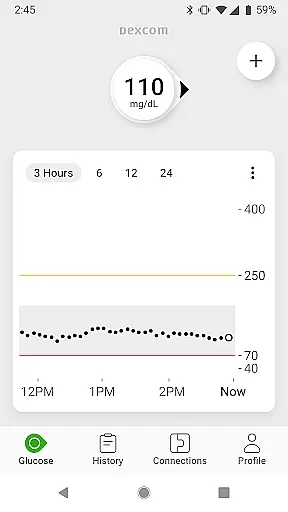
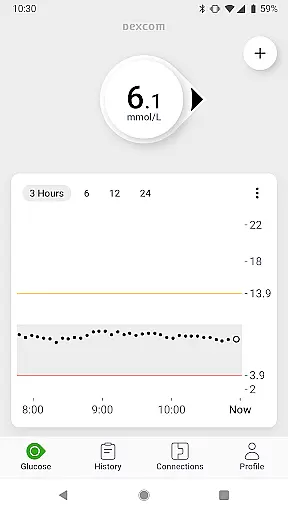
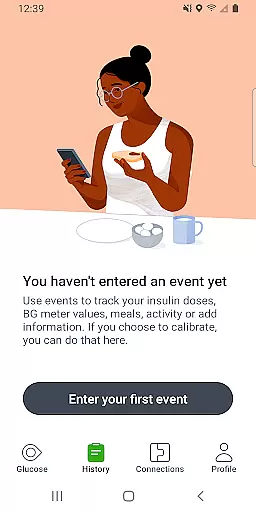
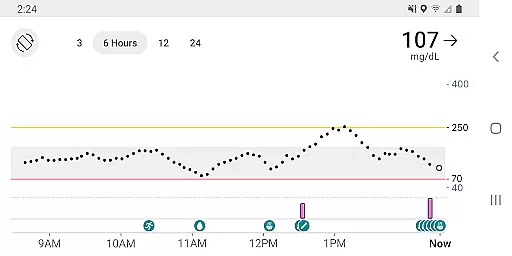
The Dexcom G7 app is a vital tool for diabetes management, offering continuous glucose monitoring without the need for fingersticks. It provides real-time glucose data every 5 minutes to compatible devices.
With customizable alerts for high or low glucose levels and remote monitoring capabilities, users can stay connected with their care teams. The app also allows sharing of glucose data with followers and integrates with third-party health apps for comprehensive health tracking.
Dexcom G7 stands out with its low-profile wearable sensor that seamlessly syncs with your smart device. Customizable alerts ensure timely warnings about glucose level changes, enhancing user safety.
Users benefit from features like Clarity Clinic integration for healthcare team data sharing, estimated fasting glucose logging, and Digital Health app integrations. Quick Glance offers lock screen glucose readings, making daily management more convenient.
Personalized planning in the Dexcom G7 app empowers users with tailored diabetes management strategies. The app provides real-time glucose data every 5 minutes, enabling users to make informed decisions about their treatment.
The system offers customizable alerts for high or low glucose levels, ensuring users can take timely action. These alerts are designed based on individual needs and patterns, enhancing personal diabetes management.
With features like Clarity Clinic integration and estimated fasting glucose logging, users can work closely with healthcare professionals to refine their plans. This collaborative approach ensures that each user's strategy evolves with their changing health conditions.
By integrating with third-party health apps and lifestyle devices, the Dexcom G7 app further enriches personalized planning. Users can incorporate additional health metrics, creating a comprehensive view of their well-being and supporting more precise adjustments to their diabetes management plan.
Progress visualization in the Dexcom G7 app allows users to see their glucose trends and patterns clearly. The app displays real-time data on a trend graph, helping users understand how different factors affect their glucose levels over time.
Users benefit from Quick Glance, which shows glucose data on the lock screen of their smart device. This feature ensures that critical information is always accessible, promoting better awareness and quicker decision-making.
Dexcom Clarity summary insights are integrated into the app, providing both real-time and retrospective views of glucose data. This dual perspective helps users track their progress and identify areas for improvement in their diabetes management.
Sharing capabilities extend progress visualization beyond the individual user. Up to 10 followers can monitor glucose data and trends via the Dexcom Follow app, fostering a supportive network of loved ones and healthcare providers who can offer guidance and encouragement.
Real-time glucose monitoring
No fingerstick required
Customizable alerts
Remote monitoring options
Data sharing with healthcare teams
Device compatibility limited
Requires internet connection
Potential accuracy concerns
Region-specific features
Dependent on sensor supply

Build Healthy Habits!
 4.60
4.60
Using Recognise™ has been shown to reduce pain and improve performance.
4.0
Interval timer for High Intensity Interval Training, Tabata and Circuit Training
4.20
Mind on steroids - relaxation, productivity, meditation and sleep!
4.60
Using Recognise™ has been shown to reduce pain and improve performance
4.2
Medbridge GO gets you moving - get back to doing what you love, faster!
4.90
Personal step counter for you, private and accurate
4.50
This is an application that serves as a companion app for smart watch.
4.20
Easy to use step counter, calorie counter helps lose weight, count steps offline
4.80
Beauty Care, Makeup & Skin Care Scanner | Pregnancy App For A Mom | Healthy Baby
5.00
Measure your Pupil Distance for Eyeglasses and VR headsets in 3 quick steps.
4.70
Download MadMuscles to start your positive body transformation!
4.30
Get alert about getting out of desired heart rate zone.
4.10
Your Health Has Met Its App (℠)
3.90
Understand your body’s most meaningful messages and transform your health.
3.90
Turn your steps into cash, gift cards & rewards with our step counting pedometer
3.80
FitCloudPro takes care of your health every minute.
3.70
The app helps you address digestive symptoms based on the Fast Tract Diet.
3.50
A simple way to calculate peptide doses and also to convert different units.
4.4


User Reviews